
Prode Properties - Permits to calculate the properties of a pure fluid or a mixture - Messaggi

Prode Properties





Prode Properties must be installed or copied (ppp.dll and pppx.dll) to the directory of plugin. The chemical database should be in the folder where the application will look for it. This may vary by version.
Protected оriginal installer (p/w: friend): Prode Properties 1.2d1.exe.7z (13,83 MiB) scaricato 1019 volta(e).
Unpacked оriginal installer: Prode1.2d1free.7z (10,77 MiB) scaricato 1049 volta(e).
Prode Properties. Technical features overview (Windows version).pdf (54 KiB) scaricato 1086 volta(e).
Prode Properties 1.2. User Manual.pdf (8,72 MiB) scaricato 2340 volta(e).
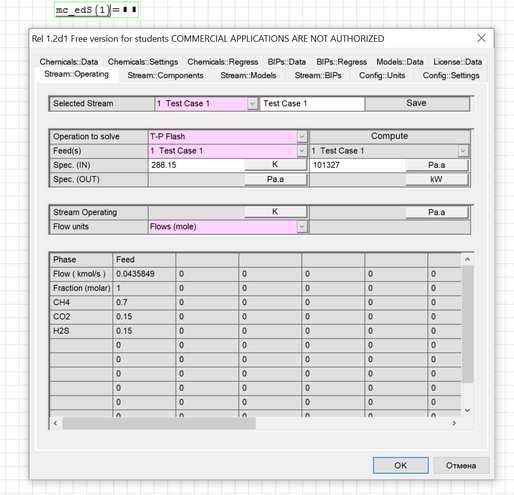
Note. You must delete the prode library (prode.dll) if it was previously used in the mcadefi plugin.
Links:
1. Prode download Area
Examples:
test_ppp_1-2b.sm (307,58 KiB) scaricato 1799 volta(e).
test_ppp_1-2b SMath.pdf (341,63 KiB) scaricato 996 volta(e).
test_ppp_1-2b_smath.pdf (102,71 KiB) scaricato 1029 volta(e).
Prode Properties must be installed or copied (ppp.dll and pppx.dll) to the directory of plugin. The chemical database should be in the folder where the application will look for it. This may vary by version.
Protected оriginal installer (p/w: friend): Prode Properties 1.2d1.exe.7z (13,83 MiB) scaricato 1019 volta(e).
Unpacked оriginal installer: Prode1.2d1free.7z (10,77 MiB) scaricato 1049 volta(e).
Prode Properties. Technical features overview (Windows version).pdf (54 KiB) scaricato 1086 volta(e).
Prode Properties 1.2. User Manual.pdf (8,72 MiB) scaricato 2340 volta(e).
Note. You must delete the prode library (prode.dll) if it was previously used in the mcadefi plugin.
Links:
1. Prode download Area
Examples:
test_ppp_1-2b.sm (307,58 KiB) scaricato 1799 volta(e).
test_ppp_1-2b SMath.pdf (341,63 KiB) scaricato 996 volta(e).
test_ppp_1-2b_smath.pdf (102,71 KiB) scaricato 1029 volta(e).
Russia ☭ forever, Viacheslav N. Mezentsev
1 utenti hanno apprezzato questo post
Radovan Omorjan 23/06/2014 04:45:00

It is amazing 
I have no experience in using this interesting product and, as I can notice, every function is working in SMath excluding the ones returning matrix or more than one value.
Regards,
Radovan
I have no experience in using this interesting product and, as I can notice, every function is working in SMath excluding the ones returning matrix or more than one value.
Regards,
Radovan
When Sisyphus climbed to the top of a hill, they said: "Wrong boulder!"

Hi uni,
I now have the MathcadEFI working. I put my prode.dll in the userefi folder. The test__ppp_1-2b.sm file does not run properly: all of the mc_xxxx functions are not defined.
Help please.
I now have the MathcadEFI working. I put my prode.dll in the userefi folder. The test__ppp_1-2b.sm file does not run properly: all of the mc_xxxx functions are not defined.
Help please.
Unfortunately, the above links are out of date. Please attach your prode.dll to the post I'll see what I can do. As I can see, the current version of the distribution does not have this library. It would be better if you provide a previous version where both libraries were present: ppp.dll (32-bit) and prode.dll.
Russia ☭ forever, Viacheslav N. Mezentsev
You must copy ppp.dll and prode.dll to the userefi folder and restart the program. After that you must point to some location when document opened.
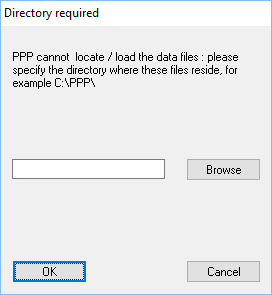
I don't have this archive and this folder and I no longer remember what it is for. But now all functions are accessible.
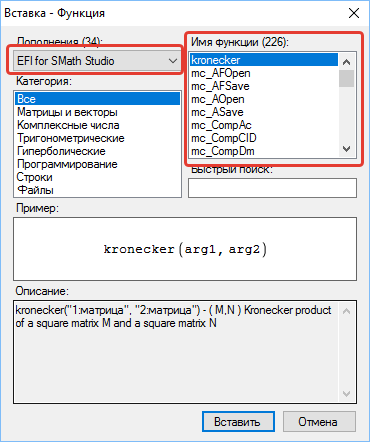
When the program is running, you can see the list of loaded functions in the log file (mcadefi.log) in the folder with the plugin.
Procedure:

1. Calculate the entire worksheet, ctrl-F9
2. Select dep.ppp archive when first window appears, and click Open
3. When second popup window, the Prode archive, appears, it should show stream 2. Click OK.
I don't have this archive and this folder and I no longer remember what it is for. But now all functions are accessible.
When the program is running, you can see the list of loaded functions in the log file (mcadefi.log) in the folder with the plugin.
Russia ☭ forever, Viacheslav N. Mezentsev
I added the ppp.dll to userefi folder, but only kronecker and Psi show in the function list for EFI. I have restarted the SMath program and also disabled EFI and then enabled it an still no mc_xxxx functions.
I created the test_ppp file so I know how to use it.
I created the test_ppp file so I know how to use it.
Show me mcadefi.log file. It appears only when program is running.
Russia ☭ forever, Viacheslav N. Mezentsev
There is no mcadefi.log file. When you said earlier to restart the SMath program did you mean open the program or re-install the program?
Reopen I mean, try to reinstall the plugin using the Extension manager.
The default path for plugin is: C:\Users\%user_name%\Application Data\SMath\extensions\plugins\91a20d24-c30b-4774-9b1b-4d502a80420f\x.x.x.x\
The default path for plugin is: C:\Users\%user_name%\Application Data\SMath\extensions\plugins\91a20d24-c30b-4774-9b1b-4d502a80420f\x.x.x.x\
Russia ☭ forever, Viacheslav N. Mezentsev
1 utenti hanno apprezzato questo post
frapuano 31/05/2020 04:48:00
mcadef_logi.zip - Shortcut.lnk (2,63 KiB) scaricato 1519 volta(e).
I found the efi files you mentioned but the path was different, and not where my SMath Studio is installed. Do I need to move them to the SMath Studio\plugins folder?
I found the efi files you mentioned but the path was different, and not where my SMath Studio is installed. Do I need to move them to the SMath Studio\plugins folder?
It is not recommended to use SMath Studio\plugins folder. For a standard installation of the program, all extensions are installed in the above path.
As I can see, you are using an old version of the plugin (1.0.6982.32016, Tuesday, February 12, 2019 5:47:12 PM).
The last version is: 1.0.7165.40625, 14-aug-2019 22:34:10
I don't know why you are using SMath Studio\plugins folder. Try to download last SMath Studio and install the plugin in standard way - using Extension manager in main menu.
After that - copy dlls to the plugin directory (not SMath Studio\plugins). Reopen the program and show me also \userefi\efi.txt file.
As I can see, you are using an old version of the plugin (1.0.6982.32016, Tuesday, February 12, 2019 5:47:12 PM).
The last version is: 1.0.7165.40625, 14-aug-2019 22:34:10
I don't know why you are using SMath Studio\plugins folder. Try to download last SMath Studio and install the plugin in standard way - using Extension manager in main menu.
After that - copy dlls to the plugin directory (not SMath Studio\plugins). Reopen the program and show me also \userefi\efi.txt file.
Russia ☭ forever, Viacheslav N. Mezentsev
1 utenti hanno apprezzato questo post
frapuano 31/05/2020 04:48:00
Here's the actual path where I found the plugins. C:\Users\Harvey\AppData\Roaming\SMath\extensions\plugins
Here's the path where my SMath program is currently installed: C:\Program Files (x86)\SMath Studio
As I recall, I only got to say where the program was to be installed, not the plugins.
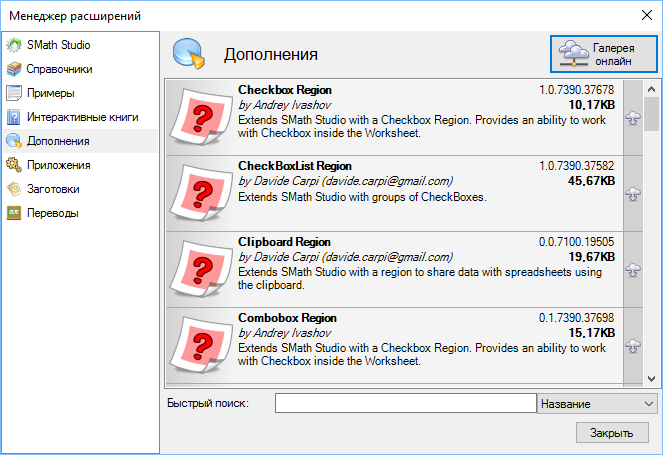
Before I start the re-installation process, I have a question: By Extension manager do you mean tools>plugins? I see no Extension manager.
Here's the path where my SMath program is currently installed: C:\Program Files (x86)\SMath Studio
As I recall, I only got to say where the program was to be installed, not the plugins.
Before I start the re-installation process, I have a question: By Extension manager do you mean tools>plugins? I see no Extension manager.
Using this window
It is possible to create a plugin for SMath Studio and not to use such tricks. I mean the analogue for prode.dll for SMath Studio. Someday, if there is time.
It is possible to create a plugin for SMath Studio and not to use such tricks. I mean the analogue for prode.dll for SMath Studio. Someday, if there is time.
Russia ☭ forever, Viacheslav N. Mezentsev
1 utenti hanno apprezzato questo post
frapuano 31/05/2020 04:47:00
Wrote
As I can see, you are using an old version of the plugin (1.0.6982.32016, Tuesday, February 12, 2019 5:47:12 PM).
The last version is: 1.0.7165.40625, 14-aug-2019 22:34:10
My version of the EFI plugin is the latest that the installer provides.
The GOOD NEWS: Prode Phys. Properties works! The functions appear in the function list and the test file opens. There were some errors but I may be able to fix those. It appears that one problem is the SMath program doesn't recognize disabled math statements. That could explain some of the errors.
Thank you so much for your prompt help.
As the author of the test file for the Prode Physical Properties dll, I have edited the SMath version of the test file to remove the errors. Many of the errors were due to one of the following:
Everything in the test file now works. In addition to using this file to ensure that Prode is installed properly, this file serves as a tutorial for use in SMath.
I have attached the test file and its pdf version. Uni, it might be a good idea to replace these files in your initial post.
test_ppp_1-2b.sm (307,58 KiB) scaricato 1799 volta(e).
test_ppp_1-2b SMath.pdf (341,63 KiB) scaricato 996 volta(e).
- converted index variable "i" to "i_" because in SMath "i" is used for imaginary
converted ranges to start with 1 instead of 0
insured that variable names were chosen properly using the dynamic edit option
created plots in SMath form
Everything in the test file now works. In addition to using this file to ensure that Prode is installed properly, this file serves as a tutorial for use in SMath.
I have attached the test file and its pdf version. Uni, it might be a good idea to replace these files in your initial post.
test_ppp_1-2b.sm (307,58 KiB) scaricato 1799 volta(e).
test_ppp_1-2b SMath.pdf (341,63 KiB) scaricato 996 volta(e).
3 utenti hanno apprezzato questo post
WroteAs the author of the test file for the Prode Physical Properties dll, I have edited the SMath version of the test file to remove the errors.
If you have the source code for the prode.dll, then I could use them to create a plug-in for SMath Studio which will be 32- or 64-bit.
Russia ☭ forever, Viacheslav N. Mezentsev
1 utenti hanno apprezzato questo post
frapuano 02/06/2020 03:42:00
Updated. Prode Physical Properties must be installed or copied (ppp.dll and pppx.dll) to the directory of plugin.
Changes:
- support 32 and 64-bit modes;
- dynamic function binding (only existing functions are available);
- library search paths are hardcoded: C:\Program Files\Prode\LIB\64;C:\Program Files\Prode\LIB\32;plugin directory.
Changes:
- support 32 and 64-bit modes;
- dynamic function binding (only existing functions are available);
- library search paths are hardcoded: C:\Program Files\Prode\LIB\64;C:\Program Files\Prode\LIB\32;plugin directory.
Russia ☭ forever, Viacheslav N. Mezentsev
1 utenti hanno apprezzato questo post
Andrey Ivashov 06/06/2020 20:13:00
Updated. Tested with Prode Properties 1.2d1 Free version.
Prode1.2d1free.7z (10,77 MiB) scaricato 1049 volta(e).
Prode Properties 1.2. User Manual.pdf (8,72 MiB) scaricato 2340 volta(e).
Changes:
- source code refactored.
Prode1.2d1free.7z (10,77 MiB) scaricato 1049 volta(e).
Prode Properties 1.2. User Manual.pdf (8,72 MiB) scaricato 2340 volta(e).
Changes:
- source code refactored.
Russia ☭ forever, Viacheslav N. Mezentsev
1 utenti hanno apprezzato questo post
frapuano 08/06/2020 06:55:00
- Nuovi post
- Nessun nuovo post