
1 Pages (14 items)
DISCARDED: SMath Studio 0.99.6647 (14 March 2018) - Messages

SMath Studio
Tiny, but powerful mathematical program with WYSIWYG editor and complete units of measurements support.
Download
SMathStudioDesktop.0_99_6647.Mono.tar.gz (1.28 MiB) downloaded 1957 time(s).
SMathStudioDesktop.0_99_6647.Setup.msi (2.15 MiB) downloaded 3998 time(s).
SMathStudio 0.99.6646 and 0.99.6647 discarded due to serious bug with colapsed areas, which could damage your worksheet data.
Sorry for inconvenience. Working to fix it asap!
10 users liked this post
Василий Николаевич Храмушин 2018/3/13 14:43:00, Arie 2018/3/13 14:44:00, uncblue 2018/3/13 15:00:00, sergio 2018/3/13 15:41:00, Igor Skarine 2018/3/13 17:33:00, frapuano 2018/3/13 20:08:00, Вячеслав Мезенцев 2018/3/13 23:59:00, NDTM Amarasekera 2018/3/14 01:39:00, Radovan Omorjan 2018/3/14 04:00:00, Davide Carpi 2018/3/14 09:04:00

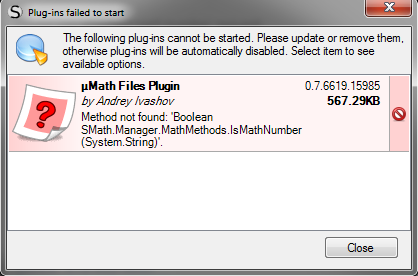
uMath Files Plugin appears to be broken with new release.
Feel free to join the SMath Studio Users Discord Channel: https://discord.gg/PayZpJW
WroteuMath Files Plugin appears to be broken with new release.
Thank you! Fixed and new plug-in version uploaded.
Best regards.
Updated version released: SMath Studio 0.99.6647.
The result formatting options of math regions aren't saved or handled correctly, see SS-3515.
Technische Mechanik mit SMath Studio: https://link.springer.com/book/10.1007/978-3-658-50592-9
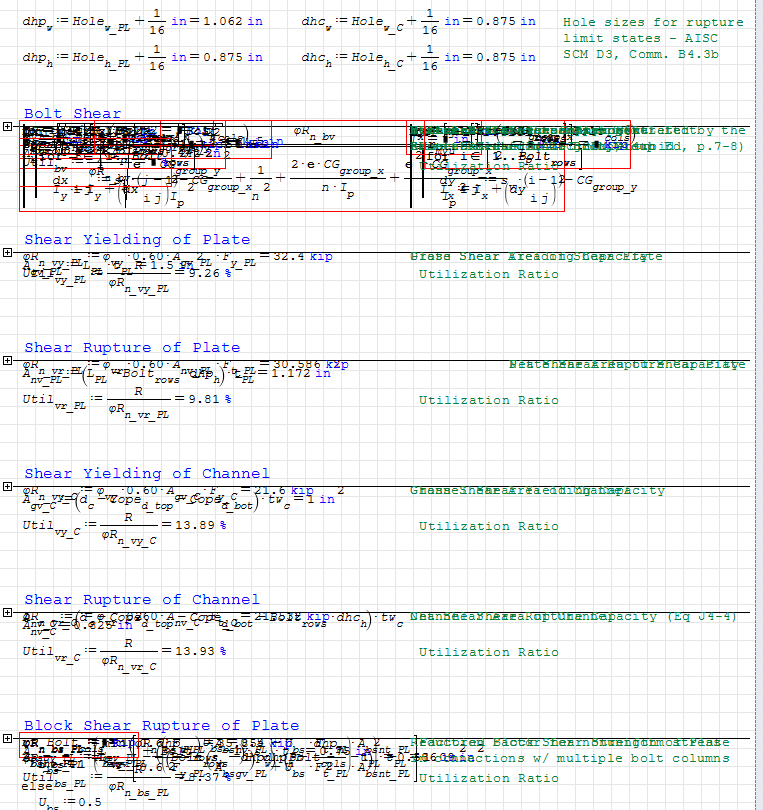
Area controls seem to have been adversely affected with this build. A worksheet I have where a lot of the calcs are hidden inside separate areas to allow for the option of a "summary" calc or a "detailed" calc opened up almost completely unreadable. It appears the contents of the collapsed areas are being displayed over the top of each other all in 1 line instead of being hidden inside the area. See the attached screenshot. Also experiencing some instability when trying to click on the area "+" signs to expand them. The areas don't expand, and instead completely disappeared once. Deleting one area at the end of the worksheet deleted all the calcs (4 pages with all areas collapsed, 10 or so pages fully expanded) except for the part that had been inside the first collapsed area on the first page.
Thanks,
Jason
Thanks,
Jason
Jason McCool
Robbins Engineering
Little Rock, AR, USA
1 users liked this post
Davide Carpi 2018/3/14 13:53:00
WroteArea controls seem to have been adversely affected with this build.
Please could you send a file to me by e-mail to fix? I cannot reproduce this issue on any of my worksheets.
Best regards.

I experienced problems similar to those of Jason.
In my case, when the sheet is opened, the problem does not exist but after saving the sheet, after closing it and finally reopening, problems with the collapsed areas occur.
sergio
In my case, when the sheet is opened, the problem does not exist but after saving the sheet, after closing it and finally reopening, problems with the collapsed areas occur.
sergio
Sorry, I forgot to check to get responses by email when I posted earlier. Here you go 
C6 Channel Shear Tab.sm (228.91 KiB) downloaded 1450 time(s).
C6 Channel Shear Tab.sm (228.91 KiB) downloaded 1450 time(s).
Jason McCool
Robbins Engineering
Little Rock, AR, USA
Jason, I see this file was saved by SMath Studio 0.99.6646.16669 and already have problems.
Do you have the initial version?
Do you have the initial version?
WroteI experienced problems similar to those of Jason.
In my case, when the sheet is opened, the problem does not exist but after saving the sheet, after closing it and finally reopening, problems with the collapsed areas occur.
Sergio, seems this is very important issue. And bug is in saving logic.
Please could you provide any file which gives this error on save?
Thanks in advance!
I actually hadn't meant to be using beta versions on my production work, but I apparently unchecked the "exclude beta versions" at some point recently and had saved that worksheet in build 6646. It seemed to work well yesterday, and I have a pdf printout that doesn't show any issues with the display of the collapsed areas, but that was printed to pdf prior to saving and closing, so perhaps it is the same behavior as for Sergio. I had to finish getting some calcs ready for a client today, so I reinstalled the last stable build from the website this afternoon, and can't confirm the behavior now with any of the beta builds. But here is the original worksheet that works in build 6622. Thanks!
Jason
Channel Shear Tab.sm (228.88 KiB) downloaded 1414 time(s).
Jason
Channel Shear Tab.sm (228.88 KiB) downloaded 1414 time(s).
Jason McCool
Robbins Engineering
Little Rock, AR, USA
Thank you Jason and Sergio!
I've reproduced this issue and it is introduced exactly in 0.99.6646.
I'm working to figure out the reason and fix it asap.
The following SMath Studio nightly builds are marked as NOT APPROVED and will not be suggested to download to anyone anymore: 0.99.6646, 0.99.6647!
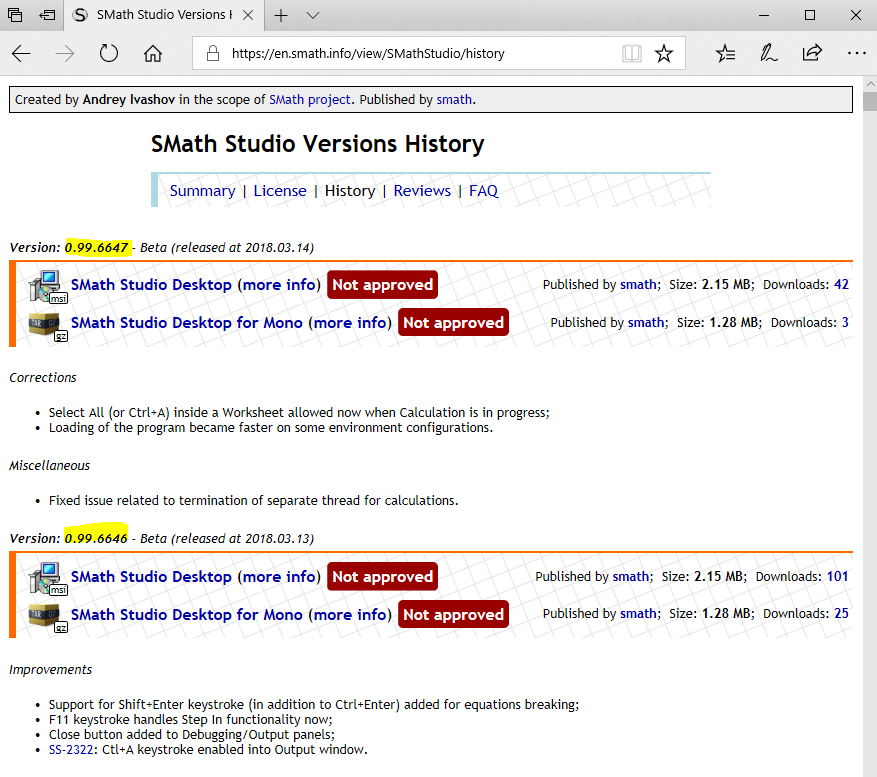
Thank you very much for the report and your help!
I've reproduced this issue and it is introduced exactly in 0.99.6646.
I'm working to figure out the reason and fix it asap.
The following SMath Studio nightly builds are marked as NOT APPROVED and will not be suggested to download to anyone anymore: 0.99.6646, 0.99.6647!
Thank you very much for the report and your help!
1 users liked this post
Jason McCool 2018/3/14 16:48:00
1 Pages (14 items)
- New Posts
- No New Posts