
text in if statements - Mensajes

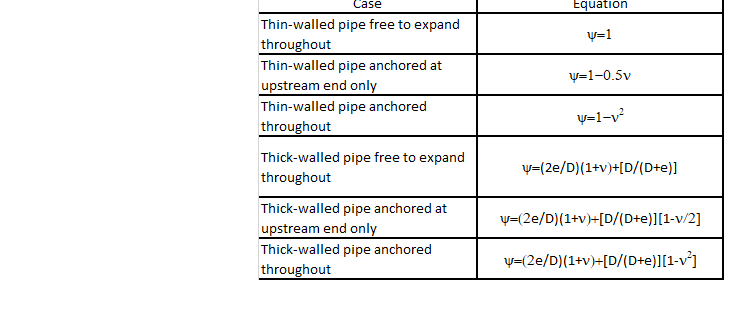
If "Thin-walled pipe anchored throughout" then P=1-v.
I have various conditions that different formulas would be used depending on the conditions, see below.
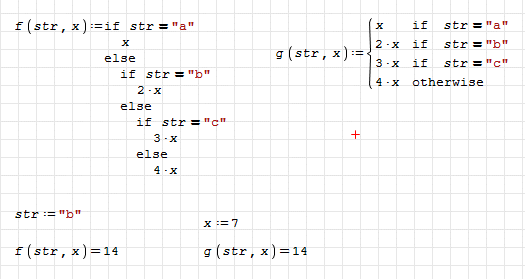
Best regards.
Alvaro.
WroteYou have some options for doing that.
Easy to complete the conditions, thus the project.
Cheers Alvaro ... Jean
WroteI don't understand how to input the data into the statement.
If I press the space key, the input ends, and I cannot input anything.
There is no space key to press. Construct the snippet, done.
WroteSorry, I have never constructed a snippet before. How do I do that?
Construct the math regions as per the image that we call snippet.
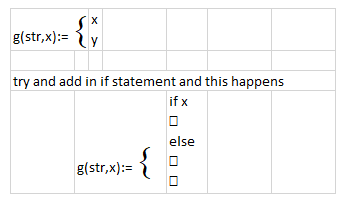
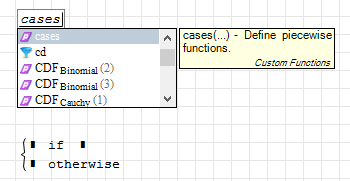
WroteThe cases() function is included into the "custom functions" plugin, so you should also be sure to have it installed.
Thank you. I had the "custom functions" plugin installed, but the use of it is not in any of the manuals, at least not that I could find. I had no idea I had to type the word "cases" to get to the input.
Wroteg(str,x):=then from menu f(x), then cases, then fill-in
Thank you. I understand now.
WroteI had no idea I had to type the word "cases"
only click the function 'cases' from the f(x) menu.
In the right most place holder of the first 'if'
place the cursor type coma, coma [,,]
that gives another line of conditions ... and so on.
WroteWroteI had no idea I had to type the word "cases"
only click the function 'cases' from the f(x) menu.
In the right most place holder of the first 'if'
place the cursor type coma, coma [,,]
that gives another line of conditions ... and so on.
Thank you. I was trying to figure out how to do that.
WroteWroteYou have some options for doing that.
Easy to complete the conditions, thus the project.
Cheers Alvaro ... Jean
I use the cases function to type everything in, but when I go back to the first line that says "x if str", as soon as I type "x if str =, as soon as I type the = sign, I get "x not defined". I am trying to understand, but not getting it yet. I had it almost working, but then this glitch appeared.
WroteWroteWroteYou have some options for doing that.
Easy to complete the conditions, thus the project.
Cheers Alvaro ... Jean
I use the cases function to type everything in, but when I go back to the first line that says "x if str", as soon as I type "x if str =, as soon as I type the = sign, I get "x not defined". I am trying to understand, but not getting it yet. I had it almost working, but then this glitch appeared.
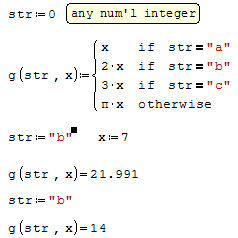
I figured out how I did it before. I cannot type the = in the above, but it works with a :=. But it does not really work, because if I say str:="b" and x:=7, the answer is 21.99 instead of 14, but it does allow me to type it. I am confused.
WroteI figured out how I did it before. I cannot type the = in the above, but it works with a :=. But it does not really work, because if I say str:="b" and x:=7, the answer is 21.99 instead of 14, but it does allow me to type it. I am confused.


WroteWroteWroteWroteYou have some options for doing that.
Easy to complete the conditions, thus the project.
Cheers Alvaro ... Jean
I use the cases function to type everything in, but when I go back to the first line that says "x if str", as soon as I type "x if str =, as soon as I type the = sign, I get "x not defined". I am trying to understand, but not getting it yet. I had it almost working, but then this glitch appeared.
I figured out how I did it before. I cannot type the = in the above, but it works with a :=. But it does not really work, because if I say str:="b" and x:=7, the answer is 21.99 instead of 14, but it does allow me to type it. I am confused.
Please post the worksheet or a screenshot. In the second column of cases you have to use boolean equals, not the assignment operator.
You can find the boolean operators in one of the palettes on the right of your screen, hovering the mouse hover the symbols you should see the keyboard shortcut.
WroteWroteI figured out how I did it before. I cannot type the = in the above, but it works with a :=. But it does not really work, because if I say str:="b" and x:=7, the answer is 21.99 instead of 14, but it does allow me to type it. I am confused.
thank you. I can't use the "Thank" button because every time I do, it says "error occurred"
WroteWroteI had no idea I had to type the word "cases"
only click the function 'cases' from the f(x) menu.
In the right most place holder of the first 'if'
place the cursor type coma, coma [,,]
that gives another line of conditions ... and so on.
How do I remove a line. I tried backspacing, and it did not work.
- Nuevos mensajes
- Sin mensajes nuevos