
1 pagine (11 elementi)
Symbols used in Astronomy - How can I add symbols - Messaggi

In astronomy I need to use a symbol that looks like a circle with a dot in the middle as a subscript
see luminosity formulas
http://en.wikipedia.org/wiki/Luminosity
Is there a plugin available with more symbols or can I somehow add more symbols.
cheers
Ivan
see luminosity formulas
http://en.wikipedia.org/wiki/Luminosity
Is there a plugin available with more symbols or can I somehow add more symbols.
cheers
Ivan

WroteIn astronomy I need to use a symbol that looks like a circle with a dot in the middle as a subscript
see luminosity formulas
http://en.wikipedia.org/wiki/Luminosity
Is there a plugin available with more symbols or can I somehow add more symbols.
cheers
Ivan
Hi IAks,
You don't need a plugin, just the right Unicode character (you can copy and paste the character from one site like Wikipedia, tamasoft.co.jp, alanwood.net or you can add the character holding the U and typing a #CODE# from the numpad)
look the attachments

regards,
w3b5urf3r
solar.sm (1,73 KiB) scaricato 1306 volta(e).
If you like my plugins please consider to support the program buying a license; for personal contributions to me: paypal.me/dcprojects
1 utenti hanno apprezzato questo post
frapuano 07/11/2018 04:50:00

You can create your own toolbar to send unicode symbols to SMath with this freeware tool for windows:
http://easyunicodepaster.wikidot.com/
Edit:
This is a bookmarklet to launch from the bookmarks toolbar on your web browser :
http://panmental.de/symbols/info.htm
http://easyunicodepaster.wikidot.com/
Edit:
This is a bookmarklet to launch from the bookmarks toolbar on your web browser :
http://panmental.de/symbols/info.htm
1 utenti hanno apprezzato questo post
Davide Carpi 10/12/2012 05:28:00
Hi Davide
sorry for the newbie question but how did you enter the the Sun Unicode character, I am trying to follow your suggestions without suceeding.
What do you mean for holding the U and typing a #CODE# from the numpad.
If I am holding U but the result is writing continuosly U on the canvas .
I am trying to do the same using the Ctrl+K method but have the same result. The only way to make it work is with the copy and paste technique ... but it works only for one single unicode character in a variable name if I need to place 2 or 3 unicode characters close together it doesn't works ( better to say that I am not able to do this).
To write Chemical concentration variables - that is the issue I am trying to address- for instance the concentration of [SO4]-2 I start from the superscript minus ( copy & past form a Unicode symbols page over Internet) then I add SO4 then I am not able to paste another unicode symbol for the superscript 2 , luckily exists the superscript 2 as an ALT sequence and so I was able to accomplish but if it was superscript 4 it was impossible (it doesn't exist an Alt sequence for it) .
Thanks in advance for your help and best regards
Franco
sorry for the newbie question but how did you enter the the Sun Unicode character, I am trying to follow your suggestions without suceeding.
What do you mean for holding the U and typing a #CODE# from the numpad.
If I am holding U but the result is writing continuosly U on the canvas .
I am trying to do the same using the Ctrl+K method but have the same result. The only way to make it work is with the copy and paste technique ... but it works only for one single unicode character in a variable name if I need to place 2 or 3 unicode characters close together it doesn't works ( better to say that I am not able to do this).
To write Chemical concentration variables - that is the issue I am trying to address- for instance the concentration of [SO4]-2 I start from the superscript minus ( copy & past form a Unicode symbols page over Internet) then I add SO4 then I am not able to paste another unicode symbol for the superscript 2 , luckily exists the superscript 2 as an ALT sequence and so I was able to accomplish but if it was superscript 4 it was impossible (it doesn't exist an Alt sequence for it) .
Thanks in advance for your help and best regards
Franco
I'm not sure why or how U+code was working in my previous Windows 7 OS... 
I'm aware that paste doesn't work in variable typing (you can only select a whole variable and replace it); as workaround you have to build the variable in a text/writer region (or notepad) and paste it.
If you use writer region and you know the character code you can use CTRL+SHIFT+X (on hexadecimal code) / CTRL+SHIFT+D (on decimal code)
Without cnversion, in any text editor/region you have to wrap the uppercase code in slashes
All numbers are available as subscript/superscipt characters, although superscript 123 are in a different unicode block and might be rendered differently (uniode superscript/subscript ).
I'm aware that paste doesn't work in variable typing (you can only select a whole variable and replace it); as workaround you have to build the variable in a text/writer region (or notepad) and paste it.
If you use writer region and you know the character code you can use CTRL+SHIFT+X (on hexadecimal code) / CTRL+SHIFT+D (on decimal code)
Without cnversion, in any text editor/region you have to wrap the uppercase code in slashes
SO4\207B\\00B2\All numbers are available as subscript/superscipt characters, although superscript 123 are in a different unicode block and might be rendered differently (uniode superscript/subscript ).
¹²³⁴⁵⁶⁷⁸⁹⁰⁺⁻If you like my plugins please consider to support the program buying a license; for personal contributions to me: paypal.me/dcprojects
WroteThanks in advance for your help and best regards
Franco
Maybe like this Franco ... Win 77 Charmap Arial
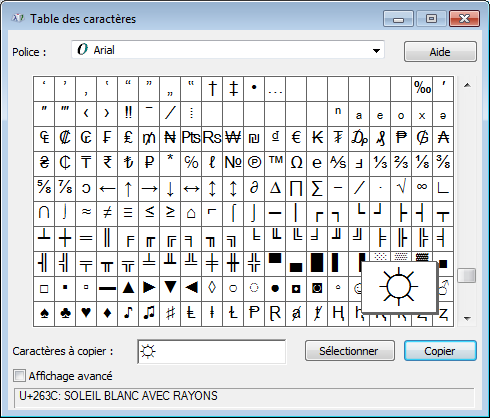
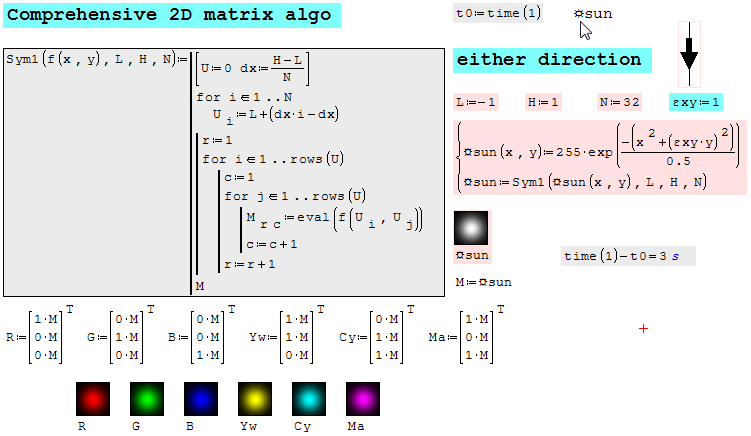
Oh ! Win 7 only
Hi. You can use this for not leave SMath and get the unicode chars that you want:

UNICODE_VAR.sm (2,45 KiB) scaricato 1262 volta(e).
Notice that you must to split the unicode char for preventing it substitution with the char itself when copy and paste the expression.
Best regards.
Alvaro.
UNICODE_VAR.sm (2,45 KiB) scaricato 1262 volta(e).
Notice that you must to split the unicode char for preventing it substitution with the char itself when copy and paste the expression.
Best regards.
Alvaro.
... otherwise with great efficiency:
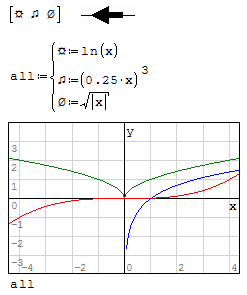
WroteIn astronomy I need to use a symbol that looks like a circle with a dot in the middle as a subscript
... from 6 years old .
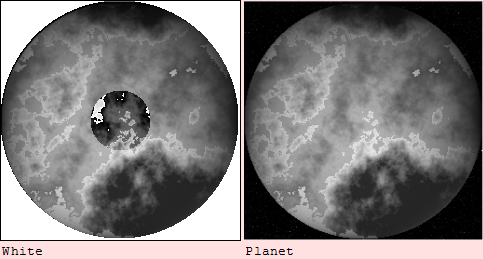
Tentatively we can highlight a specific circular region.
The attached were left unfinished.
Image Planet Luminosity_1.sm (100,57 KiB) scaricato 1260 volta(e).
Image Planet c(planet)planet.sm (79,22 KiB) scaricato 1255 volta(e).
Image Planet fmap.sm (183,45 KiB) scaricato 1279 volta(e).
Image Planet Luminosity.sm (219,14 KiB) scaricato 1216 volta(e).
Image Planet Luminosity_2.sm (236,04 KiB) scaricato 1241 volta(e).
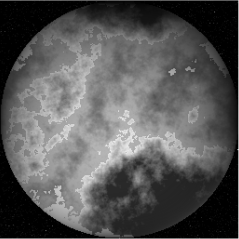
Image Planet Gamma.sm (315,73 KiB) scaricato 1290 volta(e).
Wrote... from 6 years old .
Tentatively we can highlight a specific circular region.
... Not so much happy, but proved highlight a region.
1 pagine (11 elementi)
- Nuovi post
- Nessun nuovo post