
1 páginas (5 elementos)
Table Region PlugIn - Showing calculated values in caption or footnote - Mensajes

The Table region PlugIn is very useful (thanks Davide!) and nice, but I wonder if there is any way to show a calculated value in between other text in the caption (or footnote) field.
I see that there are special keys (%T, %S, %R etc.) to show some particular numbers in the caption, it would be interesting and useful to have, let's say, %V(varname) to show the value of a variable of the sheet.
Does anyone know a workaround or maybe this could be a future additional feature?
Thanks
Marco
I see that there are special keys (%T, %S, %R etc.) to show some particular numbers in the caption, it would be interesting and useful to have, let's say, %V(varname) to show the value of a variable of the sheet.
Does anyone know a workaround or maybe this could be a future additional feature?
Thanks
Marco
Marco: not sure what you are looking for ?
Table Region [Project].sm (9,76 KiB) descargado 1122 vez(es).
Table Region Carlos.sm (17,52 KiB) descargado 1279 vez(es).
Table Region.sm (49,83 KiB) descargado 1313 vez(es).
Levenberg_Marquardt_Code_CBG Model.sm (70,93 KiB) descargado 1291 vez(es).
Table Region [Project].sm (9,76 KiB) descargado 1122 vez(es).
Table Region Carlos.sm (17,52 KiB) descargado 1279 vez(es).
Table Region.sm (49,83 KiB) descargado 1313 vez(es).
Levenberg_Marquardt_Code_CBG Model.sm (70,93 KiB) descargado 1291 vez(es).
Jean, thanks for your help, your examples always have interesting hints.
However, what I would like to do is something like this below:
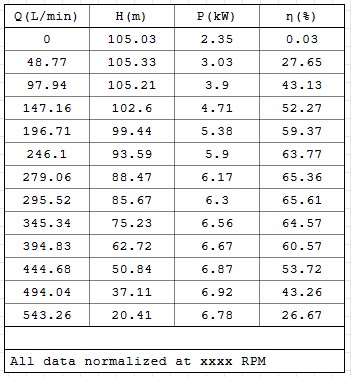
I would like to show a variable value in place of "xxxx" in the caption of the above table.
I have not found any way to do that and probably it is not possible, for the actual version of this plug-in.
Any suggestion welcome.
Thanks
Marco
However, what I would like to do is something like this below:
I would like to show a variable value in place of "xxxx" in the caption of the above table.
I have not found any way to do that and probably it is not possible, for the actual version of this plug-in.
Any suggestion welcome.
Thanks
Marco
WroteI would like to show a variable value in place of "xxxx" in the caption of the above table.
... as live variable probably not possible.
If you say and tabulate the calculated values are normalized
at some speed xxx RPM then write it as such
All data normalized @ 3600 RPM
You could just place a formatted label region over the caption . This is a bit weird but it works. Use the context menu to switch off input and border.
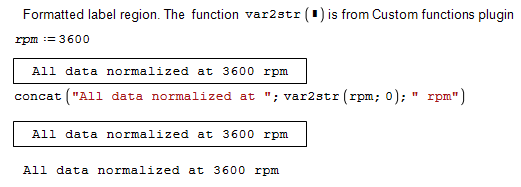
label.sm (4,57 KiB) descargado 1264 vez(es).
In newer SMath versions, you can also use a standard text region with an embedded formula, where you can suppress input display and even specify a unit.
label.sm (4,57 KiB) descargado 1264 vez(es).
In newer SMath versions, you can also use a standard text region with an embedded formula, where you can suppress input display and even specify a unit.
Technische Mechanik mit SMath Studio: https://link.springer.com/book/10.1007/978-3-658-50592-9
1 páginas (5 elementos)
- Nuevos mensajes
- Sin mensajes nuevos