
1 páginas (15 elementos)
Problems with x-y plots - Mensajes

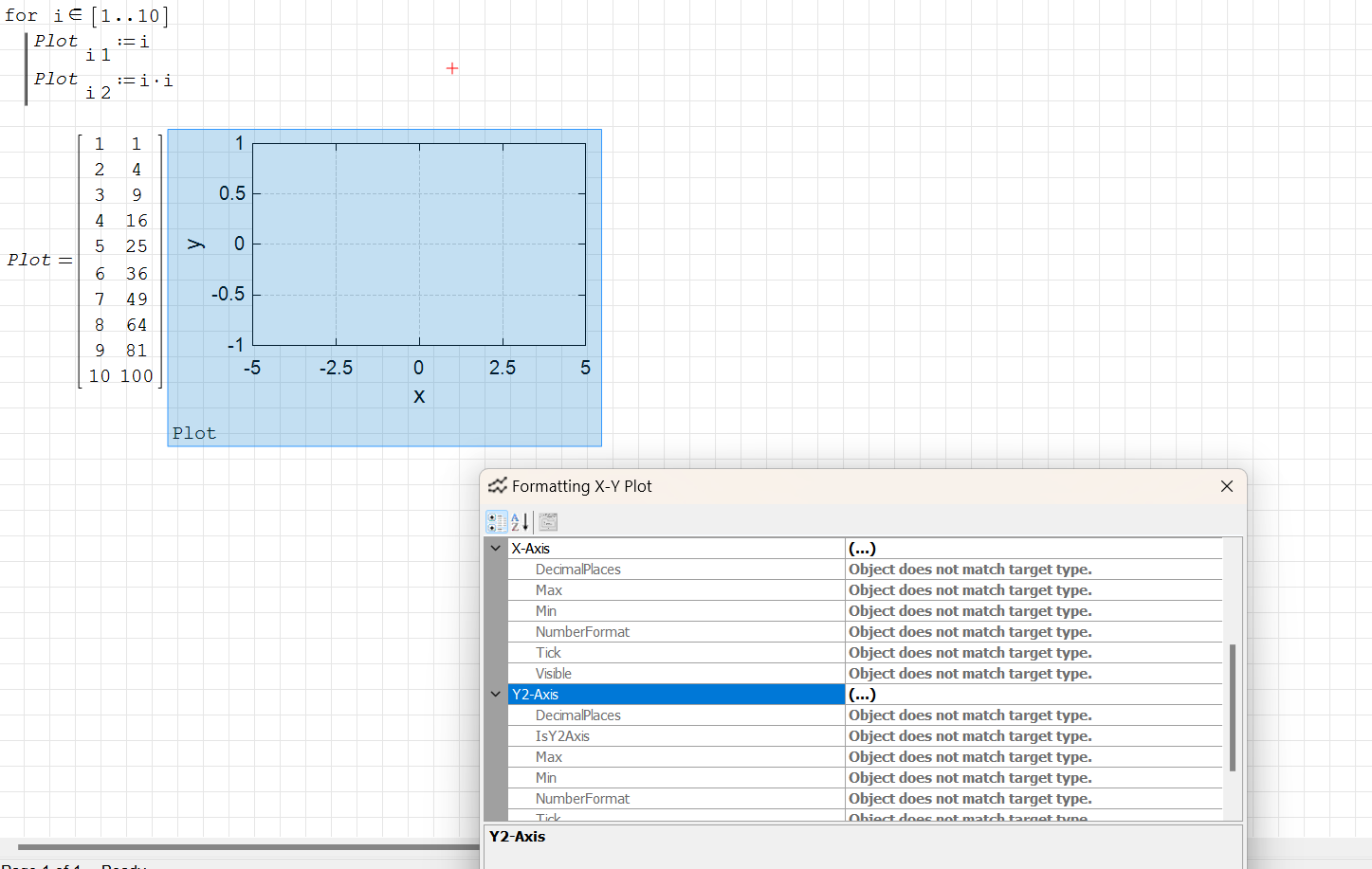
I have just tried to use Smath, after a break of two or three months. I can't get the x-y Plots to work. When I try to adjust the scales, etc, from the defaults, I get the message "object does not match target type" in most/all sections.
I checked with an older file that used x-y Plots - the plots displayed properly, but I still got the same messages when I tried to access the scales, etc.
When I launched Smath yesterday I was offered a new, updated version - I accepted - was this a mistake, has something changed?
Any help would be gratefully accepted.
TIA
Jon
I checked with an older file that used x-y Plots - the plots displayed properly, but I still got the same messages when I tried to access the scales, etc.
When I launched Smath yesterday I was offered a new, updated version - I accepted - was this a mistake, has something changed?
Any help would be gratefully accepted.
TIA
Jon

Show us what it looks like.
You are the first of 1500 users to have this problem.
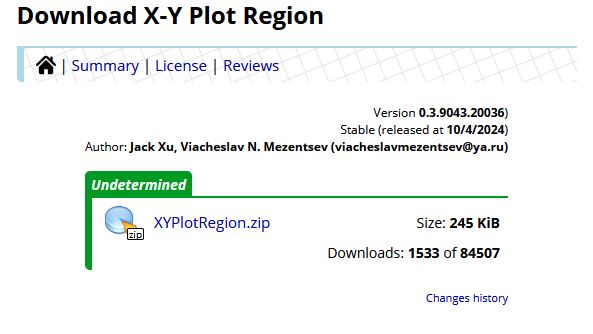
You are the first of 1500 users to have this problem.
Russia ☭ forever, Viacheslav N. Mezentsev
Hi
Here's a screenshot.
Jon
Very interesting. What operating system, SMath Studio version and X-Y Plot version?
Yes, there has been some updating, but no such side effects have been observed yet.
Yes, there has been some updating, but no such side effects have been observed yet.
Russia ☭ forever, Viacheslav N. Mezentsev
It seems, this error could not be replicated on linux.
Regards
Regards
Thanks for your interest.
Windows 11 Home
Archivo no encontrado.Archivo no encontrado.
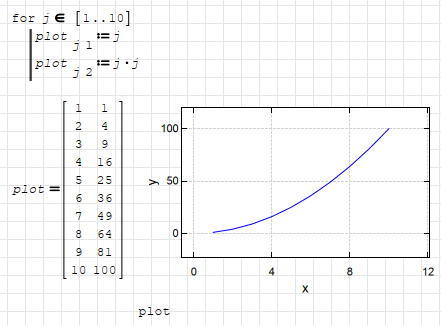
Is this what you mean?
Jon
Windows 11 Home
Archivo no encontrado.Archivo no encontrado.
Is this what you mean?
Jon
WroteIs this what you mean?
Yes.
The problem may be related to the fact that you don't have the required version of .Net Framework installed. Usually the current version is sufficient, but the component itself is developed using an older version (.Net Framework 2.0). Try checking or installing version .Net Framework 2.0 or 3.5 for Windows 11.
It's strange that the component worked on the same machine before. Others have no problem because they are most likely running older versions of operating systems or have the required versions of the .Net Framework.
Russia ☭ forever, Viacheslav N. Mezentsev

No problems here as well.
XYplot.sm (9,88 KiB) descargado 1826 vez(es).
If you install the development tools plugin, in the "Insert" > "Development tools" > "System informations" dialog you can retrieve all the relevant framework and system information.
XYplot.sm (9,88 KiB) descargado 1826 vez(es).
If you install the development tools plugin, in the "Insert" > "Development tools" > "System informations" dialog you can retrieve all the relevant framework and system information.
SMath Studio: SMath Studio Desktop 1.2.9018.0, 64-bit
OS: Microsoft Windows NT 10.0.22631.0; Windows 10 Pro, 64-bit
Screen: 1920x1080 px, 96x96 dpi, 96 GP.CDPI
Localization: language=ENG; dec.symbol=<period>; arg.separator=<semicolon>; OS dec.symbol=<comma>; OS arg.separator=<semicolon>; OS d.g.separator=<period>; units=eng;
Framework: CLR 4.0.30319.42000

	installed versions:
	v2.0.50727	2.0.50727.4927 SP2
	v3.0	3.0.30729.4926 SP2
	v3.5	3.5.30729.4926 SP1
	v4
		Client	4.8.09032
		Full	4.8.09032
	v4.0
		Client	4.0.0.0

Plugins:
- [AppDir] AreaRegion - 1.11.9018.0
- [AppDir] HTMLFileType - 1.14.9018.0
- [AppDir] ImageFileType - 1.11.9018.0
- [AppDir] MathRegion - 1.11.9018.0
- [AppDir] PictureRegion - 1.10.9018.0
- [AppDir] PlotRegion - 1.11.9018.0
- [AppDir] SMathFileType - 1.11.9018.0
- [AppDir] SpecialFunctions - 1.12.9018.0
- [AppDir] SpecialFunctions - 1.12.9018.0
- [AppDir] StandardToolboxButtons - 1.1.9018.0
- [AppDir] TextRegion - 1.11.9018.0
- [AppDir] ViewerFileType - 1.1.9018.0
- [UserDir] 3D Plot Region (Chart3DLib) - 0.1.7806.5325
- [UserDir] 3D Plot Region (Chart3DLib) - 0.1.7806.5325
- [UserDir] ALGLIB® - numerical analysis library - 1.0.8025.20709
- [UserDir] Biquaternion - 0.1.8037.2733
- [UserDir] ButtonRegion - 0.1.0.0
- [UserDir] Cephes Mathematical Library - 1.0.8034.38340
- [UserDir] CheckBoxList Region - 1.0.7806.5399
- [UserDir] Combinations Function - 1.0.8986.24645
- [UserDir] ComboBoxList Region - 1.0.8763.41296
- [UserDir] Conditionally Formatted Label - 1.0.8138.35464
- [UserDir] CoolProp Wrapper - 6.4.8214.13502
- [UserDir] Custom Functions - 1.1.8726.29023
- [UserDir] Custom Glyphs - 1.1.7783.42782
- [UserDir] Data Exchange - 1.1.7813.24580
- [UserDir] Development Tools - 1.1.7490.41956
- [UserDir] DotNumerics - 1.1.8269.16536
- [UserDir] EXCEL (2003+) I/O with recalculation and PNG export - 2.1.8225.33551
- [UserDir] FFTPACK - 1.1.7563.3712
- [UserDir] Hyperlink Region - 1.0.7806.5225
- [UserDir] Image Region - 2.100.9040.19576
- [UserDir] Maple Tools - 1.1.8665.21209
- [UserDir] Maple Tools - 1.1.8665.21209
- [UserDir] Maple Tools - 1.1.8665.21209
- [UserDir] Mathcad File Access Functions - 1.0.8011.30679
- [UserDir] Mathcad Toolbox - 0.4.8520.34563
- [UserDir] Mathcad Toolbox - 0.4.8520.34563
- [UserDir] MatrixExtensions - 1.0.8302.28555
- [UserDir] MaximaPlugin - 1.98.8797.27896
- [UserDir] NomoPlugin - 1.0.8302.30461
- [UserDir] Nonlinear Solvers - 1.1.7097.23301
- [UserDir] Numeric Up-Down Region - 1.0.8763.41162
- [UserDir] Pie Chart Region - 1.0.8770.25505
- [UserDir] PPTXplugin - 0.1.0.0
- [UserDir] RadioButtonList Region - 1.0.8763.40835
- [UserDir] Run - 0.2.7786.3193
- [UserDir] SectionsDB - 0.1.0.0
- [UserDir] SetOperations - 0.4.8992.40087
- [UserDir] Slider Region - 1.0.9012.24042
- [UserDir] Snapshot Region - 1.0.8770.19140
- [UserDir] Statistical Tools - 1.0.8868.19241
- [UserDir] Table Region - 0.3.8770.23606
- [UserDir] Text Region Utilities - 0.4.7802.40621
- [UserDir] WaterSteamPro - 0.8.8348.30162
- [UserDir] Writer Region - 0.23.8034.36139
- [UserDir] XlsxImportExport - 1.3.7845.24796
- [UserDir] XMCDFileType - 1.13.9019.2329
- [UserDir] X-Y Plot Region (JXCharts) - 0.3.9043.20036
- [UserDir] X-Y Plot Region (JXCharts) - 0.3.9043.20036
- [UserDir] ZedGraph Region (ZedGraph) - 0.1.7806.5613
If you like my plugins please consider to support the program buying a license; for personal contributions to me: paypal.me/dcprojects
Thanks for your help, guys. This is starting to reach the bounds of my competence!
These are the details of my system.
SMath System Details.txt (1,7 KiB) descargado 1520 vez(es).
The XYplot.sm file works and displays fine, but I still get the "object does not match target type" message if I try to format the plot.
I'm a high-level, maths type of user, not a low-level/OS nerd, so I've never messed around with .Net Framework before (or even heard of it!). I'll have to find out what it's all about. Hopefully changing to an older version won't screw up anything else I'm using. Or, at least I can get back to where I am now.
Jon
These are the details of my system.
SMath System Details.txt (1,7 KiB) descargado 1520 vez(es).
The XYplot.sm file works and displays fine, but I still get the "object does not match target type" message if I try to format the plot.
I'm a high-level, maths type of user, not a low-level/OS nerd, so I've never messed around with .Net Framework before (or even heard of it!). I'll have to find out what it's all about. Hopefully changing to an older version won't screw up anything else I'm using. Or, at least I can get back to where I am now.
Jon
I seem to have version 4.8.9032.0 of .Net
Jon
Jon
You're welcome. As for sure you miss any framework before 4.0
It should be enough to install the framework 3.5, you can found detailed instructions here.
The frameworks before/after 4.0 are different and run as parallel entities.
It should be enough to install the framework 3.5, you can found detailed instructions here.
The frameworks before/after 4.0 are different and run as parallel entities.
If you like my plugins please consider to support the program buying a license; for personal contributions to me: paypal.me/dcprojects
I've just downloaded .Net 3.5, using the instructions at
https://www.howtogeek.com/880208/how-to-enable-net-framework-2-0-and-3-5-in-windows-11/
which I found before I saw Davide's reply. They appear to be doing much the same thing.
Unfortunately, there is no change - I still cannot format the XY plot.
Any other suggestions, anyone?
Jon
https://www.howtogeek.com/880208/how-to-enable-net-framework-2-0-and-3-5-in-windows-11/
which I found before I saw Davide's reply. They appear to be doing much the same thing.
Unfortunately, there is no change - I still cannot format the XY plot.
Any other suggestions, anyone?
Jon
WroteAny other suggestions, anyone?
You can install an older version from the list here:
https://smath.com/en-US/view/XYPlotRegion/history
1. Remove the current version of the plugin from the program.
2. Restart the program.
3. Drag the archive with the plugin to the program window with the mouse. This is an alternative installation method.
Russia ☭ forever, Viacheslav N. Mezentsev
Thanks for this Uni.
Things have got a bit busy here lately - I'll try these in the next few days and get back to you.
Jon
Things have got a bit busy here lately - I'll try these in the next few days and get back to you.
Jon
I seem to have solved my problem. While looking to delete and try an older version of XYPlot, it occurred to me to uninstall & reinstall Smath. So I did, and it worked! Everything now seems to work as expected - so far. Maybe I should have thought of that before!
Thanks for your help, all.
Jon
Thanks for your help, all.
Jon
A 1 usuarios les gustó este mensaje
Davide Carpi 10/11/2024 21:32:00
1 páginas (15 elementos)
- Nuevos mensajes
- Sin mensajes nuevos