
Square Inches for Area instead of Square Meters - When Assigning Units Output is Meters Squared - Mensajes

Calculating Area of a piston when I enter the diameter in inches the output is m2, how do I get the output units to in2?
Thanks and apologies if this is something easy to solve, I have searched all over and have not been able to figure it out.
WroteCalculating Area of a piston when I enter the diameter in inches the output is m2, how do I get the output units to in2?
Copy inch²/paste in the empty place holder of result.
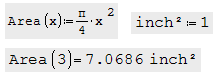
WroteQuestion:
Calculating Area of a piston when I enter the diameter in inches the output is m2, how do I get the output units to in2?
Thanks and apologies if this is something easy to solve, I have searched all over and have not been able to figure it out.
Click to result, you wil notice there will be a placeholder for unit change.
Change it to square inch. It will be calculated as you wanted.
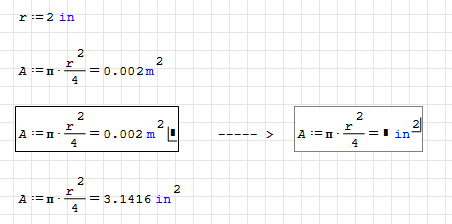
WroteCalculating Area of a piston when I enter the diameter in inches the output is m2, how do I get the output units to in2?
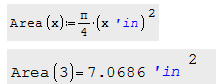
... or like this in silent unit:
1. x*in ... in from unit panel
2. backspace twice to remove in
3. at this point you see a big round place holder,
4. in that special place holder ... in from unit panel
5. 'in in blue is now silent for result 'in²
Cannot figure out the syntax of how to changes the units, I select so the box has the dogleg right then I type in^2 and get the result in not defined like I am adding another step to the calculation? Just typing in also gives me the same error.
Archivo no encontrado.Archivo no encontrado.
WroteCannot figure out the syntax of how to changes the units
... as explained above. Read again.
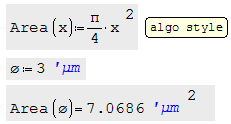
WroteCannot figure out the syntax of how to changes the units
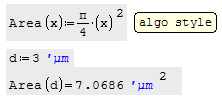
Make your project math style [no decoration, no gyzmas ...]
No syntax to freak, code accordingly.
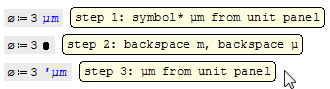
WroteI want to thank everyone for their responses.
Cannot figure out the syntax of how to changes the units, I select so the box has the dogleg right then I type in^2 and get the result in not defined like I am adding another step to the calculation? Just typing in also gives me the same error.
After you typed "in", press Tab or double click on inch unit before you enter the square.
So that you will get the inch unit. It should be blue colored.
You can define variables in Smath even by unit names.
I can see your inch unit is not unit. It is a new variable named "in".
I am repeating again, units are blue colored.
Regards.
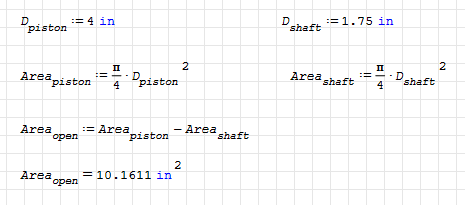
I am going down the path of using the units. Took me a couple of attempts to get the in2 but it is now working
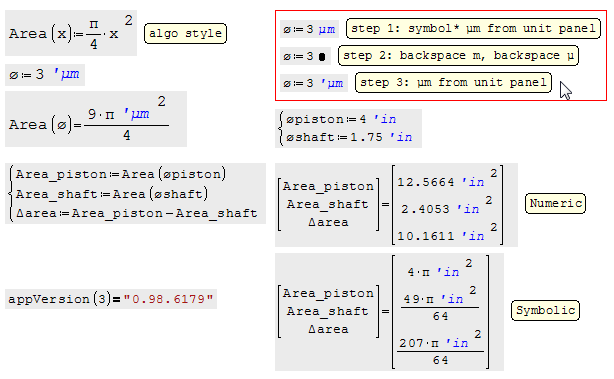
One follow-up, if I set the equation to optimization none to show the numeric values they all default to meters, is there a way to have them shown as inches?
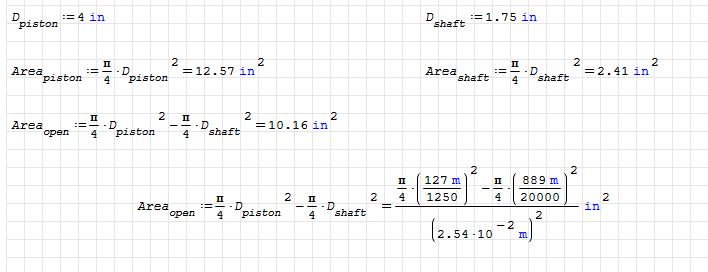
WroteOne follow-up, if I set the equation to optimization none to show the numeric values they all default to meters, is there a way to have them shown as inches?
Construct as is, it may have to do with your SS version.
Otherwise, you are wrongdoing, not following guidance.
WroteOnce again, I want to thank everyone for their help.
I am going down the path of using the units. Took me a couple of attempts to get the in2 but it is now working
One follow-up, if I set the equation to optimization none to show the numeric values they all default to meters, is there a way to have them shown as inches?
Definitions are converted to SI upon storage (you see that when you hover with the mouse over a definition. Control of display units is just by the optional placeholder, where you can insert any factor (a unit or pi or any variable name which your result may contain)
Also note that the default display unit depends on optimization. Numeric and symbolic display different units, e.g. 1/s defaults to Hz in numeric optimization and to 1/s in symbolic.
- Nuevos mensajes
- Sin mensajes nuevos