
Conditionally Formatted Labels - Add Conditionally Formatted Labels in SMath Studio worksheets - Mensajes

Thank you both, I've made a patch that seems to work. (SS-1224 opened)
PLUGIN UPDATED
Important: please report here if anyone notice a "PrePainter" error message on this region.
Best regards,
Davide
PLUGIN UPDATED
Important: please report here if anyone notice a "PrePainter" error message on this region.
Best regards,
Davide
If you like my plugins please consider to support the program buying a license; for personal contributions to me: paypal.me/dcprojects

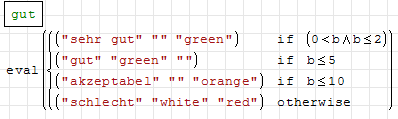
I would like to use cases because if you nest i.e. 10 if loops the code looks ugly. But cases seems not to work with conditionally formatted labels. Is there a nice looking workaround?

I'm from smartphone so I can't guarantee, but an eval(cases(...)) should works
If you like my plugins please consider to support the program buying a license; for personal contributions to me: paypal.me/dcprojects
works like a charm!
I am trying to create a label that displays " full psi " for a ratio greater than 2, but if the value drops below 2, it needs to display the actual value needed to maintain the ratio. I have it working except that it is stuck in symbolic format and displays an obscenely large fraction instead of the decimal value I need.
I have checked all of my formats and everything is in decimal and optimized to numeric. I have tried converting to a string with num2str and rounding the fraction to a decimal value.
Please help!
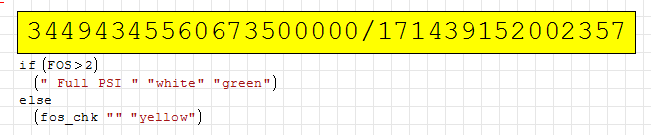
I have checked all of my formats and everything is in decimal and optimized to numeric. I have tried converting to a string with num2str and rounding the fraction to a decimal value.
Please help!
Thank you! This worked exactly like I needed to. And I agree, quite buggy.
I'll check it. BTW it is possible to use an eval() on the first argument.
If you like my plugins please consider to support the program buying a license; for personal contributions to me: paypal.me/dcprojects
A 1 usuarios les gustó este mensaje
ioan92 3/6/2015 3:33:00
Would it be possible to add a button style to the Conditionally Formatted Label that had no black line border. The button style could be called "NoBorder" or something similar. I use the conditionally formatted label for displaying design checks as shown below

and I think it would be nice to not have the border around the equality sign (>).
Another possible use would be for repeating text in a header on multiple pages and not have borders around the text or quotes around the text if it is a string variable as shown below.

And if the background color could be set to transparent that would be crowning achievement.
Thanks for your consideration.
and I think it would be nice to not have the border around the equality sign (>).
Another possible use would be for repeating text in a header on multiple pages and not have borders around the text or quotes around the text if it is a string variable as shown below.
And if the background color could be set to transparent that would be crowning achievement.
Thanks for your consideration.
WroteAnd if the background color could be set to transparent that would be crowning achievement.
For the remaining of the question, work sheet would help.
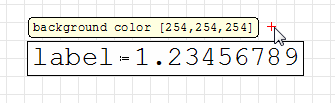
Image Formated LABEL [Oxyhemoglobin].sm (17,32 KiB) descargado 1492 vez(es).
A 1 usuarios les gustó este mensaje
Davide Carpi 18/5/2018 4:54:00
Engr, try using Table Region.
Use setings like on the screenshots.
Archivo no encontrado. Archivo no encontrado.
Archivo no encontrado. Archivo no encontrado.
Use setings like on the screenshots.
Archivo no encontrado. Archivo no encontrado.
Archivo no encontrado. Archivo no encontrado.
A 1 usuarios les gustó este mensaje
Davide Carpi 18/5/2018 4:54:00
WroteWould it be possible to add a button style to the Conditionally Formatted Label that had no black line border [...] And if the background color could be set to transparent
I think they are both feasible options

WroteAnother possible use would be for repeating text in a header on multiple pages and not have borders
If the content is not related with calculation an option is even to use metadata content in fields objects of writer regions
If you like my plugins please consider to support the program buying a license; for personal contributions to me: paypal.me/dcprojects
PLUGIN UPDATED 
- context menu: added border on/off option;
- "transparent" is now a valid color name;
- alpha channel of colors now blends with underlying objects;
- text wrap issue on printing mitigated;
If you like my plugins please consider to support the program buying a license; for personal contributions to me: paypal.me/dcprojects
A 6 usuarios les gustó este mensaje
Engr 8/6/2018 12:00:00, Denis Nikitin 8/6/2018 9:03:00, frapuano 7/6/2018 9:25:00, Arie 7/6/2018 10:29:00, sergio 7/6/2018 10:44:00, Oscar Campo 7/6/2018 11:56:00
Davide - thank you for revising the plugin per my suggestions. The revised plugin works for me very well. Per your postscript note I made a donation to Smath Studio for your efforts.
Hello,
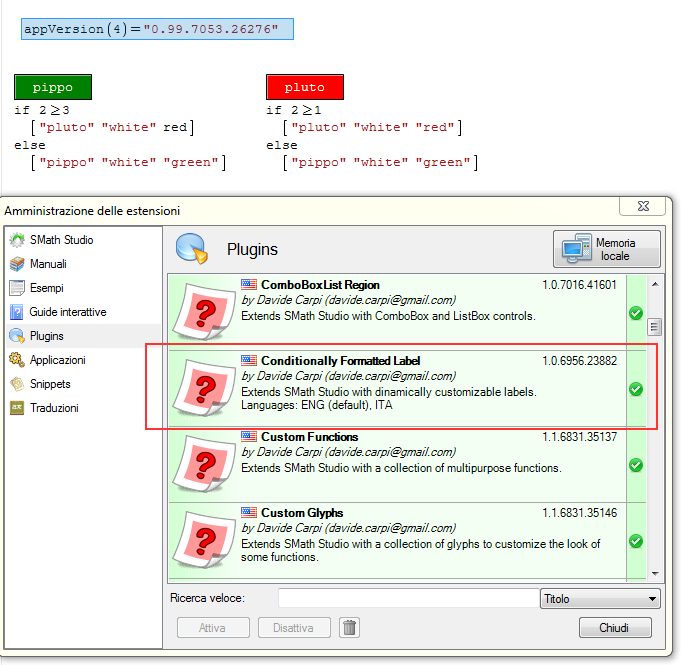
is this plugin working with version 0.99 of SMath? I can't find it to download from the application's plugin manager.
Thanks,
is this plugin working with version 0.99 of SMath? I can't find it to download from the application's plugin manager.
Thanks,

in my installation (win7 PRO) it works correctly
sergio
sergio
From SS 6179
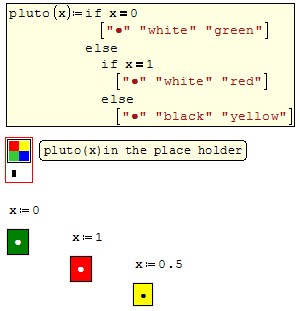
Here is the creator, adapted/augmented from Martin.
2D Util Bar Fourier_Martin.sm (75,63 KiB) descargado 1767 vez(es).
2D Util Bar Fourier_Martin.sm (75,63 KiB) descargado 1767 vez(es).
... finally: does it work one way or another ?
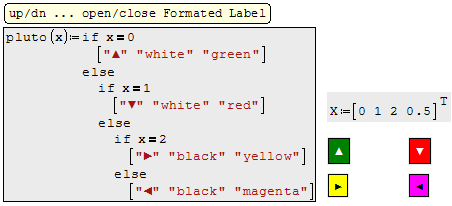
A 1 usuarios les gustó este mensaje
sergio 7/5/2019 14:37:00
Hello!
Sometimes you want the calculation to show by which formula the calculations were performed. Use for this combo boxlist is not beautiful. Formatted label would be more accurate. But Formatted Label does not display a formalized formula. Is it possible to add such a possibility to the formatted label? And in addition, the ability to remove the frame around the edges of the formatted label?
Thanks in advance!
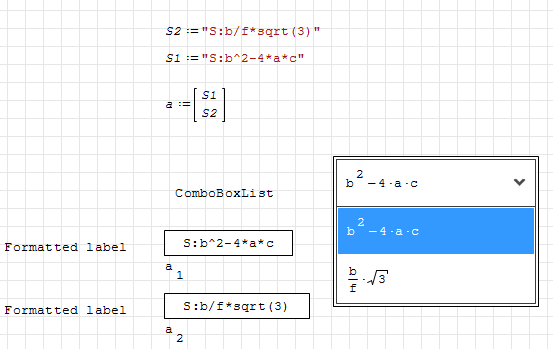
Sometimes you want the calculation to show by which formula the calculations were performed. Use for this combo boxlist is not beautiful. Formatted label would be more accurate. But Formatted Label does not display a formalized formula. Is it possible to add such a possibility to the formatted label? And in addition, the ability to remove the frame around the edges of the formatted label?
Thanks in advance!
I think is not a problem 😉
If you like my plugins please consider to support the program buying a license; for personal contributions to me: paypal.me/dcprojects
- Nuevos mensajes
- Sin mensajes nuevos