
MathRegion Critical Error on DEL key action - Mensajes

critical_bug.sm (3,85 KiB) descargado 1691 vez(es).
Try to delete the first number "4" in front of the ratio.
Step 1: Select it with the cursor.
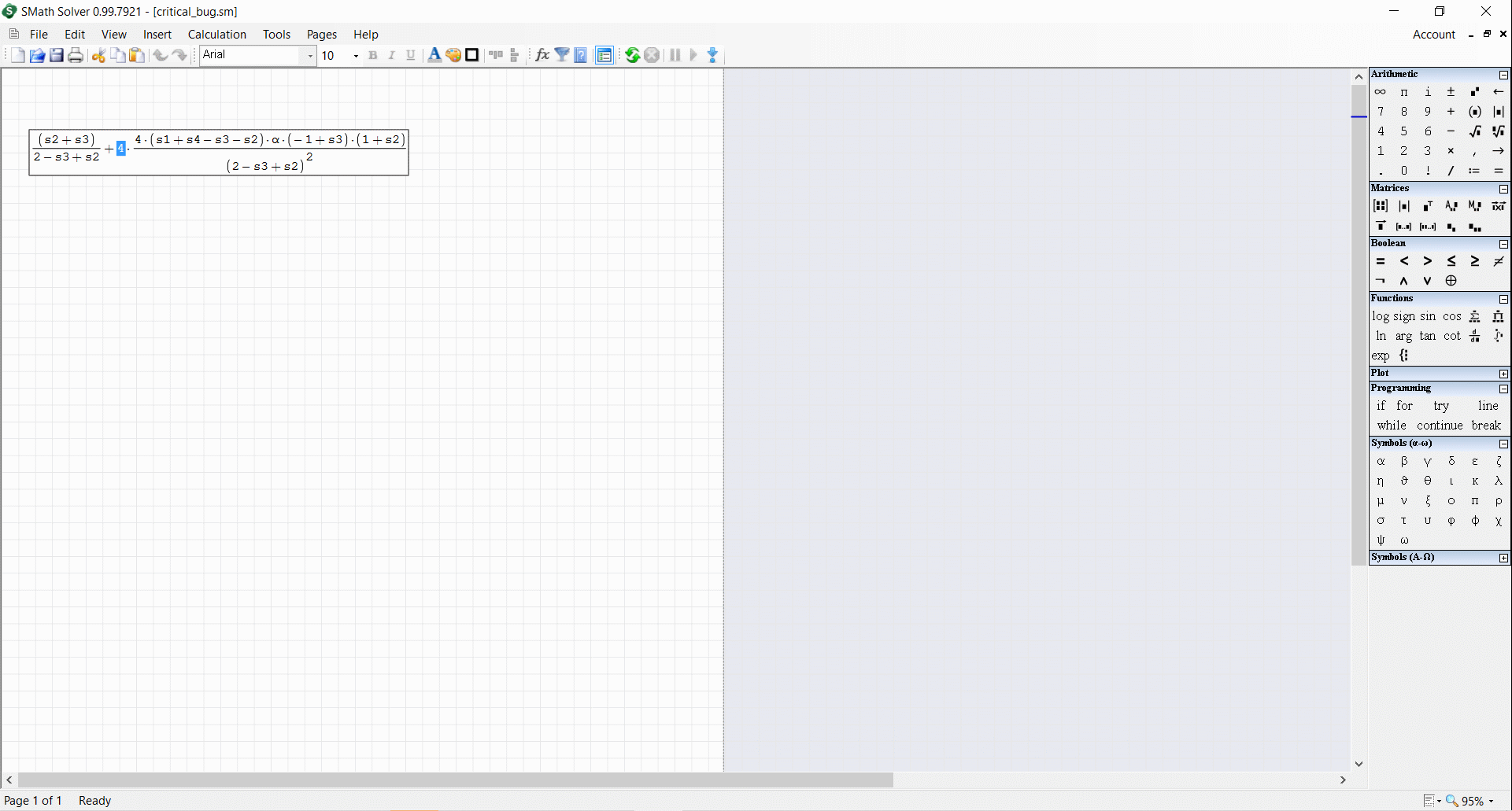
Step 2: Press "Del", the "4" turns into a black square.
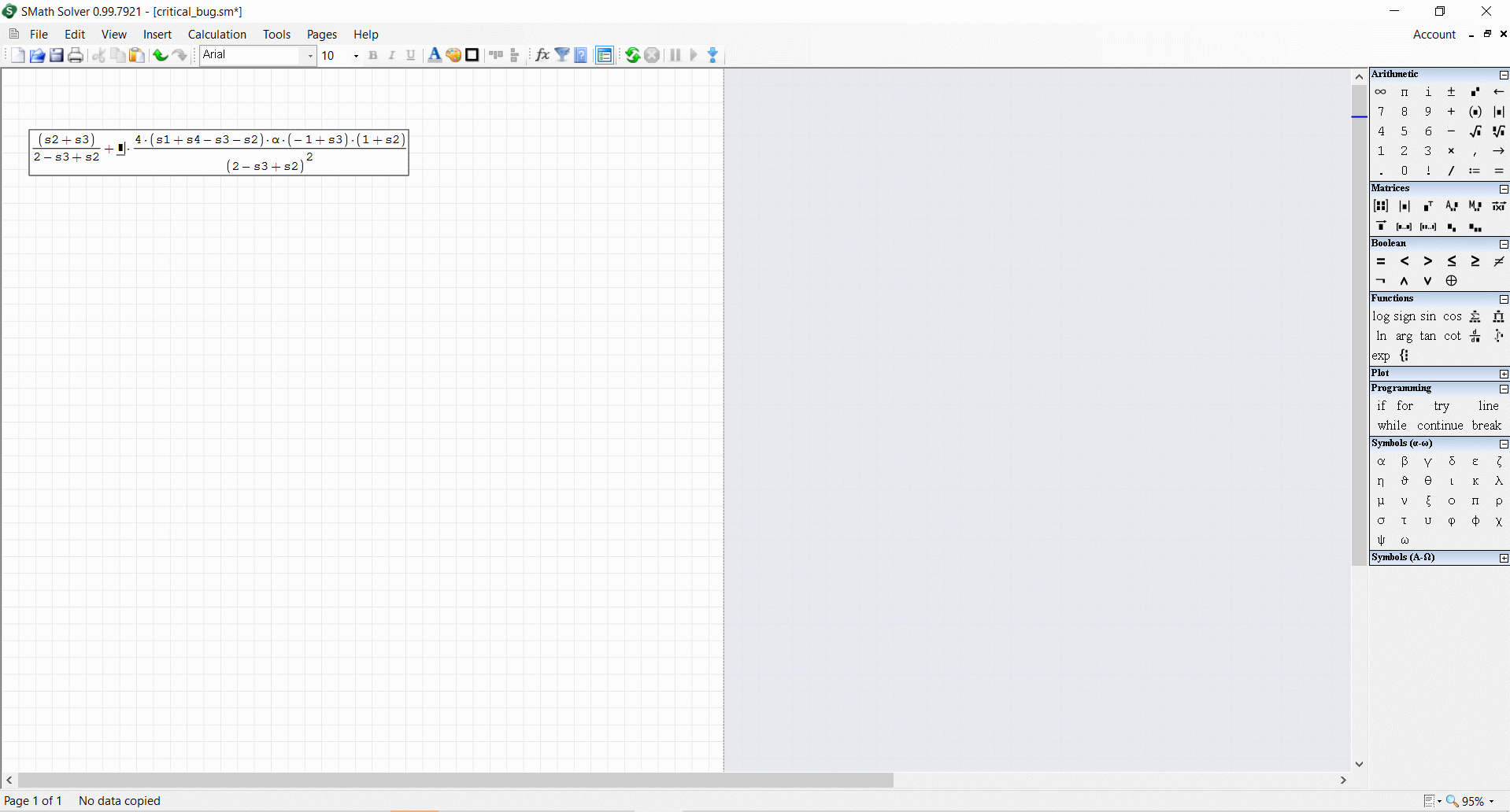
Step 3: Press "Del" once again. SM pops on "Critical error".
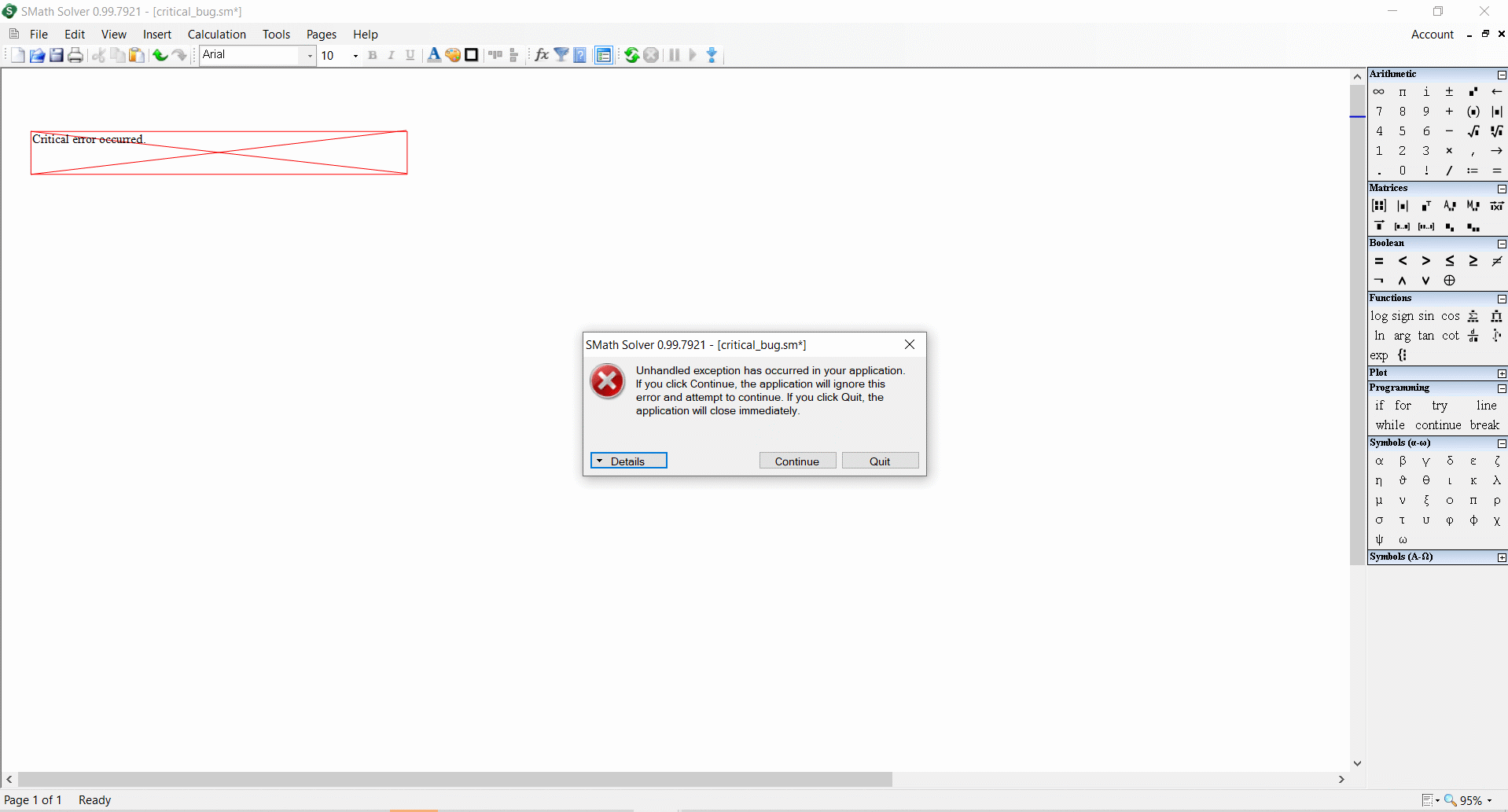
It can't be doctored, it is not a calculation issue.
Smath Studio crashes at the moment you push "DEL" key to delete this number "4" or whatever else there.


same behavior.

System.IndexOutOfRangeException: Index out of matrix bounds.
   in SMath.Controls.MathPainter.PrepareForPaint(MathRegion region, PaintContext ctx, Term[] input, MathAnswer answer, Term[] units, Boolean inputDataVisibility, Int32 currentTermIdx, FontInfo font, Boolean focused, Single& middleLine, Single& baseLine)
   in SMath.Controls.MathRegion.(IGraphics , PaintEventOptions )
   in SMath.Controls.MathRegion.OnCommandSend(String value)
   in SMath.Controls.WorksheetEditor.(RegionBase , String )
   in SMath.Controls.WorksheetEditor.InsertManager(String value)
   in SMath.Controls.Worksheet.Insert(String value)
   in SMath.Controls.WorksheetEditor.KeyDown(KeyEventOptions e)
   in SMath.UI.Accessories.DesktopWorksheet.OnKeyDown(KeyEventArgs e)
   in System.Windows.Forms.Control.ProcessKeyEventArgs(Message& m)
   in System.Windows.Forms.Control.WmKeyChar(Message& m)
   in System.Windows.Forms.Control.WndProc(Message& m)
in System.Windows.Forms.NativeWindow.Callback(IntPtr hWnd, Int32 msg, IntPtr wparam, IntPtr lparam)WroteWroteEventually I have caught a bug that bothered me in a few latest versions of Smath.
... end of it !
It didn't surprise me that Jean couldn't understand what the bug is.
WroteBasically up to SS 6179, Smath is an equation editor
working similar to Mathcad 11 and earlier, including program.
AFAIK, an option for script style [typical Kalkulator ...]
will manage the critical error demo bug.
Is it possible to combine both: part script style & equation editor ?
As well as accommodate both styles in program ?
Cheers ... Jean.
And yet another useless not related post again.
Unbelievable. Wow, just wow.
Such ignorance, such obstinate, such thick head...
I am out of speech right now.
The "Critical Error on Del key action" was not fixed yet in the latest stable version.
Try to delete "g" by using DEL key.
oldbug.sm (2,25 KiB) descargado 1679 vez(es).


I can also confirm the existence of this issue ( "v0.99.7921.69" ). Upon investigation, I have (2) items:
1) The program does not actually 'crash', the program is still running. Thus: you can recover from this bug without losing all your work!
a) To recover from this error:
1) On the "⨂ Unhandled exception has occurred ... Index was outside the bounds of the array" popup error message, Click on the button: 「Continue」
2) 'UNDO' your last action, either via the menu bar: 「Edit」 -> 「↻ Undo」 or via keypress 「Ctrl」 + 「Z」
3) Repeat steps #1 and #2 until you achieve a successful 'undo'.
2) The elements of this error seem to require a grouping operator (e.g., Absolute Value, Parenthesis, Determinant, Square Root, Matrix) that is paired with a fraction/division operation, prepend this with a multiplication statement and you can duplicate the error. See screen capture below:
Below are a few statements I compiled; performing the double-delete on the integer '6' will throw the same error:

-Kenny Lemens, P.E.
I found another configuration that can trigger this error; if you declare/evaluate a variable, and then try to multiply that entire set: you get a syntax error. Now if you attempt to correct the statement by using the [DEL] to remove the evaluation, the error gets thrown (as shown below):
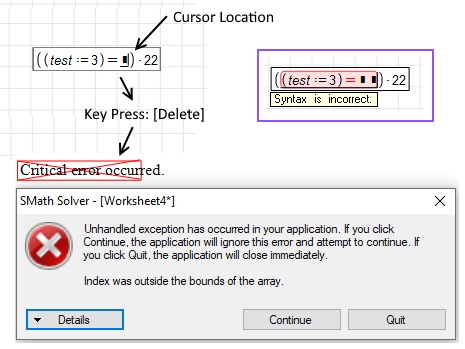
The work around would be to use the [Backspace] to delete/correct the equation, or to copy/paste the terms into a new statement without syntax errors.
-Kenny Lemens, P.E.
WroteGreetings,
I found another configuration that can trigger this error; if you declare/evaluate a variable, and then try to multiply that entire set: you get a syntax error. Now if you attempt to correct the Candy Crush statement by using the [DEL] to remove the evaluation, the error gets thrown (as shown below):
The work around would be to use the [Backspace] to delete/correct the equation, or to copy/paste the terms into a new statement without syntax errors.
-Kenny Lemens, P.E.
I tried that .... still get the error
- Nuevos mensajes
- Sin mensajes nuevos