
1 páginas (7 elementos)
Formatted Label ito a matrix - How to insert a formatted label into a matrix? - Mensajes

Hello,
Question :
Please, is there now possible to insert one or more formatted labels into a matrix or into a table?o_o
In case where it is not yet possible, is there a way to make it possible?
Thanks,
Ioan
Question :
Please, is there now possible to insert one or more formatted labels into a matrix or into a table?o_o
In case where it is not yet possible, is there a way to make it possible?
Thanks,
Ioan
Do to others as you would like them to do to you! Knowledge is of no value unless you put it into practice - Chekhov

Hi Ioan, nope, as for now is not possible. I might think about something.
If you like my plugins please consider to support the program buying a license; for personal contributions to me: paypal.me/dcprojects
A 1 usuarios les gustó este mensaje
ioan92 20/10/2023 16:13:00
It is at least possible to put other regions into text regions. So in general, this might not be impossible. Yet, for now, it doesn't even seem to be possible to put more placeholder into custom regions. An important application would be Mathcad-like plots, where you have placeholders for the x and y values and for the axes limits.
For now I recommend to make use of tables with string-encoded SMath expressions. Whatever you can write or display in a formula region can be displayed in a table cell (with minor deviations like italic/roman style).
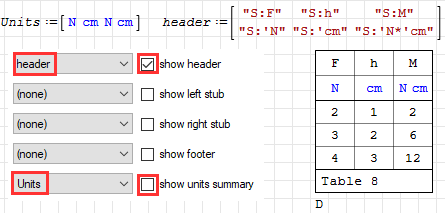
For now I recommend to make use of tables with string-encoded SMath expressions. Whatever you can write or display in a formula region can be displayed in a table cell (with minor deviations like italic/roman style).
Technische Mechanik mit SMath Studio: https://link.springer.com/book/10.1007/978-3-658-50592-9
A 1 usuarios les gustó este mensaje
ioan92 20/10/2023 18:14:00
WrotePlease, is it possible to insert one or more formatted labels into a matrix or into a table ?
Into a Table, don't know. Into a matrix YES..
1. Insert the Formatted Label, absent of title to see the decorative icon
2. Insert 1 x 3 matrix ... top/bottom 0,0
3. Brush over blue style the Formatted Label
4. copy/paste in the black center place holder.
In my example document, result Formatted Label evaluates.
Consequently, I have my numerical result of Convolution example.
Jean
Bonjour Jean,
Thanks for your proposal. Unfortunately I'm not able to reproduce it.
Could you insert your file in line.
Ioan
Thanks for your proposal. Unfortunately I'm not able to reproduce it.
Could you insert your file in line.
Ioan
Do to others as you would like them to do to you! Knowledge is of no value unless you put it into practice - Chekhov
WroteBonjour Jean,
Salut Ioan from the old days.
Please, confirm it works.
Take care ... Jean.
Image Formatted LABEL INSERT MATRIX.sm (22,52 KiB) descargado 1414 vez(es).
Merci Jean,
Maybe I'm not enough smart to catch the point of the connection between my question and your solution.
Bonne journée,
Ioan
Maybe I'm not enough smart to catch the point of the connection between my question and your solution.
Bonne journée,
Ioan
Do to others as you would like them to do to you! Knowledge is of no value unless you put it into practice - Chekhov
1 páginas (7 elementos)
- Nuevos mensajes
- Sin mensajes nuevos