
Stable: SMath Studio 0.99.7030 (01 April 2019) - Messages

SMath Studio
Tiny, but powerful mathematical program with WYSIWYG editor and complete units of measurements support.
Download
SMathStudioDesktop.0_99_7030.Mono.tar.gz (1.36 MiB) downloaded 48064 time(s).
SMathStudioDesktop.0_99_7030.Setup.msi (2.24 MiB) downloaded 125259 time(s).
- Desktop (Windows):
Framework: .NET Framework 2.0 or higher - Desktop (Linux):
Framework: Mono 2.0 (libmono-winforms-2.0-cil package) or higher
- [ARA] Arabic / العربي
- [BEL] Belarusian / Беларуская
- [BUL] Bulgarian / Български
- [CAT] Catalan / Català
- [CHS] Chinese (Simplified) / 简体中文
- [CHT] Chinese (Traditional) / 簡體中文
- [CPP] Portuguese (Brazil) / Brazil (Português)
- [CZE] Czech / Čeština
- [DAN] Danish / Dansk
- [DUT] Dutch / Nederlands
- [ENG] English / English
- [FAS] Persian / فارسی
- [FIN] Finnish / Suomi
- [FRE] French / Français
- [GER] German / Deutsch
- [GRE] Greek / Ελληνικά
- [HEB] Hebrew / עברית
- [HUN] Hungarian / Magyar
- [IND] Indonesian / Bahasa Indonesia
- [ITA] Italian / Italiano
- [JPN] Japanese / 日本語
- [KOR] Korean / 한국어
- [LAV] Latvian / Latviešu
- [LTH] Lithuanian / Lietuvių
- [NOR] Norwegian / Norsk
- [POL] Polish / Polski
- [POR] Portuguese / Português
- [RON] Romanian / Română
- [RUS] Russian / Русский
- [SCC] Serbian (Latin) / Srpski
- [SCR] Croatian / Hrvatski
- [SLK] Slovak / Slovenčina
- [SPA] Spanish / Español
- [SRP] Serbian (Cyrillic) / Српски
- [SWE] Swedish / Svenska
- [TUR] Turkish / Türkçe
- [UKR] Ukrainian / Українська
SMath Studio tutorial by Bernard Liengme.
 SMathPrimer.pdf (Date: 11.11.2011. File size: 2.06MB) - to open in Adobe Acrobat Reader
Introduction of the use of SMath Studio by Gilberto E. Urroz, Ph.D., P.E.
- SMathStudio.0_85.Article.Eng.pdf (Date: 23.09.2009. File size: 828.96KB) - to open in Adobe Acrobat Reader
- SMathStudio.0_85.IOFiles.Article.Eng.pdf (Date: 27.09.2009. File size: 453.24KB) - to open in Adobe Acrobat Reader
- SMathStudio.0_85.NumericFunctions.Article.Eng.pdf (Date: 18.10.2009. File size: 622.45KB) - to open in Adobe Acrobat Reader
- SMathStudio.0_85.Programming.Article.Eng.pdf (Date: 18.10.2009. File size: 411.74KB) - to open in Adobe Acrobat Reader
SMath Studio icons (
 SMathStudio.Icons.zip (Date: 12.04.2010. Size: 63.74KB)

WroteIs there a way to open several instances of the app in that version? Not like a few windows with different documents, but few system windows with different documents. Looks like it doesn't work now, but worked in previous version. Now it's super inconvenient because it's impossible to work on few monitors in different files at the same time.
Not clear what you could do before and not anymore.
When you open a PC session, you have nothing yet
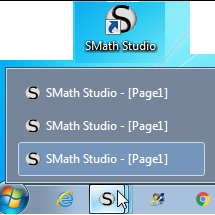
At this point: click on the Smath icon TaskBar ... bingo Smath.
From there, you can open any Smath work sheet from wherever
in the PC box as you have a single Smath session.
Now, if you want another Smath session, double click on the
Smath icon in the DeskTop ... not TaskBar.
You then have a 2nd Smath session identified page 1.
Do that as many times as you want independent Smath sessions.
Now, to reach those Smath sessions, hover on the Smath icon
on the TaskBar ... click on the one you want identified page 1.
From the Smath menu "Open", browse for the document you want
from wherever in the PC box. Do same for the other not yet opened.
Now, you have as many Smath sessions as desired for each of
your active screen for multiple consultations.
But, all that is BS & BK [Bull Shit & Book Keeping].
Open documents from a single Smath sessions ... open any number,
I know no limit. From your individual screen just consult the
one in cause. Just works great Win 7, SS 6179.
It can be done other wise.
WroteIs there a way to open several instances of the app in that version? Not like a few windows with different documents, but few system windows with different documents. Looks like it doesn't work now, but worked in previous version. Now it's super inconvenient because it's impossible to work on few monitors in different files at the same time.
Hi. I ask for this feature, which is good for low resources systems, because SMath is some slow starting. I guess that it's in the c:\Users\##USER##\AppData\Roaming\SMath\settings.inf the option, but can't find where.
Check this: https://en.smath.com/forum/yaf_postst17103_About-messages-and-smath-instances.aspx
Hope this helps.
Best regards.
ALvaro.
WroteI ask for this feature, which is good for low resources systems, because SMath is some slow starting.
Does it work this way for you ?
3 double click on the Smath icon Desktop.
The first Smath instance takes > 1 min
2nd & 3rd instance 45 sec.
Now, you have 3 Smath sessions, each one to be filled
from your main Smath documents directory
SS 6179 Win 7
I would like to know if future plans for development on smath are still ongoing and, in case, if a new stable build is going to be released?
Thanks
Bye!
WroteHello, new stable builds have not been release for a while now (more than one year).
I would like to know if future plans for development on smath are still ongoing and, in case, if a new stable build is going to be released?
Everything is OK. It is not a first time in a project's lifetime when development was paused.
Currently I've almost finished work on my other projects so plan to return to SMath very soon.
Best regards.
Since so much bad news is happening in 2020...
It is good to hear you are doing well.
btw could you look into the no symbols shown in toolbox bug we linux users are facing?
- New Posts
- No New Posts