
Stable: SMath Studio 0.99.6884 (06 November 2018) - Messages

SMath Studio
Tiny, but powerful mathematical program with WYSIWYG editor and complete units of measurements support.
Download
SMathStudioDesktop.0_99_6884.Mono.tar.gz (1.35 MiB) downloaded 5490 time(s).
SMathStudioDesktop.0_99_6884.Setup.msi (2.23 MiB) downloaded 43745 time(s).
- Desktop (Windows):
Framework: .NET Framework 2.0 or higher - Desktop (Linux):
Framework: Mono 2.0 (libmono-winforms-2.0-cil package) or higher
- [ARA] Arabic / العربي
- [BEL] Belarusian / Беларуская
- [BUL] Bulgarian / Български
- [CAT] Catalan / Català
- [CHS] Chinese (Simplified) / 简体中文
- [CHT] Chinese (Traditional) / 簡體中文
- [CPP] Portuguese (Brazil) / Brazil (Português)
- [CZE] Czech / Čeština
- [DAN] Danish / Dansk
- [DUT] Dutch / Nederlands
- [ENG] English / English
- [FAS] Persian / فارسی
- [FIN] Finnish / Suomi
- [FRE] French / Français
- [GER] German / Deutsch
- [GRE] Greek / Ελληνικά
- [HEB] Hebrew / עברית
- [HUN] Hungarian / Magyar
- [IND] Indonesian / Bahasa Indonesia
- [ITA] Italian / Italiano
- [JPN] Japanese / 日本語
- [KOR] Korean / 한국어
- [LAV] Latvian / Latviešu
- [LTH] Lithuanian / Lietuvių
- [NOR] Norwegian / Norsk
- [POL] Polish / Polski
- [POR] Portuguese / Português
- [RON] Romanian / Română
- [RUS] Russian / Русский
- [SCC] Serbian (Latin) / Srpski
- [SCR] Croatian / Hrvatski
- [SLK] Slovak / Slovenčina
- [SPA] Spanish / Español
- [SRP] Serbian (Cyrillic) / Српски
- [SWE] Swedish / Svenska
- [TUR] Turkish / Türkçe
- [UKR] Ukrainian / Українська
SMath Studio tutorial by Bernard Liengme.
 SMathPrimer.pdf (Date: 11.11.2011. File size: 2.06MB) - to open in Adobe Acrobat Reader
Introduction of the use of SMath Studio by Gilberto E. Urroz, Ph.D., P.E.
- SMathStudio.0_85.Article.Eng.pdf (Date: 23.09.2009. File size: 828.96KB) - to open in Adobe Acrobat Reader
- SMathStudio.0_85.IOFiles.Article.Eng.pdf (Date: 27.09.2009. File size: 453.24KB) - to open in Adobe Acrobat Reader
- SMathStudio.0_85.NumericFunctions.Article.Eng.pdf (Date: 18.10.2009. File size: 622.45KB) - to open in Adobe Acrobat Reader
- SMathStudio.0_85.Programming.Article.Eng.pdf (Date: 18.10.2009. File size: 411.74KB) - to open in Adobe Acrobat Reader
SMath Studio icons (
 SMathStudio.Icons.zip (Date: 12.04.2010. Size: 63.74KB)


In case anyone else has the same problem, I found that it displays correctly when saved in the Users area - C:\Users\'username'\ - and opened from there.
I think this must be a Windows 'Security' feature.
Brian
WroteIn response to Davide's documentation post, the first time I tried to open the file on my Windows 7 PC the topics on the left-hand pane displayed correctly but the right-hand pane was blank.
In case anyone else has the same problem, I found that it displays correctly when saved in the Users area - C:\Users\'username'\ - and opened from there.
I think this must be a Windows 'Security' feature.
Brian
Yes, it is a security feature of Windows.
here in the accepted answer you can see different approaches to solve it.
It is just can't be pasted to anywhere in Smath.
Have a nice sunday folks,
Regards
WroteI can't copy or cut and paste any region (text, writer, image, etc) from header/footer.
It is just can't be pasted to anywhere in Smath.
Can't understand what you mean by text, writer, image from header/footer
WroteI am talking about 6884. there is a new functionality which is introduced in 6873, header/footer areas.
... what is it supposed to do, or what did you expect it would do ?
You let suppose it would take an image in either or both header/footer ?
WroteWroteI am talking about 6884. there is a new functionality which is introduced in 6873, header/footer areas.
... what is it supposed to do, or what did you expect it would do ?
You let suppose it would take an image in either or both header/footer ?
I will try to explain, from the beginning.
There are header and footer areas for MS Office Word, Libreoffice Writer, LaTeX, etc for decades.
You know, some reports or calculations are not just one or two page.
Header and footer areas helps people to maintain some crucial information for the multiple paged reports they assembled.
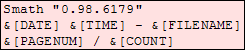
Project name, company logo, page number, etc. Please don't mention the one-lined "&[DATE]&[TIME] &[PAGENUM]/&[TOTAL]" thing. It is not the same thing.
So our beloved Smath has this helpful functionality, thanks to Andrey.
So the problem is, you can directly write into header or footer in Smath. You can even paste company logo, writer regions, text regions.
You can delete these mentioned regions in header/footer areas too. But you can not copy these regions.
You can not copy to another Smath File's header/footer area, even to Smath calculation area.
Simply you can not copy the information in header/footer area to anywhere.
Regards.
WroteI will try to explain ...
Thanks: I know about those things [header/footer]
In Mathcad, I have included a small RGB logo in either one
but so small, that the visitor who demanded just abandoned.
Just a little rainbow was of no interest either !
Does it work w/o copy/paste ?
Wait and see ...
I've found an issue in SMath.
I made more SMath document with 100% Windows Custom DPI. Month ago I changed my monitor and I had to change Windows Custom DPI to 125%. Unfortunatelly I can't now print my old documents, because the right side of the documents located on the nonprintable area yet.
I use Windows7, I tested 100%, 125% and 150%.
This screenshot was created with 125% Windows Custom DPI:
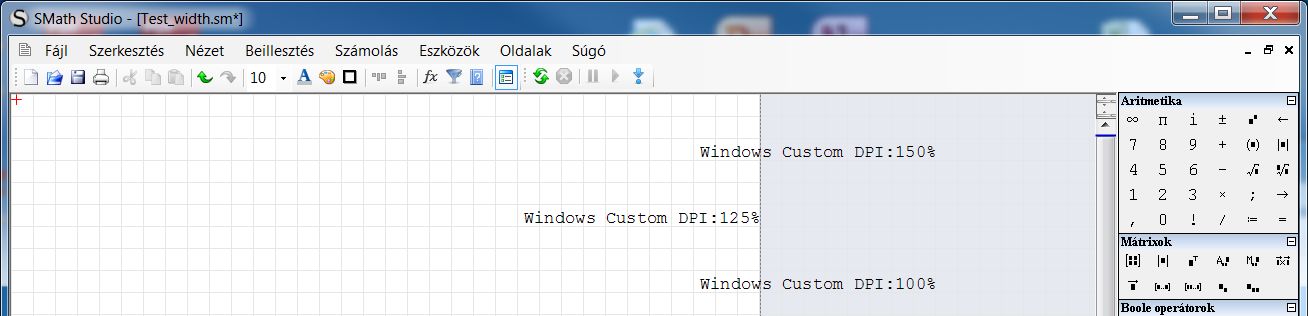
Here is a test document:
Test_width.sm (1.97 KiB) downloaded 1594 time(s).
There is an other small issue too. I have to click two times to Print icon in printer selection page if I would like to print. First time nothing happens.
Best regards
Peter Kaderasz
Yes, I'm already informed about this issue. Working on it right now.
Sorry for inconvenience.
Best regards.
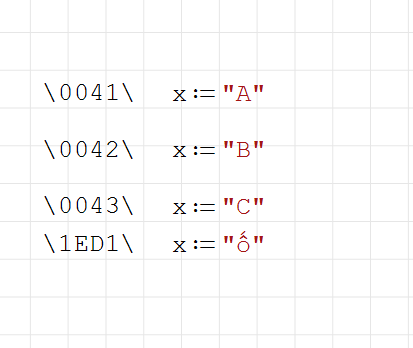
I have a problem with strings in smath worksheet. It turns out that some characters are converted if input string matches some hexadecimal characters..i don't know if this is a feature..but it transforms some of my smath documents specially with strings as FilePaths..please see attached snapshot.
- New Posts
- No New Posts