
Stable: SMath Studio 0.99.7005 (07 March 2019) - Messages

SMath Studio
Tiny, but powerful mathematical program with WYSIWYG editor and complete units of measurements support.
Download
SMathStudioDesktop.0_99_7005.Mono.tar.gz (1.36 MiB) downloaded 2800 time(s).
SMathStudioDesktop.0_99_7005.Setup.msi (2.23 MiB) downloaded 15751 time(s).
- Desktop (Windows):
Framework: .NET Framework 2.0 or higher - Desktop (Linux):
Framework: Mono 2.0 (libmono-winforms-2.0-cil package) or higher
- [ARA] Arabic / العربي
- [BEL] Belarusian / Беларуская
- [BUL] Bulgarian / Български
- [CAT] Catalan / Català
- [CHS] Chinese (Simplified) / 简体中文
- [CHT] Chinese (Traditional) / 簡體中文
- [CPP] Portuguese (Brazil) / Brazil (Português)
- [CZE] Czech / Čeština
- [DAN] Danish / Dansk
- [DUT] Dutch / Nederlands
- [ENG] English / English
- [FAS] Persian / فارسی
- [FIN] Finnish / Suomi
- [FRE] French / Français
- [GER] German / Deutsch
- [GRE] Greek / Ελληνικά
- [HEB] Hebrew / עברית
- [HUN] Hungarian / Magyar
- [IND] Indonesian / Bahasa Indonesia
- [ITA] Italian / Italiano
- [JPN] Japanese / 日本語
- [KOR] Korean / 한국어
- [LAV] Latvian / Latviešu
- [LTH] Lithuanian / Lietuvių
- [NOR] Norwegian / Norsk
- [POL] Polish / Polski
- [POR] Portuguese / Português
- [RON] Romanian / Română
- [RUS] Russian / Русский
- [SCC] Serbian (Latin) / Srpski
- [SCR] Croatian / Hrvatski
- [SLK] Slovak / Slovenčina
- [SPA] Spanish / Español
- [SRP] Serbian (Cyrillic) / Српски
- [SWE] Swedish / Svenska
- [TUR] Turkish / Türkçe
- [UKR] Ukrainian / Українська
SMath Studio tutorial by Bernard Liengme.
 SMathPrimer.pdf (Date: 11.11.2011. File size: 2.06MB) - to open in Adobe Acrobat Reader
Introduction of the use of SMath Studio by Gilberto E. Urroz, Ph.D., P.E.
- SMathStudio.0_85.Article.Eng.pdf (Date: 23.09.2009. File size: 828.96KB) - to open in Adobe Acrobat Reader
- SMathStudio.0_85.IOFiles.Article.Eng.pdf (Date: 27.09.2009. File size: 453.24KB) - to open in Adobe Acrobat Reader
- SMathStudio.0_85.NumericFunctions.Article.Eng.pdf (Date: 18.10.2009. File size: 622.45KB) - to open in Adobe Acrobat Reader
- SMathStudio.0_85.Programming.Article.Eng.pdf (Date: 18.10.2009. File size: 411.74KB) - to open in Adobe Acrobat Reader
SMath Studio icons (
 SMathStudio.Icons.zip (Date: 12.04.2010. Size: 63.74KB)

Thanks again for all your hard work.
Reg curry

Wroteplease turn off the popup trying to install the 7005 version every time I open my 6884 version
Go to: Tools > Plugins... > SMath Studio
then enable the option "Don't check for updates"


There is only Tools>Plugins>Online gallery


WroteI did. However, now I cannot even use the older version with maple or XY plots. This has totally ruined my workflow. Let me know when this is fixed and I will return to Smath.
I generally recommend to not upgrade the installed version until you verified that new versions are functional to the level you need.
To test new versions, use the linux version (yes, it runs under Windows and yes it is significantly smaller), unpack it to some directory and add a file named portable.version to that directory. Then you have a sandbox which is totally independent of the "installed" SMath version.
WroteAlso, there is not Tools>Plugins>SMath Studio
There is only Tools>Plugins>Online gallery
Is the first item in the left panel
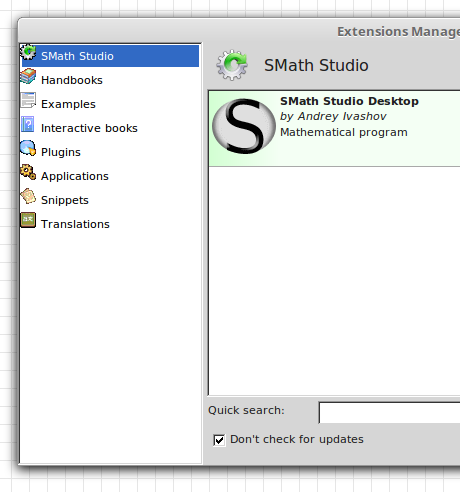
WroteI did. However, now I cannot even use the older version with maple or XY plots.
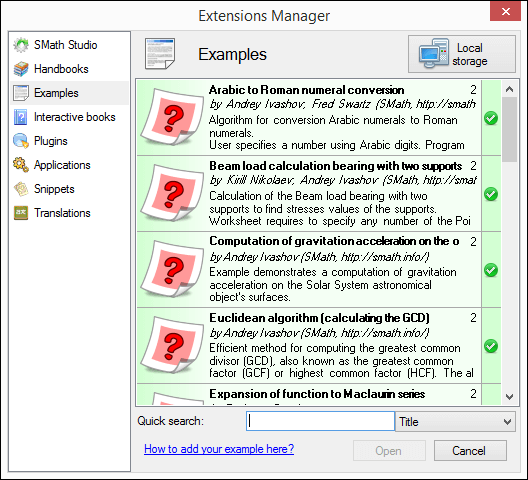
Once you reinstalled the old program version go in the Extensions Manager (Tools > Plugins) and remove the plugins you have previously updated in the newer version (select each plugin that has a red backkground or didn't work as expected, then click on the trash bin), finally switch the top right button from "Local Storage" to "Online Gallery" and reinstall the extensions you need.
Спасибо за вашу работу и за новое обновление SMath Studio.
Я обратил внимание на следующую особенность в новоей стабильной версии Smath 0.9.0075.xxx, когда пользователь удаляет строки в документе с помощью клавиши 'Delete‘.
Так не виден маркер удалемых строк и вообще строка статична. Она не двигается вверх, пока жмешь кнопку 'Delete‘. И только потом после операции удаления нескольких строк весь документ сдвигается вверх. А во сколько строк удаляется в процессе удержания кнопки 'Delete‘ - неизвестно . Если риск удалить и сам фрагмент текста или формулы, если маркер находится над ними и пользователь удерживает кнопку 'Delete‘.
С уважением Андрей
p.s. могу выложить видео, но не знаю как на форуме это видео выложить
Wrote
I generally recommend to not upgrade the installed version until you verified that new versions are functional to the level you need.
To test new versions, use the linux version (yes, it runs under Windows and yes it is significantly smaller), unpack it to some directory and add a file named portable.version to that directory. Then you have a sandbox which is totally independent of the "installed" SMath version.
Martin- Thank you for this!
How do you recommend to handle the different plugin versions? If there is a version update to the plugin, is it safe to assume that the updated plugins are 100% backward compatible?
Thanks
Dennis
WroteWrote
I generally recommend to not upgrade the installed version until you verified that new versions are functional to the level you need.
To test new versions, use the linux version (yes, it runs under Windows and yes it is significantly smaller), unpack it to some directory and add a file named portable.version to that directory. Then you have a sandbox which is totally independent of the "installed" SMath version.
Martin- Thank you for this!
How do you recommend to handle the different plugin versions? If there is a version update to the plugin, is it safe to assume that the updated plugins are 100% backward compatible?
Thanks
Dennis
If you are working with different portable versions, then you have separate directories for each of them. Each version has it's own extensions subdirectory, which you need to fill using the extension manager. Then the extension manager should offer you the plugin versions appropriate for the particular SMath version. Usually this works reliably. Never just copy the extension subdir from some other portable version.
Available via Extension manager or website.
f Ctrl-G now produces the closed phi sign (\phi in LateX). In previous versions it used to produce the open version of the sign (\varphi)
I'd vote for the old version.
i remembered the mention that it was added the 2 'special' greek chars, but I could not figure what it meant until i looked at the symbols panel. if you hover over the symbol, it gives you the shortcut in the new version.
curiously, in 6839, the hotkey work, i do not remember when they got added.
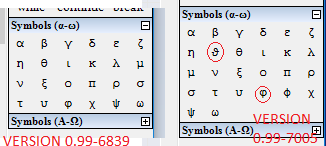
WroteAndrey, did you deliberately change shortcuts for greek letters?
f Ctrl-G now produces the closed phi sign (\phi in LateX). In previous versions it used to produce the open version of the sign (\varphi)
I'd vote for the old version.
Looks like a bug. Will fix it. Thank you!
- New Posts
- No New Posts