
1 Pages (7 items)
Question about CheckBox - Messages

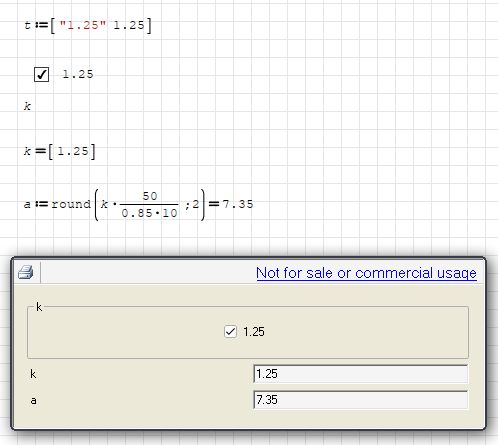
Hello. Important coefficient k=1.25. Sometimes you need to use it, sometimes you don't need to use it.I decided to take CheckBox. Here's what happenedFile not found.
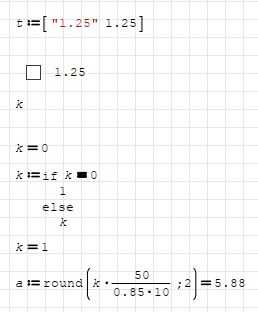
I tried another way. I changed the formula using inactive check (K=0).Result is good with inactive checkFile not found.
But the result bad with active checkFile not found.
Question 1: Why did it happen?
Question 2: When inactive check, k=0.How can do k=1 with inactive check?
I tried another way. I changed the formula using inactive check (K=0).Result is good with inactive checkFile not found.
But the result bad with active checkFile not found.
Question 1: Why did it happen?
Question 2: When inactive check, k=0.How can do k=1 with inactive check?
WroteQuestion 1: Why did it happen?
Question 2: When inactive check, k=0.How can do k=1 with inactive check?
Answer 1: It is a long lasted bug/limitation.
SMath Viewer doesn't respect your decimal places in Smath Studio.
I had reported it 6 years ago, maybe it can't be fixable as it is.
https://en.smath.com/forum/yaf_postsm35182_SMath-Studio-0-98-6077--21-August-2016.aspx#post35182
However, you can round your results as you wish.
Answer 2: What I understood from your desire is;
If checkbox is active, then result should be matrix value.
If checkbox is inactive, then result should be 1.
You can do that with an if/else statement.
questions.sm (4.41 KiB) downloaded 1067 time(s).
Regards
1 users liked this post
Davide Carpi 2022/7/17 07:10:00
WroteWroteQuestion 1: Why did it happen?
Question 2: When inactive check, k=0.How can do k=1 with inactive check?
Answer 1: It is a long lasted bug/limitation.
SMath Viewer doesn't respect your decimal places in Smath Studio.
I had reported it 6 years ago, maybe it can't be fixable as it is.
https://en.smath.com/forum/yaf_postsm35182_SMath-Studio-0-98-6077--21-August-2016.aspx#post35182
However, you can round your results as you wish.
Answer 2: What I understood from your desire is;
If checkbox is active, then result should be matrix value.
If checkbox is inactive, then result should be 1.
You can do that with an if/else statement.
questions.sm (4.41 KiB) downloaded 1067 time(s).
Regards
Great! Thank you very much!!
WroteWroteQuestion 1: Why did it happen?
Question 2: When inactive check, k=0.How can do k=1 with inactive check?
Answer 1: It is a long lasted bug/limitation.
Answer 2: What I understood from your desire is;
If checkbox is active, then result should be matrix value.
If checkbox is inactive, then result should be 1.
You can do that with an if/else statement.
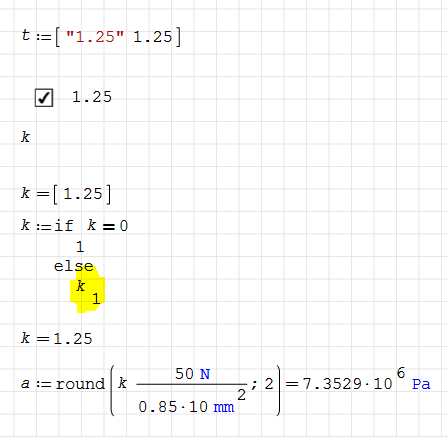
When adding units, the result has changed. When checkbox is inactive, everything is fine. When checkbox is active, units disappear.
File not found.File not found.
1. your example
2. Davide Carpi tutorial 8 years ago.
Cheers ... Jean.
Maths checkbox.sm (22.86 KiB) downloaded 1087 time(s).
Maths checkbox DAVIDE.sm (18.66 KiB) downloaded 1111 time(s).
2. Davide Carpi tutorial 8 years ago.
Cheers ... Jean.
Maths checkbox.sm (22.86 KiB) downloaded 1087 time(s).
Maths checkbox DAVIDE.sm (18.66 KiB) downloaded 1111 time(s).
WroteWhen adding units, the result has changed. When checkbox is inactive, everything is fine. When checkbox is active, units disappear.
If you have noticed, when checkbox is selected k is in vector and look like k=[1.25]
Alter the if/else statement as below.
Regards
1 Pages (7 items)
- New Posts
- No New Posts