
1 страниц (1 вхождений)
Portable documents with variable names like a,b and scoping line behaviour - Сообщения

Hello,
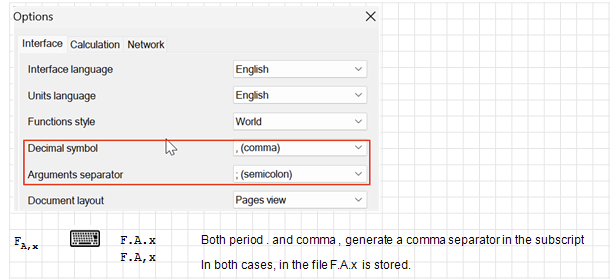
The following applies to version 9678. While transferring the examples of my book on Engineering Mechanics with SMath Studio from German settings (decimal separator comma, argument separator semicolon) to US settings (decimal separator period, argument separator comma), I experience a nasty problem.
With German settings, it was easy to input variable names with comma separated subscripts like
When I open this document with US settings, I get what is stored in the file:
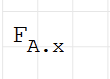
Some people might understand the period in the subscript as multiplication symbol. So there is a good reason to insist on keeping the comma in the subscript. A safe way to do so is using Ctrl K for switching to special character mode.

Here, F.A\002C\x is stored.
For now, this will break the Maxima-Plugin (the same applies to the new text superscripts.
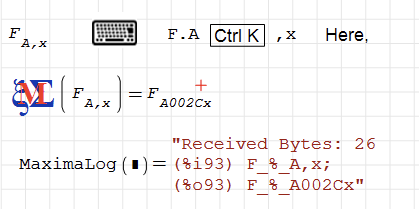
I tend to accept the periods in the text subscripts, because don't have the time to fix the Maxima plugin in parallel to finalizing the book.
Currently, in the period/comma setting, typing a comma while editing a name is actually ignored. I'd recommend to treat period and comma the same way as in the comma/semicolon setting.
- periods or commas which are recognized as name part separators can internally be converted to a period.
- periods or commas within a name part should be kept as they were typed.
BTW, the introduction of the superscript seems to have inforced a change in the horizontal scoping line of the curser. This results in inconsistent behaviour between scoping line and selection. Any complex name with super- and subscripts can only be selected as a whole. It is not possible to select part of it. Yet the scoping line is limited to the base name, the subscript or the superscript, extending it to the full name (as one usually would try to) is not possible.
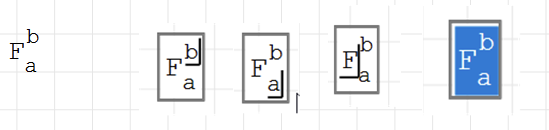
I admit that now it is easier to tell whether the insert point is at base name level or at subscript level. In previous versions, you had to find out by typing.
The following applies to version 9678. While transferring the examples of my book on Engineering Mechanics with SMath Studio from German settings (decimal separator comma, argument separator semicolon) to US settings (decimal separator period, argument separator comma), I experience a nasty problem.
With German settings, it was easy to input variable names with comma separated subscripts like
When I open this document with US settings, I get what is stored in the file:
Some people might understand the period in the subscript as multiplication symbol. So there is a good reason to insist on keeping the comma in the subscript. A safe way to do so is using Ctrl K for switching to special character mode.
Here, F.A\002C\x is stored.
For now, this will break the Maxima-Plugin (the same applies to the new text superscripts.
I tend to accept the periods in the text subscripts, because don't have the time to fix the Maxima plugin in parallel to finalizing the book.
Currently, in the period/comma setting, typing a comma while editing a name is actually ignored. I'd recommend to treat period and comma the same way as in the comma/semicolon setting.
- periods or commas which are recognized as name part separators can internally be converted to a period.
- periods or commas within a name part should be kept as they were typed.
BTW, the introduction of the superscript seems to have inforced a change in the horizontal scoping line of the curser. This results in inconsistent behaviour between scoping line and selection. Any complex name with super- and subscripts can only be selected as a whole. It is not possible to select part of it. Yet the scoping line is limited to the base name, the subscript or the superscript, extending it to the full name (as one usually would try to) is not possible.
I admit that now it is easier to tell whether the insert point is at base name level or at subscript level. In previous versions, you had to find out by typing.
Отредактировано 11.08.2026 11:37:52
Technische Mechanik mit SMath Studio: https://link.springer.com/book/10.1007/978-3-658-50592-9
1 страниц (1 вхождений)
- Новые сообщения
- Нет новых сообщений