
solve does not work with two equations - Messaggi

something is going wrong, but what?
I tried to solve two equations (x+y = 15 and x-y = 5), but the solver means "Assign variable" ???
If I do the same with just one exuation, it works?
(I'm new with Smath and just want to evaluate If we should use SMath or Mathcad Prime instead of Matcad 15 in future)
kind regards
Thomas
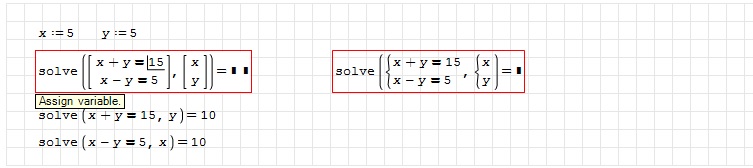
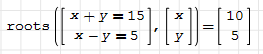
Wroteroots() is the appropriate command to solve this system
Thanks very much!

But why?
Solve will work in finding multiple roots for one function, roots will find the "roots" of a non-linear system.
Developers may explain in depth why different commands for differents purpose have been implemented.
By the way, since you are approaching now SMath you may find useful to read a couple of "handbooks" prepared by some PRO users
 .
Some are available through the extension manager (Tools->Snippet Manager).
Among the ones available, I remember I read the two that I am highlighting in the image.
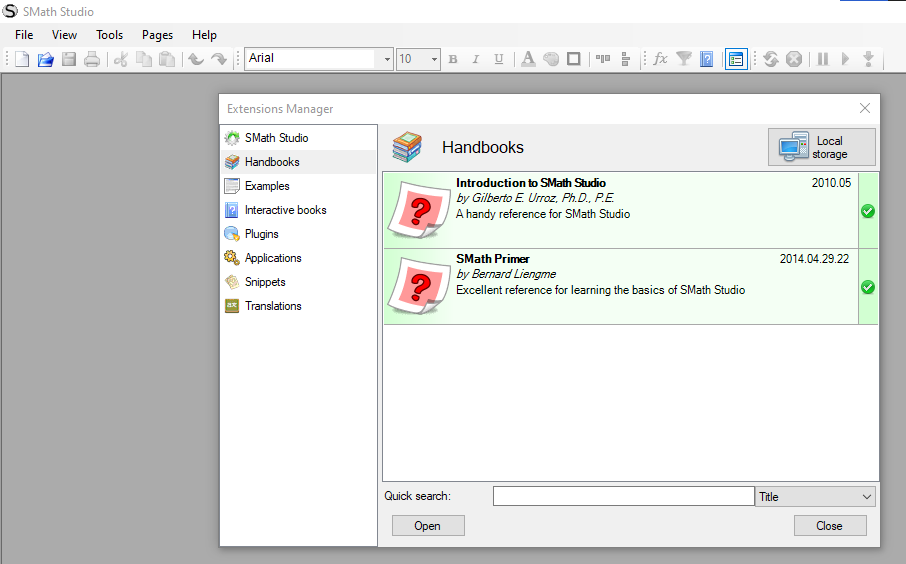
If you want to download this two (or even any other handbook), select "online gallery" instead of "local storage", and you will see the complete list.
WroteDifferent commands with different purpose, I guess.
Solve will work in finding multiple roots for one function, roots will find the "roots" of a non-linear system.
Developers may explain in depth why different commands for differents purpose have been implemented.
By the way, since you are approaching now SMath you may find useful to read a couple of "handbooks" prepared by some PRO users
Some are available through the extension manager (Tools->Snippet Manager).
Among the ones available, I remember I read the two that I am highlighting in the image.
If you want to download this two (or even any other handbook), select "online gallery" instead of "local storage", and you will see the complete list.
Thanks again
Okay, I was looking for more than a hour why it does not work and i found lots of examples with "Solve" (not the same as "solve"?)...
I will have a look on it!
solve() is the built-in solver.
Solve() (big S :^P) will only become available in your system in case you decide to install Maxima plugin.
I am not using Maxima plugin and so I cannot give you further details about differences between Solve() and solve()
Bye
ps: be sure to add also interactive guide by mkraska in you SMath (again, you will find it in the relevant extension manager section)

It is super-useful to find quick interactive (and wisely "read only".. ) references for a lot of commands.
My understanding is that native SMath Studio is optimized to solve stuff numerically, like a spreadsheet. If you want to be more abstract, then you need to use appropriate plugins. For example you can solve only defined integrals with native SS, where with Maxima Plugin you extend SS to handle also indefinite integral
solve_vs_maxima.sm (12,75 KiB) scaricato 1266 volta(e).
WroteMy understanding is that native SMath Studio is optimized to solve stuff numerically, like a spreadsheet. If you want to be more abstract, then you need to use appropriate plugins. For example you can solve only defined integrals with native SS, where with Maxima Plugin you extend SS to handle also indefinite integral
Visit Samples Symbolic COMPENDIUM...Download them all.
We Linux users can use native maxima in terminal but we can't use Maxima plugin with SMath.
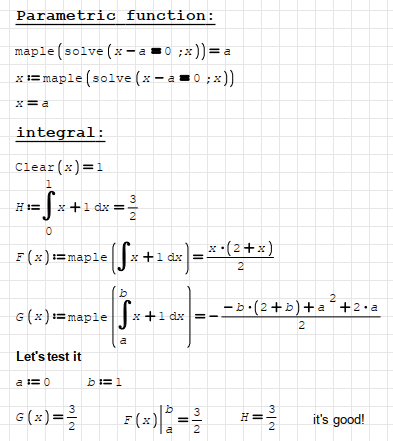
This conclude with our only option, maple plugin. And it can answer all questions in your file.
Regards
Wrote(I'm new with Smath and just want to evaluate If we should use SMath or Mathcad Prime instead of Matcad 15 in future)
kind regards
Thomas
Smath is not a clone of Mathcad 11.
There are no known unsolved demand in Smath.

- Nuovi post
- Nessun nuovo post