
1 pagine (5 elementi)
how to use importData() - Messaggi

Hi,
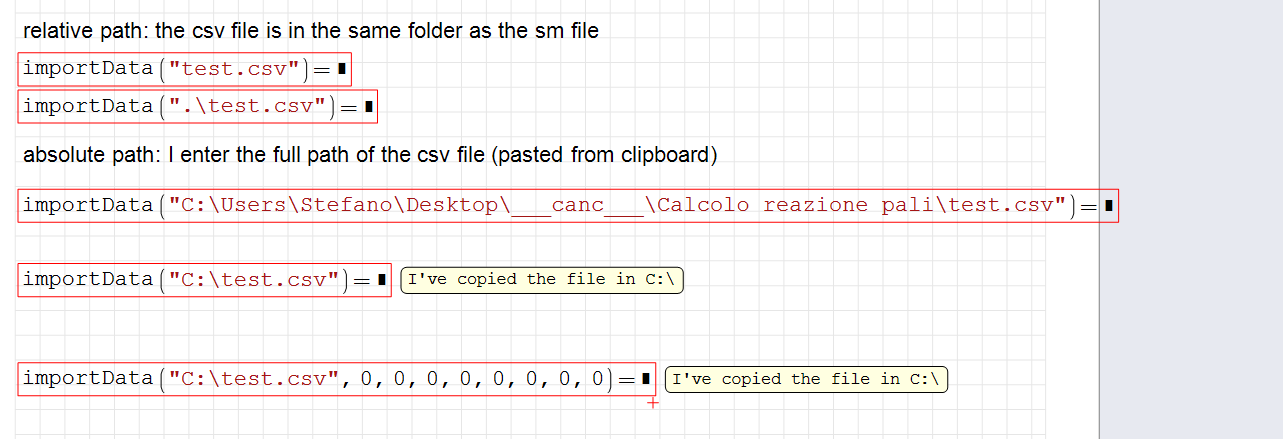
I have some trouble understanding how to use importData() function.
I get these type of errors:
I am at loss, I don't understand what is not working
on win10
smath studio version 0.99 vuild 7921
I have some trouble understanding how to use importData() function.
I get these type of errors:
- "file does not exist" if I try a relative path
- "input string is not in a correct format" if I try a absolute path
I am at loss, I don't understand what is not working
on win10
smath studio version 0.99 vuild 7921
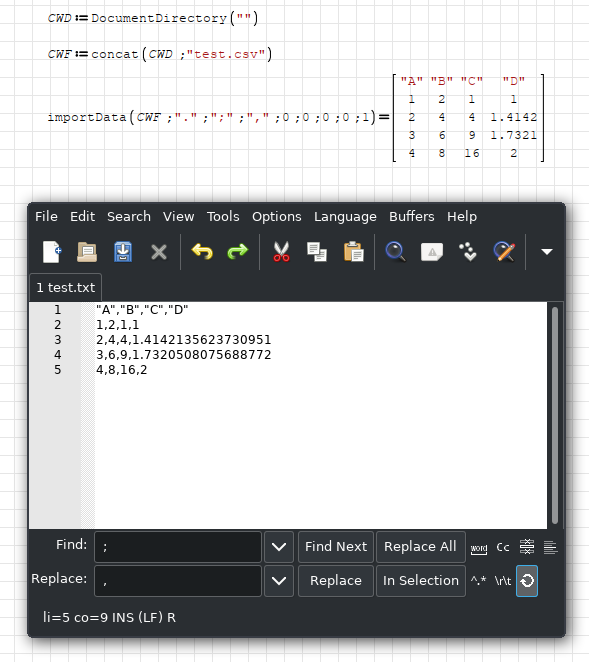
DocumentDirectory() can be used for getting path of file.
If there are texts in your document, they need to be in quotes.
And arguments are depending on how they are written on file.
If you could provide your csv file, it would be more helpful to find correct ones.
Regards
If there are texts in your document, they need to be in quotes.
And arguments are depending on how they are written on file.
If you could provide your csv file, it would be more helpful to find correct ones.
Regards
Ah I almost got it!
Some notes:
In the end the culprit was not the file path, which was ok, but the content of csv itself: the string where not enclosed in double quotes and there where also some whitespaces. The error message I got was unclear because it spoked about the "input string" being in the wrong format and I mistakenly thought it referred to the file's path passed to the function.
After properly formatting the csv file, I was able to correctly import in my sheet.
Thanks you
Edit: damn emoji
Some notes:
- I was confused by the function "DocumentDirectory()" since it is part of the Mathcad Toolbox plugin, which I didn't have in my installation (thanks to Razonar for the sm file)
- I still don't understand what is "Arguments Separator ("3: delimiter" )" meant for since the columns separator is defined in the 4th parameter; could functions being imported from the csv? (e.g. "...,foo(x;y),..." )
In the end the culprit was not the file path, which was ok, but the content of csv itself: the string where not enclosed in double quotes and there where also some whitespaces. The error message I got was unclear because it spoked about the "input string" being in the wrong format and I mistakenly thought it referred to the file's path passed to the function.
After properly formatting the csv file, I was able to correctly import in my sheet.
Thanks you
Edit: damn emoji
WroteAh I almost got it!
Some notes: ...
I still don't understand what is "Arguments Separator ("3: delimiter" )" meant for since the columns separator is defined in the 4th parameter; could functions being imported from the csv? (e.g. "...,foo(x;y),..." )
From the "Interactive SMath Handbook" (In the SMath menu: Tools / Plugins / Interactive books):
(string or 0) argument separator character in the file, relevant for symbolic expressions. 0: use default setting
This is the 'argument separator', which could be set at Tools / Options as period, colon or semicolon.
In other words: useful if you want to import / export symbolic expressions with two or more arguments, like atan(y,x) or atan(y;x)
Best regards.
Alvaro.
1 pagine (5 elementi)
- Nuovi post
- Nessun nuovo post