
1 pagine (9 elementi)
Maxima plug-in - systems of linear equations - Messaggi

Hi,
I often have to solve systems of linear equations (usually equilibrium equations in statics) numerically or symbolically. So I have downloaded the Maxima plug-in from this thread: https://en.smath.com/forum/yaf_postst2078_Maxima-Plugin.aspx
It's installed and configured but I can't get Solve and LinSolve working.
I tested various ways of entering the equations but none of them works. Here's what I tried, among the others:

I'm not sure what's the correct syntax. I attached the sm file to this post. Or maybe the plug-in doesn't work properly on my machine, even though the installation and configuration were succesfull.
Also, I can't find the reference book/manual for this plug-in anywhere.
Thanks in advance for your help.
Maxima plugin equations.sm (5,46 KiB) scaricato 1354 volta(e).
I often have to solve systems of linear equations (usually equilibrium equations in statics) numerically or symbolically. So I have downloaded the Maxima plug-in from this thread: https://en.smath.com/forum/yaf_postst2078_Maxima-Plugin.aspx
It's installed and configured but I can't get Solve and LinSolve working.
I tested various ways of entering the equations but none of them works. Here's what I tried, among the others:
I'm not sure what's the correct syntax. I attached the sm file to this post. Or maybe the plug-in doesn't work properly on my machine, even though the installation and configuration were succesfull.
Also, I can't find the reference book/manual for this plug-in anywhere.
Thanks in advance for your help.
Maxima plugin equations.sm (5,46 KiB) scaricato 1354 volta(e).
Thank you both for replies but I wonder what's the problem with my syntax. Why doesn't it work and how should I formulate the LinSolve or Solve function to solve such equations ? Or maybe that's the problem with Maxima plug-in ?

for simple parametric equations, you can use the integrated
solver without problem (solve with lowercase "s" )
and for Maxima Solve (with a capital "S" ) you must use the right button of
the mouse and select optimize symbolically, that is the only detail you are
missing to obtain the answer you are looking for.

If you want to obtain results, the 2 expressions in the image above must be
evaluated with symbolic optimization.
Solve gives you a result, but does not define "x"
that's why you get the error x undefined
you can use Assign so that "x" is now defined

1 utenti hanno apprezzato questo post
EngMath 30/05/2021 09:01:00
Thank you very much, it works great now:

By the way, do you know how to convert these fractions to decimals ? I tried doing this from the menu available when clicking with right mouse button but it doesn't change anything.
By the way, do you know how to convert these fractions to decimals ? I tried doing this from the menu available when clicking with right mouse button but it doesn't change anything.
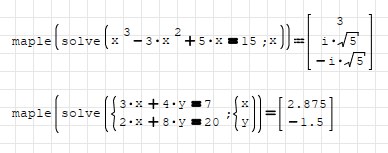
Maple plugin can also solve equations.
And it doesn't require any additional software.
Just simple one click installation from plugins.
Though it will not write x=*** or y=***.
Regards
And it doesn't require any additional software.
Just simple one click installation from plugins.
Though it will not write x=*** or y=***.
Regards
fractions to decimal :

with numeric optime, but remember you firsth must declare x & y
with Assign command.
with numeric optime, but remember you firsth must declare x & y
with Assign command.
1 pagine (9 elementi)
- Nuovi post
- Nessun nuovo post