
1 pagine (7 elementi)
Problem with scientific notation and unit - Messaggi

Hi,
I would like to use the following input:
E=2,1*10^5 MPa
but after entering the value, I can't define unit (apostrophe button has no effect). So I tried using = sign. After it I can enter unit but here's what I get:

How to use scientific notation with units properly ?
I would like to use the following input:
E=2,1*10^5 MPa
but after entering the value, I can't define unit (apostrophe button has no effect). So I tried using = sign. After it I can enter unit but here's what I get:
How to use scientific notation with units properly ?

Just type 'MPa or add another multiplication and 'MPa after 10^4
If you like my plugins please consider to support the program buying a license; for personal contributions to me: paypal.me/dcprojects
confirm

WroteHow to use scientific notation with units properly ?
Like this ... hover cursor as shown to see otherwise SI units.
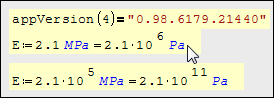
Thanks, it seems that I can specify unit using apostrophe button only when the whole 10^5 term is highlighted:

Otherwise, this button doesn't work.
Otherwise, this button doesn't work.
WroteThanks, it seems that I can specify unit using apostrophe button only when the whole 10^5 term is highlighted:
Correct, only as shown.
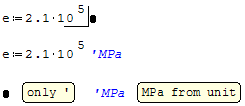
WroteThanks, it seems that I can specify unit using apostrophe button only when the whole 10^5 term is highlighted:
Otherwise, this button doesn't work.
Just watch the video, these are easier ways to entering unit.
You can also use Insert > Unit from the menu bar, not shown in here.
Enter your number, when you are at writing definition either directly write mpa or press * for multiplication symbol then write mpa.
1- Double click to the Mpa placeholder.
or;
2- Press tab button on your keyboard when it is in the corect unit (mpa for this example)
If you had correctly done it, unit will shown as blue colored without any character before or after.
This is the easy, proper and correct way to enter unit with keyboard and mouse.
Regards

1 utenti hanno apprezzato questo post
Павел 24/07/2025 19:49:02
1 pagine (7 elementi)
- Nuovi post
- Nessun nuovo post