
1 pagine (7 elementi)
Solve function problem (simple example) - Messaggi

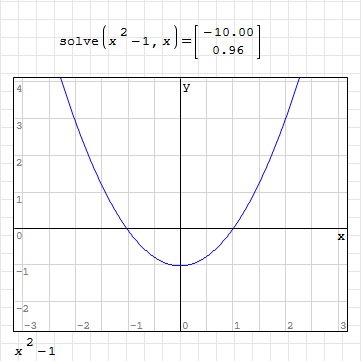
Hello, please tell me what is wrong with this function?
Solve problem.sm (2,86 KiB) scaricato 1340 volta(e).
Solve problem.sm (2,86 KiB) scaricato 1340 volta(e).

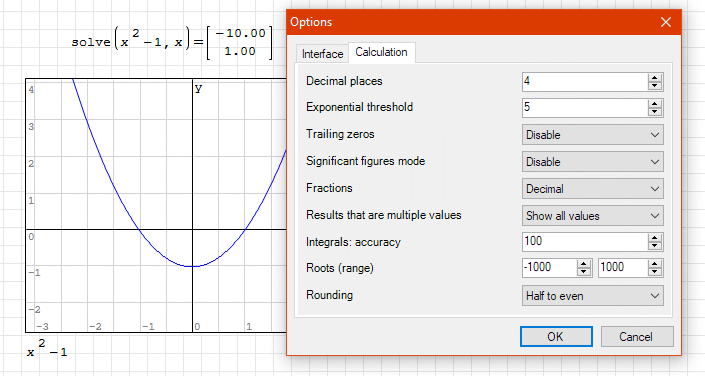
The solution method is numeric and depends on the search limits of the roots. By appropriately setting the limits to the nearest values (Tools->Options->Calculation->Roots (range)-10 + 10), you get the correct result. Downstream of a numerical solution, it is always necessary to proceed to the direct verification of the result (sanity check).
sergio
sergio
Full reinstallation (including deletion of plugins) repaired this problem. But what was exact source?.. I don't know.
Edit:
I was writing post when You answered my problem... Change of the range of roots - this is the correct answer.
But now, there is a question: how to use this range? (cuz I remember that I had to increase it becouse there were no roots in my previous calculations and now I need to decrease it).
How to handle with it if it is defined globally for spreadsheet and not for exact calculation?
Edit:
I was writing post when You answered my problem... Change of the range of roots - this is the correct answer.
But now, there is a question: how to use this range? (cuz I remember that I had to increase it becouse there were no roots in my previous calculations and now I need to decrease it).
How to handle with it if it is defined globally for spreadsheet and not for exact calculation?

WroteHow to handle with it if it is defined globally for spreadsheet and not for exact calculation?
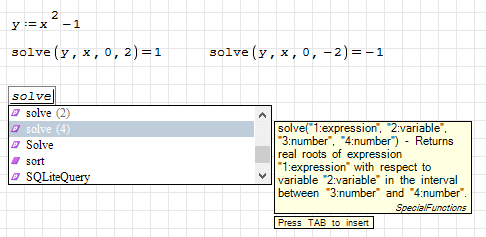
Use solve(4) instead of solve(2). The one with 2 arguments it's handly for calculations on the fly, but not reliable for structured calculations.
If you like my plugins please consider to support the program buying a license; for personal contributions to me: paypal.me/dcprojects
WroteFull reinstallation (including deletion of plugins) repaired this problem. But what was exact source?.. I don't know.
If you put some big range, you get wrong answers, like in this picture
Wrote
But now, there is a question: how to use this range? (cuz I remember that I had to increase it becouse there were no roots in my previous calculations and now I need to decrease it).
How to handle with it if it is defined globally for spreadsheet and not for exact calculation?
You can't. Solve with default range for search "all" the roots it's just a helper for some easy calculations. If it give the correct answer, good, but if not, there are not to much to do.
For that you must to use the solve with 4 arguments (or other numerical solver), and get the roots one by one.
Best regards.
Alvaro.
Thank you for your answers! It helped me a lot.
Mroczak
Mroczak
WroteThank you for your answers! It helped me a lot.
That will help you more.
Solve roots.sm (25,34 KiB) scaricato 1310 volta(e).
1 pagine (7 elementi)
- Nuovi post
- Nessun nuovo post