MathRegion Critical Error on DEL key action

MathRegion Critical Error on DEL key action - Messaggi

#1 Pubblicato: 13/01/2022 14:39:53
Igor Skarine

Igor Skarine

14 apprezzamenti in 97 post.

Gruppo: User

Eventually I have caught a bug that bothered me in a few latest versions of Smath.

critical_bug.sm (3,85 KiB) scaricato 1697 volta(e).


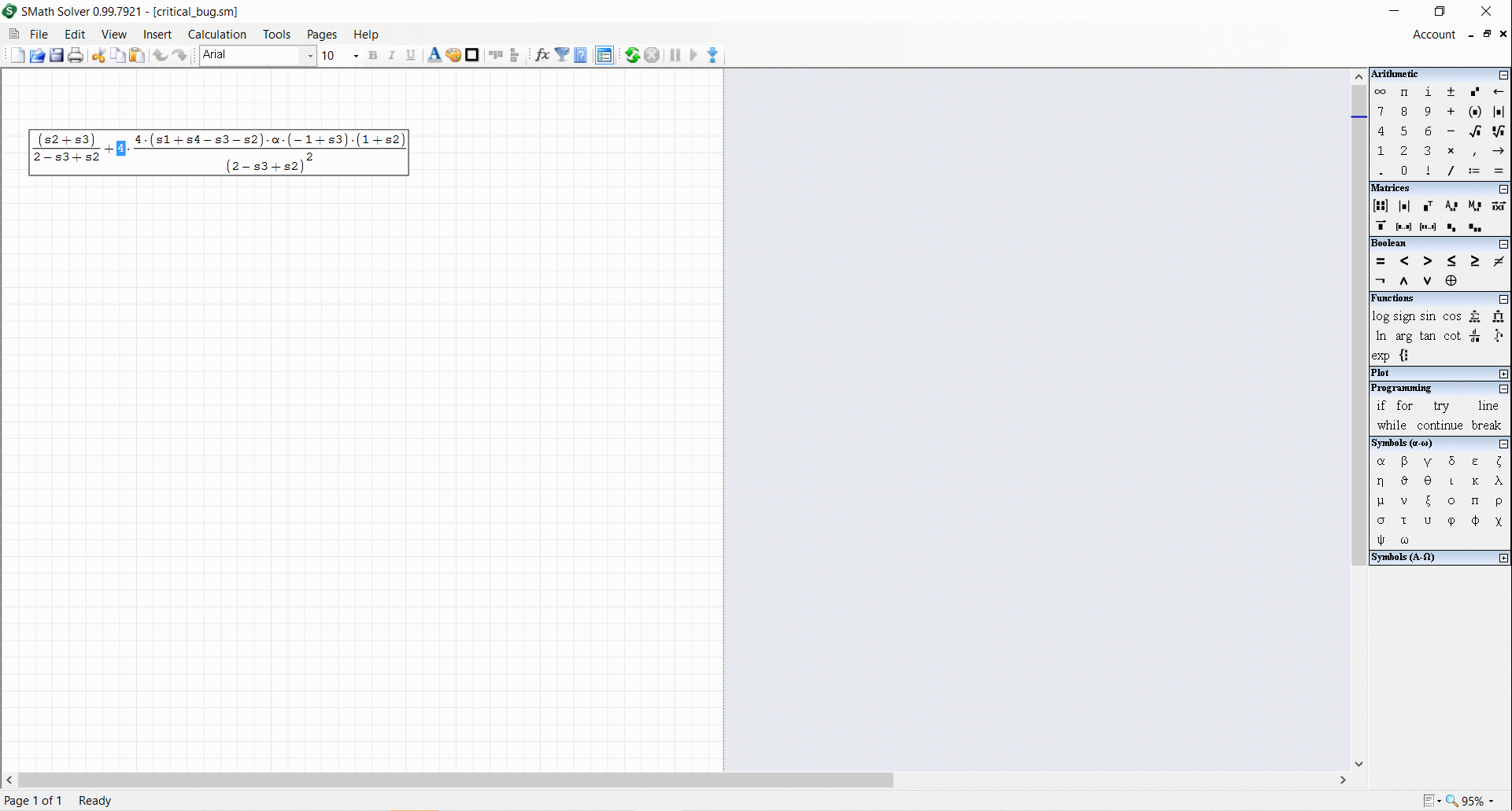
Try to delete the first number "4" in front of the ratio.

Step 1: Select it with the cursor.

Mostra spoiler


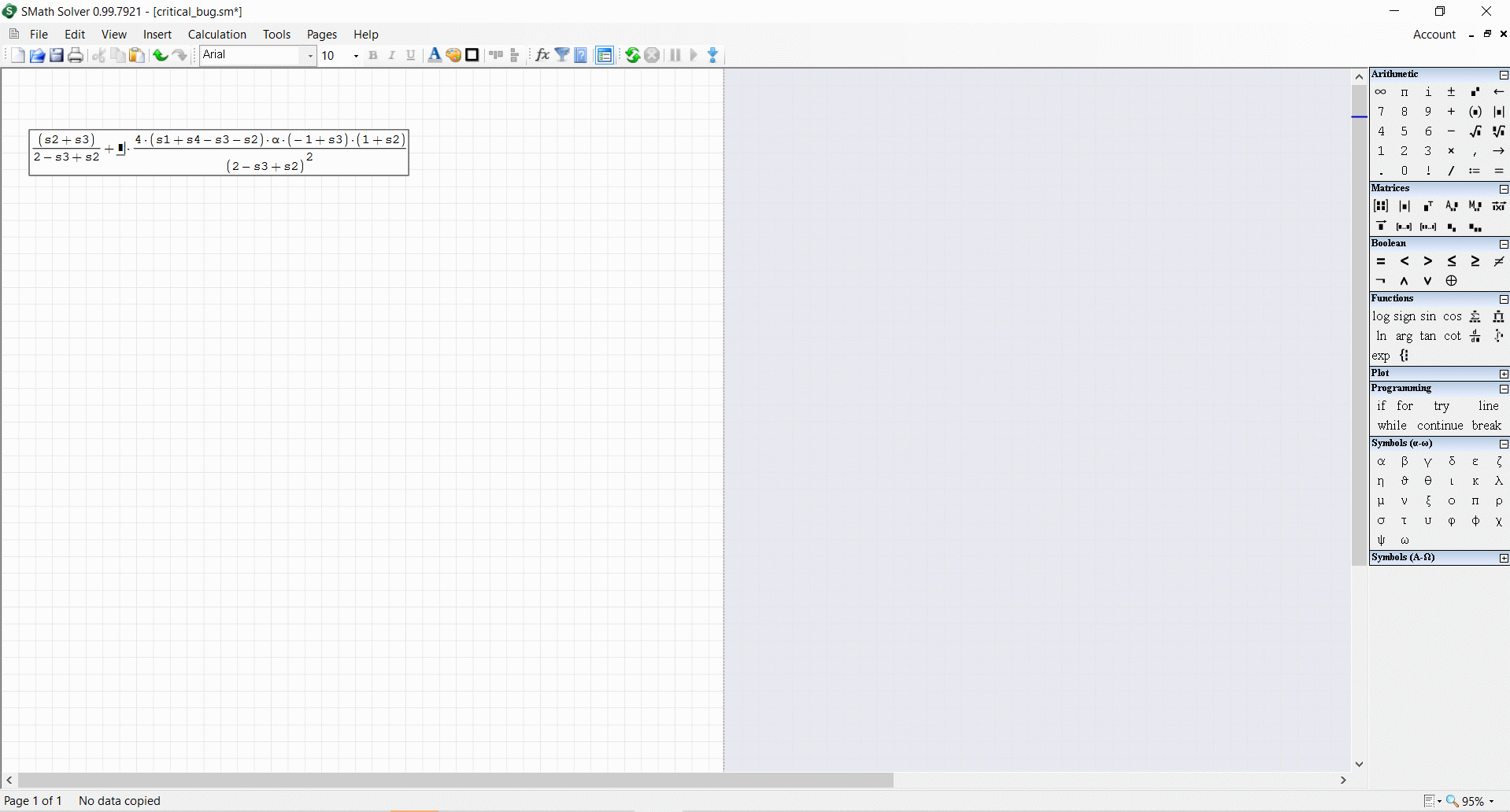
Step 2: Press "Del", the "4" turns into a black square.
Mostra spoiler


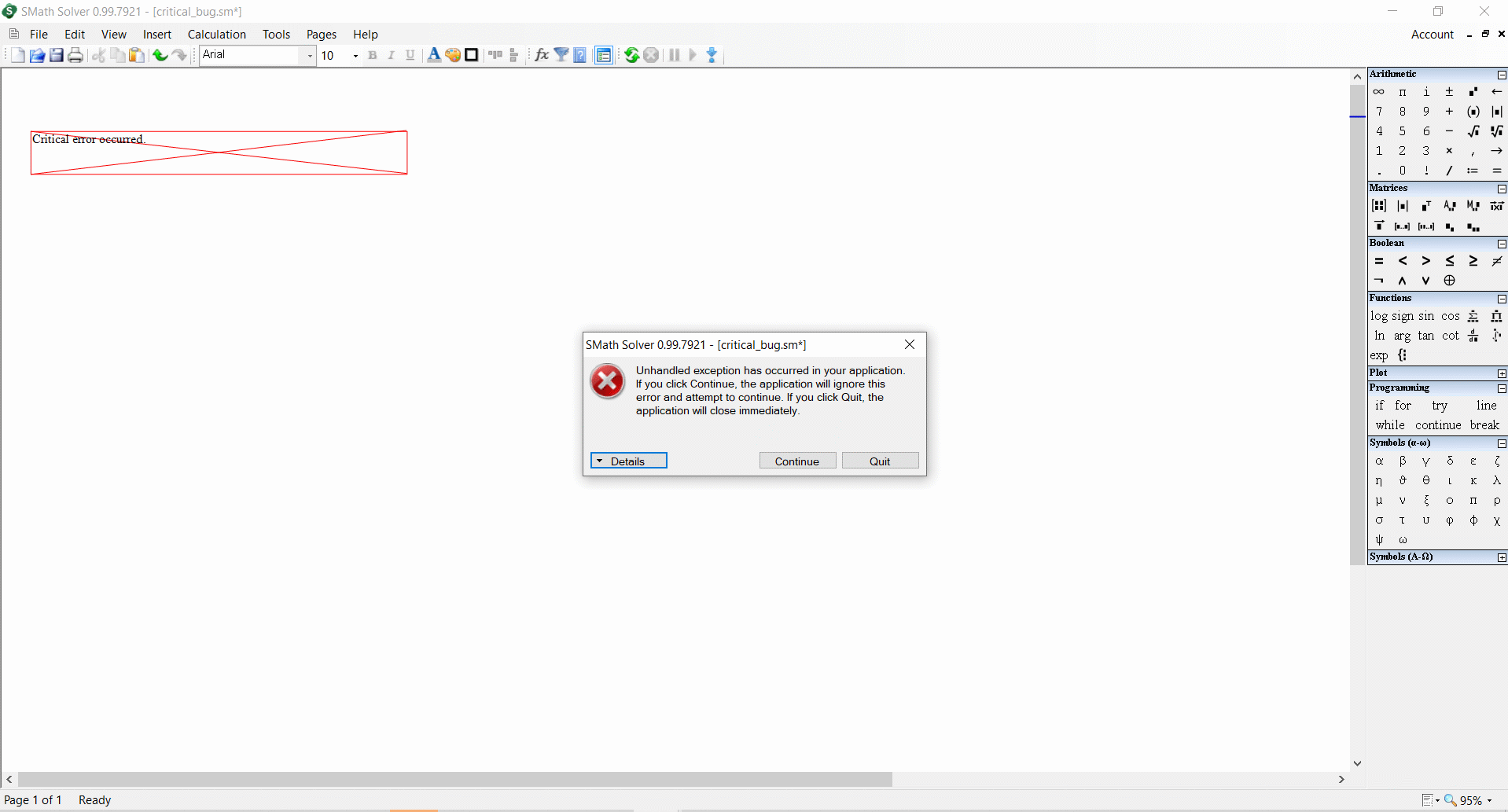
Step 3: Press "Del" once again. SM pops on "Critical error".
Mostra spoiler

1 utenti hanno apprezzato questo post
Davide Carpi 14/01/2022 04:08:00
#2 Pubblicato: 13/01/2022 18:06:39
Igor Skarine

Igor Skarine

14 apprezzamenti in 97 post.

Gruppo: User

Jean,
It can't be doctored, it is not a calculation issue.
Smath Studio crashes at the moment you push "DEL" key to delete this number "4" or whatever else there.
#3 Pubblicato: 13/01/2022 19:31:57
churichuro

churichuro

29 apprezzamenti in 79 post.

Gruppo: User

I confirm the error
#4 Pubblicato: 13/01/2022 22:05:45
Вячеслав Мезенцев

Вячеслав Мезенцев

1.558 apprezzamenti in 1.868 post.

Gruppo: Moderator

Confirmed. I also came across it, but I didn't investigate it. SMath Studio 0.99.7921.69.
Russia ☭ forever, Viacheslav N. Mezentsev
#5 Pubblicato: 14/01/2022 01:54:58
overlord

overlord

600 apprezzamenti in 1.381 post.

Gruppo: Moderator

confirmed under linux.
same behavior.
#6 Pubblicato: 14/01/2022 05:59:07
Davide Carpi

Davide Carpi

1.443 apprezzamenti in 2.936 post.

Gruppo: Moderator

Thank you, confirmed

System.IndexOutOfRangeException: Index out of matrix bounds.
   in SMath.Controls.MathPainter.PrepareForPaint(MathRegion region, PaintContext ctx, Term[] input, MathAnswer answer, Term[] units, Boolean inputDataVisibility, Int32 currentTermIdx, FontInfo font, Boolean focused, Single& middleLine, Single& baseLine)
   in SMath.Controls.MathRegion.(IGraphics , PaintEventOptions )
   in SMath.Controls.MathRegion.OnCommandSend(String value)
   in SMath.Controls.WorksheetEditor.(RegionBase , String )
   in SMath.Controls.WorksheetEditor.InsertManager(String value)
   in SMath.Controls.Worksheet.Insert(String value)
   in SMath.Controls.WorksheetEditor.KeyDown(KeyEventOptions e)
   in SMath.UI.Accessories.DesktopWorksheet.OnKeyDown(KeyEventArgs e)
   in System.Windows.Forms.Control.ProcessKeyEventArgs(Message& m)
   in System.Windows.Forms.Control.WmKeyChar(Message& m)
   in System.Windows.Forms.Control.WndProc(Message& m)
   in System.Windows.Forms.NativeWindow.Callback(IntPtr hWnd, Int32 msg, IntPtr wparam, IntPtr lparam)
If you like my plugins please consider to support the program buying a license; for personal contributions to me: paypal.me/dcprojects
#7 Pubblicato: 14/01/2022 10:59:14
overlord

overlord

600 apprezzamenti in 1.381 post.

Gruppo: Moderator

Wrote

Wrote

Eventually I have caught a bug that bothered me in a few latest versions of Smath.


... end of it !


It didn't surprise me that Jean couldn't understand what the bug is.
1 utenti hanno apprezzato questo post
Alvaro 14/01/2022 12:39:00
#8 Pubblicato: 14/01/2022 11:32:56
Вячеслав Мезенцев

Вячеслав Мезенцев

1.558 apprezzamenti in 1.868 post.

Gruppo: Moderator

Jean, what you're trying to do here is destructive. You prevent users from helping developers improve the program, that is, you bring harm. You don't have to do that. This is not good.
Russia ☭ forever, Viacheslav N. Mezentsev
6 utenti hanno apprezzato questo post
Oscar Campo 17/05/2022 12:41:00, churichuro 14/01/2022 14:38:00, sergio 14/01/2022 15:05:00, overlord 14/01/2022 11:57:00, Alvaro 14/01/2022 12:39:00, fedeghi 14/01/2022 16:43:00
#9 Pubblicato: 14/01/2022 14:17:41
Вячеслав Мезенцев

Вячеслав Мезенцев

1.558 apprezzamenti in 1.868 post.

Gruppo: Moderator

Jean, in the exUSSR there was such a norm as forced rest. People who worked hard were forced to rest in a sanatorium. And their leaders, who allowed this, were punished. I think you need to go to a sanatorium and temporarily stop working here. I don't want to be punished and I can give you a rest.
Russia ☭ forever, Viacheslav N. Mezentsev
4 utenti hanno apprezzato questo post
NDTM Amarasekera 14/01/2022 22:41:00, fedeghi 14/01/2022 16:43:00, overlord 14/01/2022 14:23:00, Alvaro 14/01/2022 15:55:00
#10 Pubblicato: 14/01/2022 16:04:25
overlord

overlord

600 apprezzamenti in 1.381 post.

Gruppo: Moderator

Wrote

Basically up to SS 6179, Smath is an equation editor
working similar to Mathcad 11 and earlier, including program.
AFAIK, an option for script style [typical Kalkulator ...]
will manage the critical error demo bug.
Is it possible to combine both: part script style & equation editor ?
As well as accommodate both styles in program ?
Cheers ... Jean.


And yet another useless not related post again.
Unbelievable. Wow, just wow.
Such ignorance, such obstinate, such thick head...
I am out of speech right now.
3 utenti hanno apprezzato questo post
fedeghi 14/01/2022 16:45:00, NDTM Amarasekera 14/01/2022 22:42:00, Oscar Campo 17/05/2022 12:40:00
#11 Pubblicato: 16/05/2022 12:06:43
Igor Skarine

Igor Skarine

14 apprezzamenti in 97 post.

Gruppo: User

Unfortunately,
The "Critical Error on Del key action" was not fixed yet in the latest stable version.
Try to delete "g" by using DEL key.
oldbug.sm (2,25 KiB) scaricato 1685 volta(e).
#12 Pubblicato: 17/05/2022 20:38:34
Andrey Ivashov

Andrey Ivashov

2.343 apprezzamenti in 4.056 post.

Gruppo: Super Administrator

Ok, will check asap.
1 utenti hanno apprezzato questo post
Davide Carpi 18/05/2022 04:42:00
#13 Pubblicato: 16/06/2022 20:29:35
⚜ Kenny Lemens, P.E. ᵂᴵ

⚜ Kenny Lemens, P.E. ᵂᴵ

85 apprezzamenti in 181 post.

Gruppo: User

Greetings!

I can also confirm the existence of this issue ( "v0.99.7921.69" ). Upon investigation, I have (2) items:

  1) The program does not actually 'crash', the program is still running. Thus: you can recover from this bug without losing all your work!
      a) To recover from this error:
            1) On the "⨂ Unhandled exception has occurred ... Index was outside the bounds of the array" popup error message, Click on the button: 「Continue」
            2) 'UNDO' your last action, either via the menu bar: 「Edit」 -> 「↻ Undo」 or via keypress 「Ctrl」 + 「Z」
            3) Repeat steps #1 and #2 until you achieve a successful 'undo'.

  2) The elements of this error seem to require a grouping operator (e.g., Absolute Value, Parenthesis, Determinant, Square Root, Matrix) that is paired with a fraction/division operation, prepend this with a multiplication statement and you can duplicate the error. See screen capture below:


Below are a few statements I compiled; performing the double-delete on the integer '6' will throw the same error:

  doubleDEL_error.jpg


-Kenny Lemens, P.E.
"No matter where you go, there you are." -Buckaroo BanzaiHotkeys: https://en.smath.com/forum/resource.ashx?a=45771&b=2
1 utenti hanno apprezzato questo post
#14 Pubblicato: 23/06/2022 11:31:02
⚜ Kenny Lemens, P.E. ᵂᴵ

⚜ Kenny Lemens, P.E. ᵂᴵ

85 apprezzamenti in 181 post.

Gruppo: User

Greetings,

I found another configuration that can trigger this error; if you declare/evaluate a variable, and then try to multiply that entire set: you get a syntax error. Now if you attempt to correct the statement by using the [DEL] to remove the evaluation, the error gets thrown (as shown below):
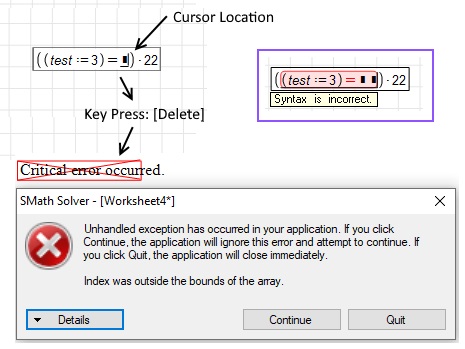
   [SMath]Critical_Error_Occured.jpg

The work around would be to use the [Backspace] to delete/correct the equation, or to copy/paste the terms into a new statement without syntax errors.


-Kenny Lemens, P.E.
"No matter where you go, there you are." -Buckaroo BanzaiHotkeys: https://en.smath.com/forum/resource.ashx?a=45771&b=2
1 utenti hanno apprezzato questo post
Davide Carpi 23/06/2022 14:21:00
#15 Pubblicato: 22/07/2022 17:33:42
Andrey Ivashov

Andrey Ivashov

2.343 apprezzamenti in 4.056 post.

Gruppo: Super Administrator

Finally fixed in version 1.0.8238.
3 utenti hanno apprezzato questo post
⚜ Kenny Lemens, P.E. ᵂᴵ 22/07/2022 17:41:00, João Felipe Seráfico Melo 22/07/2022 18:02:00, sergio 23/07/2022 05:37:00
#16 Pubblicato: 13/04/2023 10:40:14
salmawisoky

salmawisoky

0 apprezzamenti in 2 post.

Gruppo: User

Wrote

Greetings,

I found another configuration that can trigger this error; if you declare/evaluate a variable, and then try to multiply that entire set: you get a syntax error. Now if you attempt to correct the Candy Crush statement by using the [DEL] to remove the evaluation, the error gets thrown (as shown below):

   [SMath]Critical_Error_Occured.jpg

The work around would be to use the [Backspace] to delete/correct the equation, or to copy/paste the terms into a new statement without syntax errors.


-Kenny Lemens, P.E.


I tried that .... still get the error
  • Nuovi post
  • Nessun nuovo post