
1 pagine (4 elementi)
Removing brackets and subscripts - mb10 - Messaggi

A couple of editing questions from a newbie:
- is it possible to remove redundant brackets typed by mistake without deleting the entire expression?
- is it possible to remove a subscript marker without deleting the entire expression?
Thanks.

- is it possible to remove redundant brackets typed by mistake without deleting the entire expression?
- is it possible to remove a subscript marker without deleting the entire expression?
Thanks.

WroteA couple of editing questions from a newbie:
- is it possible to remove redundant brackets typed by mistake without deleting the entire expression?
- is it possible to remove a subscript marker without deleting the entire expression?
Thanks.
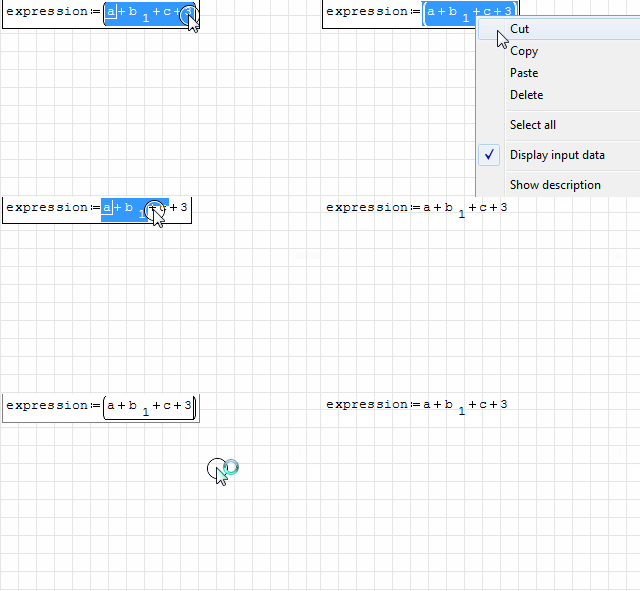
To delete external brackets:
- by keyboard: go on the right of the last inner term, hold your shift key, push the left arrow, cut (CTRL+X) or copy (CTRL+C) the selected terms, then select the whole brackets and paste the clipboard content (CTRL+V); you can do this also starting by the left of the first inner term.
- by mouse: select and copy the inner terms, select the whole brackets and paste.
To delete subscripts the only way is to select and copy the variable name and then paste it over the selection of the entire variable (variable name + subscript placeholder(s))
If you like my plugins please consider to support the program buying a license; for personal contributions to me: paypal.me/dcprojects

When Sisyphus climbed to the top of a hill, they said: "Wrong boulder!"
1 utenti hanno apprezzato questo post
Davide Carpi 30/08/2013 07:50:00
1 pagine (4 elementi)
- Nuovi post
- Nessun nuovo post