
Maple V Learning Guide examples via Smath Worksheet - Maple examples activated via Smath - Messaggi

this is my first post. Have chosen to jumpstart learning Smath via the Maple Add-on.
Hope this is useful to other newbies.
Kind Regards
Johnspark
MapleVLearningGuide.sm (141,11 KiB) scaricato 1588 volta(e).

%appdata%\SMath\extensions\plugins\32dfd679-8cfd-483a-b79a-19d5ea838750\x.x.x.x\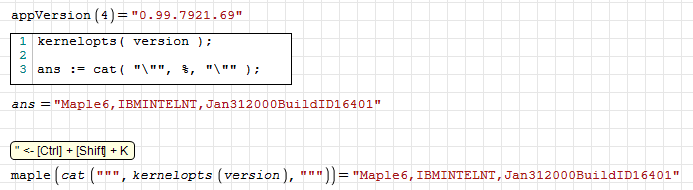
WroteHope this is useful to other newbies.
Thanks ... lot more codes never explored before.
You can visit Samples Symbolic COMPENDIUM for + posted few days ago.
Just that one doctored wrt Maple code.
Take care ... Jean
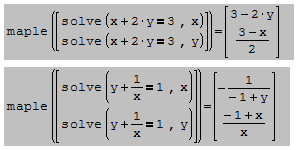
Most book style are in reverse order of Lagrange.
Lot numerical maths go by Lagrange:
Cubic solver, Polyroots, Cholesky polynomial fit ...

WroteIf you enable debug mode (
True ) in the configuration file MapleTools.config, then a log file will appear in which you can see how the function works. This file is overwritten when the program is closed, so you need to modify it when the program is not running. Also in the plugin folder you can find win.inc file in which you can include packages. This cannot be done with a separate command.%appdata%\SMath\extensions\plugins\32dfd679-8cfd-483a-b79a-19d5ea838750\x.x.x.x\
Thank you uni for your lightning response.
I have gone through a number of Maple messages in the forum and i am having a bit of difficulty finding these files. So far i have as seen below:
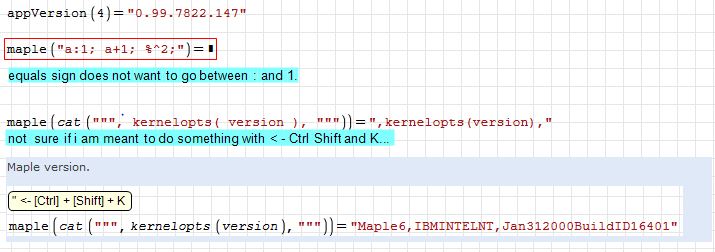
I have not been able to find the MapleTools.config so far.
Kind regards.
WroteYou mentioned conform to book style.
Most book style are in reverse order of Lagrange.
Lot numerical maths go by Lagrange:
Cubic solver, Polyroots, Cholesky polynomial fit ...
The best irony of incorrect book style:
Most CAS functions [ln, trig ...]
are Padé normalized rational fractions
NUM, DENOM are Lagrange style in ascending order.
WroteYou mentioned conform to book style.
Most book style are in reverse order of Lagrange.
Lot numerical maths go by Lagrange:
Cubic solver, Polyroots, Cholesky polynomial fit ...
I agree about the ascending order, that's what i have always been used to. Glad you found some help in the file
 .
WroteI agree about the ascending order, that's what I have always been used to. Glad you found some help in the file
Thanks Collab,
I will revisit for many new Maple codes.
What was developed in Smath Community is
more oriented to projects.
Take care ... Jean.
WroteWroteIf you enable debug mode (
True ) in the configuration file MapleTools.config, then a log file will appear in which you can see how the function works. This file is overwritten when the program is closed, so you need to modify it when the program is not running. Also in the plugin folder you can find win.inc file in which you can include packages. This cannot be done with a separate command.%appdata%\SMath\extensions\plugins\32dfd679-8cfd-483a-b79a-19d5ea838750\x.x.x.x\
Thank you uni for your lightning response.
I have gone through a number of Maple messages in the forum and i am having a bit of difficulty finding these files. So far i have as seen below:
I have not been able to find the MapleTools.config so far.
Kind regards.
Got some better progress tonight:
UsingMapleLogToSeeHowFunctionsWork.docx (194,94 KiB) scaricato 814 volta(e).
WroteGot some better progress tonight:
Please, attach the Smath document.
About combine, we have lot more in Smath.
See you soon ... Jean
Maths Combine.sm (73,69 KiB) scaricato 1570 volta(e).
WroteAbout combine, we have lot more in Smath.
See you soon ... Jean
... about GCD, LCM as well
Maths GCD-LCM.sm (17,11 KiB) scaricato 1558 volta(e).
- Nuovi post
- Nessun nuovo post