
SMath in Linux - smath can only be started as sudo - Messaggi

WroteTried it in Ubuntu 20.04 and Manjaro as well: smath can only be started by doing it as root via executing as sudo? Any hints how to fix it?
Switch to another distro (swh)
Beside the joke, all ubuntu or debian based distros have this problem.
This is not SMath's bug, it is caused by not properly updated lts mono libraries.
And this bug is not caused by user, their repositories have this problem.
Contrary to popular belief, LTS releases creates more issues sometimes.
Arch, Fedora, Void, Solus, etc don't need root to run.
Regards
regards
P.S.: My initial post was no complaint about smath's behaviour itself. It was a simple question, if anybody knows a solution - maybe by fixing some os-specific libraries.
WroteThanks. But Manjaro is arch-based.regards
Yes, but it doesn't use arch repositories.
I used to know it updates from their own repos.
If this is not changed recently.
WroteP.S.: My initial post was no complaint about smath's behaviour itself. It was a simple question, if anybody knows a solution - maybe by fixing some os-specific libraries.
Try to update Mono libraries, from another source or from arch repository.
Maybe this would help to make mono work as it should be, maybe not.
I will download latest Manjaro XFCE iso and try to pinpoint a solution for your issue.
Regards
WroteWroteThanks. But Manjaro is arch-based.regards
Yes, but it doesn't use arch repositories.
I used to know it updates from their own repos.
If this is not changed recently.WroteP.S.: My initial post was no complaint about smath's behaviour itself. It was a simple question, if anybody knows a solution - maybe by fixing some os-specific libraries.
Try to update Mono libraries, from another source or from arch repository.
Maybe this would help to make mono work as it should be, maybe not.
I will download latest Manjaro XFCE iso and try to pinpoint a solution for your issue.
Regards
Dear overlord, I would be much more glad about a solution fpr Ubuntu. Because Manjaro runs as virtual machine. And until a week ago smath worked in there.
I just installed mono with sudo pacman -Sy mono, nothing more done.
No need to be root for Manjaro when PC started from livecd installed on usb.
I will burn Ubuntu 20.04 iso to usb and try with it now.
I shall post how it went after I try it.
Followed instructions on mono website.
Installed mono, tried to run SMath.
At first it run perfectly, I installed some plugins too.
Second time, it didn't. Gave the _XRead error.
I didn't understand what happened.
Then tried to re-run, same thing.
After entering ./smathstudio_desktop_mono couple of times, it run again.
I did all this process without using sudo.
SMath apparently can run without sudo, but mono gives error most time.
I will try to dig further what is going on.
Regards
a solution would be great! Thanks for your investigation and work! If I can support you in any way - let me know!
greetings Leopold
I am running Linux Mint 20.3 with mono-complete version 6.12.0.122-0xamain1+ubuntu2004b1
When I try to open SMathStudio_Desktop.exe with Mono Runtime (right mouse button) it crashes during loading, when I execute it as Administrator, it opens an extra window, Terminal (sudo) but runs.
I already tried to remove and intall again Smath and Mono but remain the same

WroteI use Smath in Win10 without any problem but I am migrating to Linux
I am running Linux Mint 20.3 with mono-complete version 6.12.0.122-0xamain1+ubuntu2004b1
When I try to open SMathStudio_Desktop.exe with Mono Runtime (right mouse button) it crashes during loading, when I execute it as Administrator, it opens an extra window, Terminal (sudo) but runs.
I already tried to remove and intall again Smath and Mono but remain the same
This can occur on some other non-smath mono programs too.
I found this crash error on SMath can be overcome with sudo.
And I have read the solution about a different software, not smath.
Mint is Ubuntu based, Ubuntu is a Debian based linux distro as you would know.
All Debian based including pure Debian (both stable and testing) has this bug.
I know because I have tried majority of them to find how to run SMath on a Debian-based distro.
And I have failed, partially.
It runs without sudo, as I have mentioned in post#7.
You have to try to run it relentlessly if it fails to run.
Sometimes after 5-10 try it runs, but sometimes 20-30 trial fails.
Most of time it gives error, _xread error to be specific.
And this behavior is not caused by smath itself.
Debug says it is caused by a broken X extension library.
Errors are mostly on libc.so and libpthread.so.
Which are an essential package of system, libc6.
Maybe recompiling them from source code could corrects the bug.
But probably it will break the whole system.
So I wouldn't recommend it.
What I would humbly suggest is to try another distro family.
Arch or Manjaro, Fedora, Solus, Void can be candidates.
Regards
the same problem, maybe
Description: Pop!_OS 22.04 LTS
Release: 22.04
Codename: jammy
I got this error while running AppImage
Error: "unable to find gdb or lldb"
I installed gdb & lsb but it still didnt work beyond start screen
[xcb] Too much data requested from _XRead
[xcb] This is most likely caused by a broken X extension library
[xcb] Aborting, sorry about that.
mono: ../../src/xcb_io.c:833: _XRead: Assertion `!xcb_xlib_too_much_data_requested' failed.
=================================================================
Native Crash Reporting
=================================================================
Got a SIGABRT while executing native code. This usually indicates
a fatal error in the mono runtime or one of the native libraries
used by your application.
=================================================================
=================================================================
Native stacktrace:
=================================================================
0x562ff26b548e - mono : (null)
0x562ff23a6c0e - mono : (null)
0x562ff23dab1e - mono : (null)
0x7fb368042520 - /lib/x86_64-linux-gnu/libc.so.6 : (null)
0x7fb3680969fc - /lib/x86_64-linux-gnu/libc.so.6 : pthread_kill
0x7fb368042476 - /lib/x86_64-linux-gnu/libc.so.6 : raise
0x7fb3680287f3 - /lib/x86_64-linux-gnu/libc.so.6 : abort
0x7fb36802871b - /lib/x86_64-linux-gnu/libc.so.6 : (null)
0x7fb368039e96 - /lib/x86_64-linux-gnu/libc.so.6 : (null)
0x7fb364100085 - /lib/x86_64-linux-gnu/libX11.so.6 : _XRead
0x7fb3641002c5 - /lib/x86_64-linux-gnu/libX11.so.6 : _XRead32
0x7fb3640e3a4d - /lib/x86_64-linux-gnu/libX11.so.6 : XListFontsWithInfo
0x7fb36413c550 - /lib/x86_64-linux-gnu/libX11.so.6 : (null)
0x7fb3640ef0c3 - /lib/x86_64-linux-gnu/libX11.so.6 : XCreateOC
0x7fb3640e40f3 - /lib/x86_64-linux-gnu/libX11.so.6 : XCreateFontSet
0x417b60c7 - Unknown
=================================================================
Telemetry Dumper:
=================================================================
Pkilling 0x7fb337aff640 from 0x7fb368294780
Pkilling 0x7fb3376fd640 from 0x7fb368294780
Pkilling 0x7fb35d57b640 from 0x7fb368294780
Pkilling 0x7fb35d179640 from 0x7fb368294780
Pkilling 0x7fb35cd77640 from 0x7fb368294780
Pkilling 0x7fb35c975640 from 0x7fb368294780
Pkilling 0x7fb366fff640 from 0x7fb368294780
Pkilling 0x7fb35c573640 from 0x7fb368294780
Pkilling 0x7fb3372fb640 from 0x7fb368294780
Pkilling 0x7fb336ef9640 from 0x7fb368294780
Pkilling 0x7fb336af7640 from 0x7fb368294780
Pkilling 0x7fb35e33f640 from 0x7fb368294780
Pkilling 0x7fb337fff640 from 0x7fb368294780
Pkilling 0x7fb3378fe640 from 0x7fb368294780
Pkilling 0x7fb3374fc640 from 0x7fb368294780
Pkilling 0x7fb35d37a640 from 0x7fb368294780
Pkilling 0x7fb35cf78640 from 0x7fb368294780
Pkilling 0x7fb35cb76640 from 0x7fb368294780
Pkilling 0x7fb35c774640 from 0x7fb368294780
Pkilling 0x7fb3370fa640 from 0x7fb368294780
Pkilling 0x7fb336cf8640 from 0x7fb368294780
Could not exec mono-hang-watchdog, expected on path '/tmp/.mount_SMathSnvPG8U/etc/../bin/mono-hang-watchdog' (errno 2)
Entering thread summarizer pause from 0x7fb368294780
Finished thread summarizer pause from 0x7fb368294780.
Waiting for dumping threads to resume
=================================================================
External Debugger Dump:
=================================================================
[New LWP 76674]
[New LWP 76675]
[New LWP 76676]
[New LWP 76678]
[New LWP 76679]
[New LWP 76680]
[New LWP 76681]
[New LWP 76682]
[New LWP 76683]
[New LWP 76684]
[New LWP 76685]
[New LWP 76686]
[New LWP 76687]
[New LWP 76688]
[New LWP 76689]
[New LWP 76690]
[New LWP 76691]
[New LWP 76692]
[New LWP 76693]
[New LWP 76694]
[New LWP 76695]
[New LWP 76696]
warning: the debug information found in "/tmp/.mount_SMathSnvPG8U/usr/lib/../lib/libmono-native.so.0.0.0" does not match "/tmp/.mount_SMathSnvPG8U/usr/lib/../lib/libmono-native.so" (CRC mismatch).
[Thread debugging using libthread_db enabled]
Using host libthread_db library "/lib/x86_64-linux-gnu/libthread_db.so.1".
0x00007fb3680ea42f in __GI___wait4 (pid=76700, stat_loc=0x7ffc43fc5ab4, options=0, usage=0x0) at ../sysdeps/unix/sysv/linux/wait4.c:30
30 ../sysdeps/unix/sysv/linux/wait4.c: No such file or directory.
Id Target Id Frame
* 1 Thread 0x7fb368294780 (LWP 76673) "mono" 0x00007fb3680ea42f in __GI___wait4 (pid=76700, stat_loc=0x7ffc43fc5ab4, options=0, usage=0x0) at ../sysdeps/unix/sysv/linux/wait4.c:30
2 Thread 0x7fb3667ff640 (LWP 76674) "SGen worker" __futex_abstimed_wait_common64 (private=0, cancel=true, abstime=0x0, op=393, expected=0, futex_word=0x562ff281b128) at ./nptl/futex-internal.c:57
3 Thread 0x7fb366fff640 (LWP 76675) "Finalizer" __futex_abstimed_wait_common64 (private=
4 Thread 0x7fb35e33f640 (LWP 76676) "mono" futex_wait (private=0, expected=2, futex_word=0x562ff2c8e110) at ../sysdeps/nptl/futex-internal.h:146
5 Thread 0x7fb35d57b640 (LWP 76678) "mono" __futex_abstimed_wait_common64 (private=1179670597, cancel=true, abstime=0x7fb35d57ac00, op=137, expected=0, futex_word=0x562ff282e408) at ./nptl/futex-internal.c:57
6 Thread 0x7fb35d37a640 (LWP 76679) "Thread Pool Wor" __futex_abstimed_wait_common64 (private=
7 Thread 0x7fb35d179640 (LWP 76680) "Thread Pool Wor" __futex_abstimed_wait_common64 (private=
8 Thread 0x7fb35cf78640 (LWP 76681) "Thread Pool Wor" __futex_abstimed_wait_common64 (private=
9 Thread 0x7fb35cd77640 (LWP 76682) "Thread Pool Wor" __futex_abstimed_wait_common64 (private=
10 Thread 0x7fb35cb76640 (LWP 76683) "Thread Pool Wor" __futex_abstimed_wait_common64 (private=
11 Thread 0x7fb35c975640 (LWP 76684) "Thread Pool Wor" __futex_abstimed_wait_common64 (private=
12 Thread 0x7fb35c774640 (LWP 76685) "Thread Pool Wor" __futex_abstimed_wait_common64 (private=
13 Thread 0x7fb35c573640 (LWP 76686) "Thread Pool Wor" __futex_abstimed_wait_common64 (private=
14 Thread 0x7fb337fff640 (LWP 76687) "Thread Pool Wor" __futex_abstimed_wait_common64 (private=
15 Thread 0x7fb337aff640 (LWP 76688) "Thread Pool Wor" __futex_abstimed_wait_common64 (private=
16 Thread 0x7fb3378fe640 (LWP 76689) "Thread Pool Wor" __futex_abstimed_wait_common64 (private=
17 Thread 0x7fb3376fd640 (LWP 76690) "Thread Pool Wor" __futex_abstimed_wait_common64 (private=
18 Thread 0x7fb3374fc640 (LWP 76691) "Thread Pool Wor" __futex_abstimed_wait_common64 (private=
19 Thread 0x7fb3372fb640 (LWP 76692) "Thread Pool Wor" __futex_abstimed_wait_common64 (private=
20 Thread 0x7fb3370fa640 (LWP 76693) "Thread Pool Wor" __futex_abstimed_wait_common64 (private=
21 Thread 0x7fb336ef9640 (LWP 76694) "mono" __futex_abstimed_wait_common64 (private=
22 Thread 0x7fb336cf8640 (LWP 76695) "Thread Pool Wor" __futex_abstimed_wait_common64 (private=
23 Thread 0x7fb336af7640 (LWP 76696) "Thread Pool Wor" __futex_abstimed_wait_common64 (private=
Thread 23 (Thread 0x7fb336af7640 (LWP 76696) "Thread Pool Wor"):
#0 __futex_abstimed_wait_common64 (private=
#1 __futex_abstimed_wait_common (cancel=true, private=
#2 __GI___futex_abstimed_wait_cancelable64 (futex_word=futex_word@entry=0x562ff2819cc8, expected=expected@entry=0, clockid=clockid@entry=0, abstime=abstime@entry=0x7fb336af6c90, private=
#3 0x00007fb36809c9b0 in do_futex_wait (sem=sem@entry=0x562ff2819cc8, abstime=abstime@entry=0x7fb336af6c90, clockid=0) at ./nptl/sem_waitcommon.c:111
#4 0x00007fb36809ca53 in __new_sem_wait_slow64 (sem=0x562ff2819cc8, abstime=0x7fb336af6c90, clockid=0) at ./nptl/sem_waitcommon.c:183
#5 0x0000562ff2627257 in ()
#6 0x0000562ff25bc964 in ()
#7 0x00007fb368094ac3 in start_thread (arg=
#8 0x00007fb368126a40 in clone3 () at ../sysdeps/unix/sysv/linux/x86_64/clone3.S:81
Thread 22 (Thread 0x7fb336cf8640 (LWP 76695) "Thread Pool Wor"):
#0 __futex_abstimed_wait_common64 (private=
#1 __futex_abstimed_wait_common (cancel=true, private=
#2 __GI___futex_abstimed_wait_cancelable64 (futex_word=futex_word@entry=0x562ff2819cc8, expected=expected@entry=0, clockid=clockid@entry=0, abstime=abstime@entry=0x7fb336cf7c90, private=
#3 0x00007fb36809c9b0 in do_futex_wait (sem=sem@entry=0x562ff2819cc8, abstime=abstime@entry=0x7fb336cf7c90, clockid=0) at ./nptl/sem_waitcommon.c:111
#4 0x00007fb36809ca53 in __new_sem_wait_slow64 (sem=0x562ff2819cc8, abstime=0x7fb336cf7c90, clockid=0) at ./nptl/sem_waitcommon.c:183
#5 0x0000562ff2627257 in ()
#6 0x0000562ff25bc964 in ()
#7 0x00007fb368094ac3 in start_thread (arg=
#8 0x00007fb368126a40 in clone3 () at ../sysdeps/unix/sysv/linux/x86_64/clone3.S:81
Thread 21 (Thread 0x7fb336ef9640 (LWP 76694) "mono"):
#0 __futex_abstimed_wait_common64 (private=
#1 __futex_abstimed_wait_common (cancel=true, private=
#2 __GI___futex_abstimed_wait_cancelable64 (futex_word=futex_word@entry=0x562ff2819cc8, expected=expected@entry=0, clockid=clockid@entry=0, abstime=abstime@entry=0x7fb336ef8c90, private=
#3 0x00007fb36809c9b0 in do_futex_wait (sem=sem@entry=0x562ff2819cc8, abstime=abstime@entry=0x7fb336ef8c90, clockid=0) at ./nptl/sem_waitcommon.c:111
#4 0x00007fb36809ca53 in __new_sem_wait_slow64 (sem=0x562ff2819cc8, abstime=0x7fb336ef8c90, clockid=0) at ./nptl/sem_waitcommon.c:183
#5 0x0000562ff2627257 in ()
#6 0x0000562ff25bc964 in ()
#7 0x00007fb368094ac3 in start_thread (arg=
#8 0x00007fb368126a40 in clone3 () at ../sysdeps/unix/sysv/linux/x86_64/clone3.S:81
Thread 20 (Thread 0x7fb3370fa640 (LWP 76693) "Thread Pool Wor"):
#0 __futex_abstimed_wait_common64 (private=
#1 __futex_abstimed_wait_common (cancel=true, private=
#2 __GI___futex_abstimed_wait_cancelable64 (futex_word=futex_word@entry=0x562ff2819cc8, expected=expected@entry=0, clockid=clockid@entry=0, abstime=abstime@entry=0x7fb3370f9c90, private=
#3 0x00007fb36809c9b0 in do_futex_wait (sem=sem@entry=0x562ff2819cc8, abstime=abstime@entry=0x7fb3370f9c90, clockid=0) at ./nptl/sem_waitcommon.c:111
#4 0x00007fb36809ca53 in __new_sem_wait_slow64 (sem=0x562ff2819cc8, abstime=0x7fb3370f9c90, clockid=0) at ./nptl/sem_waitcommon.c:183
#5 0x0000562ff2627257 in ()
#6 0x0000562ff25bc964 in ()
#7 0x00007fb368094ac3 in start_thread (arg=
#8 0x00007fb368126a40 in clone3 () at ../sysdeps/unix/sysv/linux/x86_64/clone3.S:81
Thread 19 (Thread 0x7fb3372fb640 (LWP 76692) "Thread Pool Wor"):
#0 __futex_abstimed_wait_common64 (private=
#1 __futex_abstimed_wait_common (cancel=true, private=
#2 __GI___futex_abstimed_wait_cancelable64 (futex_word=futex_word@entry=0x562ff2819cc8, expected=expected@entry=0, clockid=clockid@entry=0, abstime=abstime@entry=0x7fb3372fac90, private=
#3 0x00007fb36809c9b0 in do_futex_wait (sem=sem@entry=0x562ff2819cc8, abstime=abstime@entry=0x7fb3372fac90, clockid=0) at ./nptl/sem_waitcommon.c:111
#4 0x00007fb36809ca53 in __new_sem_wait_slow64 (sem=0x562ff2819cc8, abstime=0x7fb3372fac90, clockid=0) at ./nptl/sem_waitcommon.c:183
#5 0x0000562ff2627257 in ()
#6 0x0000562ff25bc964 in ()
#7 0x00007fb368094ac3 in start_thread (arg=
#8 0x00007fb368126a40 in clone3 () at ../sysdeps/unix/sysv/linux/x86_64/clone3.S:81
Thread 18 (Thread 0x7fb3374fc640 (LWP 76691) "Thread Pool Wor"):
#0 __futex_abstimed_wait_common64 (private=
#1 __futex_abstimed_wait_common (cancel=true, private=
#2 __GI___futex_abstimed_wait_cancelable64 (futex_word=futex_word@entry=0x562ff2819cc8, expected=expected@entry=0, clockid=clockid@entry=0, abstime=abstime@entry=0x7fb3374fbc90, private=
#3 0x00007fb36809c9b0 in do_futex_wait (sem=sem@entry=0x562ff2819cc8, abstime=abstime@entry=0x7fb3374fbc90, clockid=0) at ./nptl/sem_waitcommon.c:111
#4 0x00007fb36809ca53 in __new_sem_wait_slow64 (sem=0x562ff2819cc8, abstime=0x7fb3374fbc90, clockid=0) at ./nptl/sem_waitcommon.c:183
#5 0x0000562ff2627257 in ()
#6 0x0000562ff25bc964 in ()
#7 0x00007fb368094ac3 in start_thread (arg=
#8 0x00007fb368126a40 in clone3 () at ../sysdeps/unix/sysv/linux/x86_64/clone3.S:81
Thread 17 (Thread 0x7fb3376fd640 (LWP 76690) "Thread Pool Wor"):
#0 __futex_abstimed_wait_common64 (private=
#1 __futex_abstimed_wait_common (cancel=true, private=
#2 __GI___futex_abstimed_wait_cancelable64 (futex_word=futex_word@entry=0x562ff2819cc8, expected=expected@entry=0, clockid=clockid@entry=0, abstime=abstime@entry=0x7fb3376fcc90, private=
#3 0x00007fb36809c9b0 in do_futex_wait (sem=sem@entry=0x562ff2819cc8, abstime=abstime@entry=0x7fb3376fcc90, clockid=0) at ./nptl/sem_waitcommon.c:111
#4 0x00007fb36809ca53 in __new_sem_wait_slow64 (sem=0x562ff2819cc8, abstime=0x7fb3376fcc90, clockid=0) at ./nptl/sem_waitcommon.c:183
#5 0x0000562ff2627257 in ()
#6 0x0000562ff25bc964 in ()
#7 0x00007fb368094ac3 in start_thread (arg=
#8 0x00007fb368126a40 in clone3 () at ../sysdeps/unix/sysv/linux/x86_64/clone3.S:81
Thread 16 (Thread 0x7fb3378fe640 (LWP 76689) "Thread Pool Wor"):
#0 __futex_abstimed_wait_common64 (private=
#1 __futex_abstimed_wait_common (cancel=true, private=
#2 __GI___futex_abstimed_wait_cancelable64 (futex_word=futex_word@entry=0x562ff2819cc8, expected=expected@entry=0, clockid=clockid@entry=0, abstime=abstime@entry=0x7fb3378fdc90, private=
#3 0x00007fb36809c9b0 in do_futex_wait (sem=sem@entry=0x562ff2819cc8, abstime=abstime@entry=0x7fb3378fdc90, clockid=0) at ./nptl/sem_waitcommon.c:111
#4 0x00007fb36809ca53 in __new_sem_wait_slow64 (sem=0x562ff2819cc8, abstime=0x7fb3378fdc90, clockid=0) at ./nptl/sem_waitcommon.c:183
#5 0x0000562ff2627257 in ()
#6 0x0000562ff25bc964 in ()
#7 0x00007fb368094ac3 in start_thread (arg=
#8 0x00007fb368126a40 in clone3 () at ../sysdeps/unix/sysv/linux/x86_64/clone3.S:81
Thread 15 (Thread 0x7fb337aff640 (LWP 76688) "Thread Pool Wor"):
#0 __futex_abstimed_wait_common64 (private=
#1 __futex_abstimed_wait_common (cancel=true, private=
#2 __GI___futex_abstimed_wait_cancelable64 (futex_word=futex_word@entry=0x562ff2819cc8, expected=expected@entry=0, clockid=clockid@entry=0, abstime=abstime@entry=0x7fb337afec90, private=
#3 0x00007fb36809c9b0 in do_futex_wait (sem=sem@entry=0x562ff2819cc8, abstime=abstime@entry=0x7fb337afec90, clockid=0) at ./nptl/sem_waitcommon.c:111
#4 0x00007fb36809ca53 in __new_sem_wait_slow64 (sem=0x562ff2819cc8, abstime=0x7fb337afec90, clockid=0) at ./nptl/sem_waitcommon.c:183
#5 0x0000562ff2627257 in ()
#6 0x0000562ff25bc964 in ()
#7 0x00007fb368094ac3 in start_thread (arg=
#8 0x00007fb368126a40 in clone3 () at ../sysdeps/unix/sysv/linux/x86_64/clone3.S:81
Thread 14 (Thread 0x7fb337fff640 (LWP 76687) "Thread Pool Wor"):
#0 __futex_abstimed_wait_common64 (private=
#1 __futex_abstimed_wait_common (cancel=true, private=
#2 __GI___futex_abstimed_wait_cancelable64 (futex_word=futex_word@entry=0x562ff2819cc8, expected=expected@entry=0, clockid=clockid@entry=0, abstime=abstime@entry=0x7fb337ffec90, private=
#3 0x00007fb36809c9b0 in do_futex_wait (sem=sem@entry=0x562ff2819cc8, abstime=abstime@entry=0x7fb337ffec90, clockid=0) at ./nptl/sem_waitcommon.c:111
#4 0x00007fb36809ca53 in __new_sem_wait_slow64 (sem=0x562ff2819cc8, abstime=0x7fb337ffec90, clockid=0) at ./nptl/sem_waitcommon.c:183
#5 0x0000562ff2627257 in ()
#6 0x0000562ff25bc964 in ()
#7 0x00007fb368094ac3 in start_thread (arg=
#8 0x00007fb368126a40 in clone3 () at ../sysdeps/unix/sysv/linux/x86_64/clone3.S:81
Thread 13 (Thread 0x7fb35c573640 (LWP 76686) "Thread Pool Wor"):
#0 __futex_abstimed_wait_common64 (private=
#1 __futex_abstimed_wait_common (cancel=true, private=
#2 __GI___futex_abstimed_wait_cancelable64 (futex_word=futex_word@entry=0x562ff2819cc8, expected=expected@entry=0, clockid=clockid@entry=0, abstime=abstime@entry=0x7fb35c572c90, private=
#3 0x00007fb36809c9b0 in do_futex_wait (sem=sem@entry=0x562ff2819cc8, abstime=abstime@entry=0x7fb35c572c90, clockid=0) at ./nptl/sem_waitcommon.c:111
#4 0x00007fb36809ca53 in __new_sem_wait_slow64 (sem=0x562ff2819cc8, abstime=0x7fb35c572c90, clockid=0) at ./nptl/sem_waitcommon.c:183
#5 0x0000562ff2627257 in ()
#6 0x0000562ff25bc964 in ()
#7 0x00007fb368094ac3 in start_thread (arg=
#8 0x00007fb368126a40 in clone3 () at ../sysdeps/unix/sysv/linux/x86_64/clone3.S:81
Thread 12 (Thread 0x7fb35c774640 (LWP 76685) "Thread Pool Wor"):
#0 __futex_abstimed_wait_common64 (private=
#1 __futex_abstimed_wait_common (cancel=true, private=
#2 __GI___futex_abstimed_wait_cancelable64 (futex_word=futex_word@entry=0x562ff2819cc8, expected=expected@entry=0, clockid=clockid@entry=0, abstime=abstime@entry=0x7fb35c773c90, private=
#3 0x00007fb36809c9b0 in do_futex_wait (sem=sem@entry=0x562ff2819cc8, abstime=abstime@entry=0x7fb35c773c90, clockid=0) at ./nptl/sem_waitcommon.c:111
#4 0x00007fb36809ca53 in __new_sem_wait_slow64 (sem=0x562ff2819cc8, abstime=0x7fb35c773c90, clockid=0) at ./nptl/sem_waitcommon.c:183
#5 0x0000562ff2627257 in ()
#6 0x0000562ff25bc964 in ()
#7 0x00007fb368094ac3 in start_thread (arg=
#8 0x00007fb368126a40 in clone3 () at ../sysdeps/unix/sysv/linux/x86_64/clone3.S:81
Thread 11 (Thread 0x7fb35c975640 (LWP 76684) "Thread Pool Wor"):
#0 __futex_abstimed_wait_common64 (private=
#1 __futex_abstimed_wait_common (cancel=true, private=
#2 __GI___futex_abstimed_wait_cancelable64 (futex_word=futex_word@entry=0x562ff2819cc8, expected=expected@entry=0, clockid=clockid@entry=0, abstime=abstime@entry=0x7fb35c974c90, private=
#3 0x00007fb36809c9b0 in do_futex_wait (sem=sem@entry=0x562ff2819cc8, abstime=abstime@entry=0x7fb35c974c90, clockid=0) at ./nptl/sem_waitcommon.c:111
#4 0x00007fb36809ca53 in __new_sem_wait_slow64 (sem=0x562ff2819cc8, abstime=0x7fb35c974c90, clockid=0) at ./nptl/sem_waitcommon.c:183
#5 0x0000562ff2627257 in ()
#6 0x0000562ff25bc964 in ()
#7 0x00007fb368094ac3 in start_thread (arg=
#8 0x00007fb368126a40 in clone3 () at ../sysdeps/unix/sysv/linux/x86_64/clone3.S:81
Thread 10 (Thread 0x7fb35cb76640 (LWP 76683) "Thread Pool Wor"):
#0 __futex_abstimed_wait_common64 (private=
#1 __futex_abstimed_wait_common (cancel=true, private=
#2 __GI___futex_abstimed_wait_cancelable64 (futex_word=futex_word@entry=0x562ff2819cc8, expected=expected@entry=0, clockid=clockid@entry=0, abstime=abstime@entry=0x7fb35cb75c90, private=
#3 0x00007fb36809c9b0 in do_futex_wait (sem=sem@entry=0x562ff2819cc8, abstime=abstime@entry=0x7fb35cb75c90, clockid=0) at ./nptl/sem_waitcommon.c:111
#4 0x00007fb36809ca53 in __new_sem_wait_slow64 (sem=0x562ff2819cc8, abstime=0x7fb35cb75c90, clockid=0) at ./nptl/sem_waitcommon.c:183
#5 0x0000562ff2627257 in ()
#6 0x0000562ff25bc964 in ()
#7 0x00007fb368094ac3 in start_thread (arg=
#8 0x00007fb368126a40 in clone3 () at ../sysdeps/unix/sysv/linux/x86_64/clone3.S:81
Thread 9 (Thread 0x7fb35cd77640 (LWP 76682) "Thread Pool Wor"):
#0 __futex_abstimed_wait_common64 (private=
#1 __futex_abstimed_wait_common (cancel=true, private=
#2 __GI___futex_abstimed_wait_cancelable64 (futex_word=futex_word@entry=0x562ff2819cc8, expected=expected@entry=0, clockid=clockid@entry=0, abstime=abstime@entry=0x7fb35cd76c90, private=
#3 0x00007fb36809c9b0 in do_futex_wait (sem=sem@entry=0x562ff2819cc8, abstime=abstime@entry=0x7fb35cd76c90, clockid=0) at ./nptl/sem_waitcommon.c:111
#4 0x00007fb36809ca53 in __new_sem_wait_slow64 (sem=0x562ff2819cc8, abstime=0x7fb35cd76c90, clockid=0) at ./nptl/sem_waitcommon.c:183
#5 0x0000562ff2627257 in ()
#6 0x0000562ff25bc964 in ()
#7 0x00007fb368094ac3 in start_thread (arg=
#8 0x00007fb368126a40 in clone3 () at ../sysdeps/unix/sysv/linux/x86_64/clone3.S:81
Thread 8 (Thread 0x7fb35cf78640 (LWP 76681) "Thread Pool Wor"):
#0 __futex_abstimed_wait_common64 (private=
#1 __futex_abstimed_wait_common (cancel=true, private=
#2 __GI___futex_abstimed_wait_cancelable64 (futex_word=futex_word@entry=0x562ff2819cc8, expected=expected@entry=0, clockid=clockid@entry=0, abstime=abstime@entry=0x7fb35cf77c90, private=
#3 0x00007fb36809c9b0 in do_futex_wait (sem=sem@entry=0x562ff2819cc8, abstime=abstime@entry=0x7fb35cf77c90, clockid=0) at ./nptl/sem_waitcommon.c:111
#4 0x00007fb36809ca53 in __new_sem_wait_slow64 (sem=0x562ff2819cc8, abstime=0x7fb35cf77c90, clockid=0) at ./nptl/sem_waitcommon.c:183
#5 0x0000562ff2627257 in ()
#6 0x0000562ff25bc964 in ()
#7 0x00007fb368094ac3 in start_thread (arg=
#8 0x00007fb368126a40 in clone3 () at ../sysdeps/unix/sysv/linux/x86_64/clone3.S:81
Thread 7 (Thread 0x7fb35d179640 (LWP 76680) "Thread Pool Wor"):
#0 __futex_abstimed_wait_common64 (private=
#1 __futex_abstimed_wait_common (cancel=true, private=
#2 __GI___futex_abstimed_wait_cancelable64 (futex_word=futex_word@entry=0x562ff2819cc8, expected=expected@entry=0, clockid=clockid@entry=0, abstime=abstime@entry=0x7fb35d178c90, private=
#3 0x00007fb36809c9b0 in do_futex_wait (sem=sem@entry=0x562ff2819cc8, abstime=abstime@entry=0x7fb35d178c90, clockid=0) at ./nptl/sem_waitcommon.c:111
#4 0x00007fb36809ca53 in __new_sem_wait_slow64 (sem=0x562ff2819cc8, abstime=0x7fb35d178c90, clockid=0) at ./nptl/sem_waitcommon.c:183
#5 0x0000562ff2627257 in ()
#6 0x0000562ff25bc964 in ()
#7 0x00007fb368094ac3 in start_thread (arg=
#8 0x00007fb368126a40 in clone3 () at ../sysdeps/unix/sysv/linux/x86_64/clone3.S:81
Thread 6 (Thread 0x7fb35d37a640 (LWP 76679) "Thread Pool Wor"):
#0 __futex_abstimed_wait_common64 (private=
#1 __futex_abstimed_wait_common (cancel=true, private=
#2 __GI___futex_abstimed_wait_cancelable64 (futex_word=futex_word@entry=0x562ff2819cc8, expected=expected@entry=0, clockid=clockid@entry=0, abstime=abstime@entry=0x7fb35d379c90, private=
#3 0x00007fb36809c9b0 in do_futex_wait (sem=sem@entry=0x562ff2819cc8, abstime=abstime@entry=0x7fb35d379c90, clockid=0) at ./nptl/sem_waitcommon.c:111
#4 0x00007fb36809ca53 in __new_sem_wait_slow64 (sem=0x562ff2819cc8, abstime=0x7fb35d379c90, clockid=0) at ./nptl/sem_waitcommon.c:183
#5 0x0000562ff2627257 in ()
#6 0x0000562ff25bc964 in ()
#7 0x00007fb368094ac3 in start_thread (arg=
#8 0x00007fb368126a40 in clone3 () at ../sysdeps/unix/sysv/linux/x86_64/clone3.S:81
Thread 5 (Thread 0x7fb35d57b640 (LWP 76678) "mono"):
#0 __futex_abstimed_wait_common64 (private=1179670597, cancel=true, abstime=0x7fb35d57ac00, op=137, expected=0, futex_word=0x562ff282e408) at ./nptl/futex-internal.c:57
#1 __futex_abstimed_wait_common (cancel=true, private=1179670597, abstime=0x7fb35d57ac00, clockid=10, expected=0, futex_word=0x562ff282e408) at ./nptl/futex-internal.c:87
#2 __GI___futex_abstimed_wait_cancelable64 (futex_word=futex_word@entry=0x562ff282e408, expected=expected@entry=0, clockid=clockid@entry=1, abstime=abstime@entry=0x7fb35d57ac00, private=private@entry=0) at ./nptl/futex-internal.c:139
#3 0x00007fb368093e9b in __pthread_cond_wait_common (abstime=0x7fb35d57ac00, clockid=1, mutex=0x562ff282e420, cond=0x562ff282e3e0) at ./nptl/pthread_cond_wait.c:503
#4 ___pthread_cond_timedwait64 (cond=0x562ff282e3e0, mutex=0x562ff282e420, abstime=0x7fb35d57ac00) at ./nptl/pthread_cond_wait.c:652
#5 0x0000562ff268a2ee in ()
#6 0x0000562ff2692693 in ()
#7 0x0000562ff262815b in ()
#8 0x0000562ff25bc964 in ()
#9 0x00007fb368094ac3 in start_thread (arg=
#10 0x00007fb368126a40 in clone3 () at ../sysdeps/unix/sysv/linux/x86_64/clone3.S:81
Thread 4 (Thread 0x7fb35e33f640 (LWP 76676) "mono"):
#0 futex_wait (private=0, expected=2, futex_word=0x562ff2c8e110) at ../sysdeps/nptl/futex-internal.h:146
#1 __GI___lll_lock_wait (futex=futex@entry=0x562ff2c8e110, private=0) at ./nptl/lowlevellock.c:49
#2 0x00007fb3680972a3 in __pthread_mutex_cond_lock (mutex=mutex@entry=0x562ff2c8e110) at ../nptl/pthread_mutex_lock.c:93
#3 0x00007fb368093934 in __pthread_cond_wait_common (abstime=0x0, clockid=0, mutex=0x562ff2c8e110, cond=0x562ff2c58640) at ./nptl/pthread_cond_wait.c:616
#4 ___pthread_cond_wait (cond=0x562ff2c58640, mutex=0x562ff2c8e110) at ./nptl/pthread_cond_wait.c:627
#5 0x00007fb3641063f3 in _XReply () at /lib/x86_64-linux-gnu/libX11.so.6
#6 0x00007fb3640dd972 in XGetGeometry () at /lib/x86_64-linux-gnu/libX11.so.6
#7 0x00007fb36454c75c in GdipCreateFromXDrawable_linux () at /tmp/.mount_SMathSnvPG8U/usr/lib/libgdiplus.so.0
#8 0x0000000041786131 in ()
#9 0x00000000ffffff0f in ()
#10 0x00000000fffffe0f in ()
#11 0x00007fb35e33e658 in ()
#12 0x00007fb35d8d4a30 in ()
#13 0x0000000004800016 in ()
#14 0x00007fb3580026a0 in ()
#15 0x00007fb35e33e440 in ()
#16 0x00007fb35e33e180 in ()
#17 0x0000000000000000 in ()
Thread 3 (Thread 0x7fb366fff640 (LWP 76675) "Finalizer"):
#0 __futex_abstimed_wait_common64 (private=
#1 __futex_abstimed_wait_common (cancel=true, private=
#2 __GI___futex_abstimed_wait_cancelable64 (futex_word=futex_word@entry=0x562ff281aea0, expected=expected@entry=0, clockid=clockid@entry=0, abstime=abstime@entry=0x0, private=
#3 0x00007fb36809cbdf in do_futex_wait (sem=sem@entry=0x562ff281aea0, abstime=0x0, clockid=0) at ./nptl/sem_waitcommon.c:111
#4 0x00007fb36809cc78 in __new_sem_wait_slow64 (sem=0x562ff281aea0, abstime=0x0, clockid=0) at ./nptl/sem_waitcommon.c:183
#5 0x0000562ff261d1ce in ()
#6 0x0000562ff25bc964 in ()
#7 0x00007fb368094ac3 in start_thread (arg=
#8 0x00007fb368126a40 in clone3 () at ../sysdeps/unix/sysv/linux/x86_64/clone3.S:81
Thread 2 (Thread 0x7fb3667ff640 (LWP 76674) "SGen worker"):
#0 __futex_abstimed_wait_common64 (private=0, cancel=true, abstime=0x0, op=393, expected=0, futex_word=0x562ff281b128) at ./nptl/futex-internal.c:57
#1 __futex_abstimed_wait_common (cancel=true, private=0, abstime=0x0, clockid=0, expected=0, futex_word=0x562ff281b128) at ./nptl/futex-internal.c:87
#2 __GI___futex_abstimed_wait_cancelable64 (futex_word=futex_word@entry=0x562ff281b128, expected=expected@entry=0, clockid=clockid@entry=0, abstime=abstime@entry=0x0, private=private@entry=0) at ./nptl/futex-internal.c:139
#3 0x00007fb368093a41 in __pthread_cond_wait_common (abstime=0x0, clockid=0, mutex=0x562ff281b140, cond=0x562ff281b100) at ./nptl/pthread_cond_wait.c:503
#4 ___pthread_cond_wait (cond=0x562ff281b100, mutex=0x562ff281b140) at ./nptl/pthread_cond_wait.c:627
#5 0x0000562ff26701fb in ()
#6 0x00007fb368094ac3 in start_thread (arg=
#7 0x00007fb368126a40 in clone3 () at ../sysdeps/unix/sysv/linux/x86_64/clone3.S:81
Thread 1 (Thread 0x7fb368294780 (LWP 76673) "mono"):
#0 0x00007fb3680ea42f in __GI___wait4 (pid=76700, stat_loc=0x7ffc43fc5ab4, options=0, usage=0x0) at ../sysdeps/unix/sysv/linux/wait4.c:30
#1 0x0000562ff26b58a6 in ()
#2 0x0000562ff23a6c0e in ()
#3 0x0000562ff23dab1e in ()
#4 0x00007fb368042520 in
#5 __pthread_kill_implementation (no_tid=0, signo=6, threadid=140408523409280) at ./nptl/pthread_kill.c:44
#6 __pthread_kill_internal (signo=6, threadid=140408523409280) at ./nptl/pthread_kill.c:78
#7 __GI___pthread_kill (threadid=140408523409280, signo=signo@entry=6) at ./nptl/pthread_kill.c:89
#8 0x00007fb368042476 in __GI_raise (sig=sig@entry=6) at ../sysdeps/posix/raise.c:26
#9 0x00007fb3680287f3 in __GI_abort () at ./stdlib/abort.c:79
#10 0x00007fb36802871b in __assert_fail_base (fmt=0x7fb3681dd150 "%s%s%s:%u: %s%sAssertion `%s' failed.\n%n", assertion=0x7fb364175e18 "!xcb_xlib_too_much_data_requested", file=0x7fb3641758c0 "../../src/xcb_io.c", line=833, function=
#11 0x00007fb368039e96 in __GI___assert_fail (assertion=0x7fb364175e18 "!xcb_xlib_too_much_data_requested", file=0x7fb3641758c0 "../../src/xcb_io.c", line=833, function=0x7fb364176273 "_XRead") at ./assert/assert.c:101
#12 0x00007fb364100085 in _XRead () at /lib/x86_64-linux-gnu/libX11.so.6
#13 0x00007fb3641002c5 in _XRead32 () at /lib/x86_64-linux-gnu/libX11.so.6
#14 0x00007fb3640e3a4d in XListFontsWithInfo () at /lib/x86_64-linux-gnu/libX11.so.6
#15 0x00007fb36413c550 in () at /lib/x86_64-linux-gnu/libX11.so.6
#16 0x00007fb3640ef0c3 in XCreateOC () at /lib/x86_64-linux-gnu/libX11.so.6
#17 0x00007fb3640e40f3 in XCreateFontSet () at /lib/x86_64-linux-gnu/libX11.so.6
#18 0x00000000417b60c7 in ()
#19 0x0000000000000000 in ()
[Inferior 1 (process 76673) detached]
=================================================================
Basic Fault Address Reporting
=================================================================
Memory around native instruction pointer (0x7fb3680969fc):0x7fb3680969ec 05 00 44 89 e2 89 ee 89 c7 b8 ea 00 00 00 0f 05 ..D.............
0x7fb3680969fc 41 89 c5 41 f7 dd 3d 00 f0 ff ff b8 00 00 00 00 A..A..=.........
0x7fb368096a0c 44 0f 46 e8 e9 6d ff ff ff 0f 1f 00 48 89 ef e8 D.F..m......H...
0x7fb368096a1c 10 a8 ff ff e9 29 ff ff ff 0f 1f 00 48 89 ef e8 .....)......H...
=================================================================
Managed Stacktrace:
=================================================================
at
at System.Windows.Forms.X11Keyboard:XCreateFontSet <0x000d6>
at System.Windows.Forms.X11Keyboard:CreateOverTheSpotXic <0x000d3>
at System.Windows.Forms.X11Keyboard:CreateXic <0x0011b>
at System.Windows.Forms.X11Keyboard:CreateXicForWindow <0x00053>
at System.Windows.Forms.X11Keyboard:FocusIn <0x000ab>
at System.Windows.Forms.XplatUIX11:SetFocus <0x000eb>
at System.Windows.Forms.XplatUI:SetFocus <0x0003c>
at System.Windows.Forms.ContainerControl:SendControlFocus <0x000b7>
at System.Windows.Forms.ContainerControl:SendControlFocus <0x00083>
at System.Windows.Forms.MdiClient:SendFocusToActiveChild <0x0004f>
at System.Windows.Forms.MdiClient:SendFocusToActiveChild <0x00073>
at System.Windows.Forms.Form:Activate <0x0007f>
at SMath.UI.Desktop.Solver.MainForm: <0x00037>
at System.Windows.Forms.Form:OnLoad <0x0009b>
at System.Windows.Forms.Form:OnLoadInternal <0x00093>
at System.Windows.Forms.Form:OnCreateControl <0x00073>
at System.Windows.Forms.Control:CreateControl <0x00157>
at System.Windows.Forms.Control:WmShowWindow <0x00147>
at System.Windows.Forms.Control:WndProc <0x002ef>
at System.Windows.Forms.ScrollableControl:WndProc <0x00033>
at System.Windows.Forms.ContainerControl:WndProc <0x00073>
at System.Windows.Forms.Form:WndProc <0x0027b>
at ControlWindowTarget:OnMessage <0x0003c>
at ControlNativeWindow:WndProc <0x00052>
at System.Windows.Forms.NativeWindow:WndProc <0x0036b>
at System.Windows.Forms.XplatUIX11:SendMessage <0x00423>
at System.Windows.Forms.XplatUIX11:MapWindow <0x001e8>
at System.Windows.Forms.XplatUIX11:CreateWindow <0x00dc7>
at System.Windows.Forms.XplatUI:CreateWindow <0x0003c>
at System.Windows.Forms.NativeWindow:CreateHandle <0x00057>
at System.Windows.Forms.Control:CreateHandle <0x00095>
at System.Windows.Forms.Form:CreateHandle <0x00043>
at System.Windows.Forms.Control:CreateControl <0x000a3>
at System.Windows.Forms.Control:SetVisibleCore <0x000d3>
at System.Windows.Forms.Form:SetVisibleCore <0x0035f>
at System.Windows.Forms.Control:set_Visible <0x0004b>
at System.Windows.Forms.Control:set_Visible <0x00083>
at System.Windows.Forms.Application:RunLoop <0x003ab>
at System.Windows.Forms.Application:Run <0x00063>
at System.Windows.Forms.Application:Run <0x0004f>
at .: <0x00203>
at
=================================================================
Aborted (core dumped)
Restoring environment...
If it runs, it is the mono runtime bug of debian based distros.
=================================================================
External Debugger Dump:
=================================================================
Could not load signature of TextRegionUtilities.SearchAndReplace:FocusMath due to: Could not load file or assembly 'MathRegion, Version=1.11.7802.37532, Culture=neutral, PublicKeyToken=null' or one of its dependencies./tmp/mono-gdb-commands.15571:1: Error in sourced command file:
Unable to attach: program terminated with signal SIGABRT, Aborted.
Waiting on threads to park on joinable thread list timed out.
Create x2 folders & 1 .sh file in the same location as APPIMAGE [these will store all downloaded plugins / settings which are persistent]
SMathStudioDesktop.1_0_8348.x86_64.ubuntu-22_04.glibc2.35.AppImage.config
SMathStudioDesktop.1_0_8348.x86_64.ubuntu-22_04.glibc2.35.AppImage.home
launcher.sh
.sh file contents
sh -c "zenity --password --title=\"sudo password prompt\" --timeout=10 2>/dev/null | sudo -S -H ~/Binaries/SMathStudioDesktop.1_0_8348.x86_64.ubuntu-22_04.glibc2.35.AppImage"
Create .desktop file with following contents. Place this is ~/.local/share/applications
[Desktop Entry]
Name=SMath
Comment=symbolic and numeric calculations
Exec=/home/ukhan/Binaries/Smath_launcher.sh
Icon=/home/ukhan/Binaries/smath.png
Type=Application
Terminal=false
Categories=Education;Math;Science;
Keywords=maths;cas;algebra;education;engineering;physics;
WroteI cannot find where APPIMAGE when ran in sudo store persistent settings
Since you ran smath with sudo, setting are stored in root home folder.
It should be in /root/.config/SMath for most linux distributions.

WroteTried it in Ubuntu 20.04 and Manjaro as well: smath can only be started by doing it as root via executing as sudo? Any hints how to fix it?
use
export MONO_WINFORMS_XIM_STYLE=disabled;./SMathStudioDesktop.1_0_8348.x86_64.ubuntu-22_04.glibc2.35.AppImage
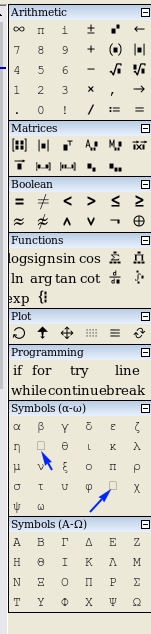
WroteThere are some font missing on Linux system. Also is it possible to increase the side pane size. Its very small for my eyesight
You do need Courier New font, Microsoft version.
It can be found under this post.
Regards
https://en.smath.com/forum/yaf_postsm66281_Missing-symbols-on-Ubuntu-20-mono.aspx#post66281
- Nuovi post
- Nessun nuovo post