
Printing from Linux/mono - Cannot print - Mensajes

I use it with Windows and Linux. (And I would really like to use it native on my Mac).
The only drawback in Linux is, its impossible to print for me. Neither the system printer nor the
pdf-subsystem work. Is anybody out, wh has any hint for me?
Thanks in advance
Leopold
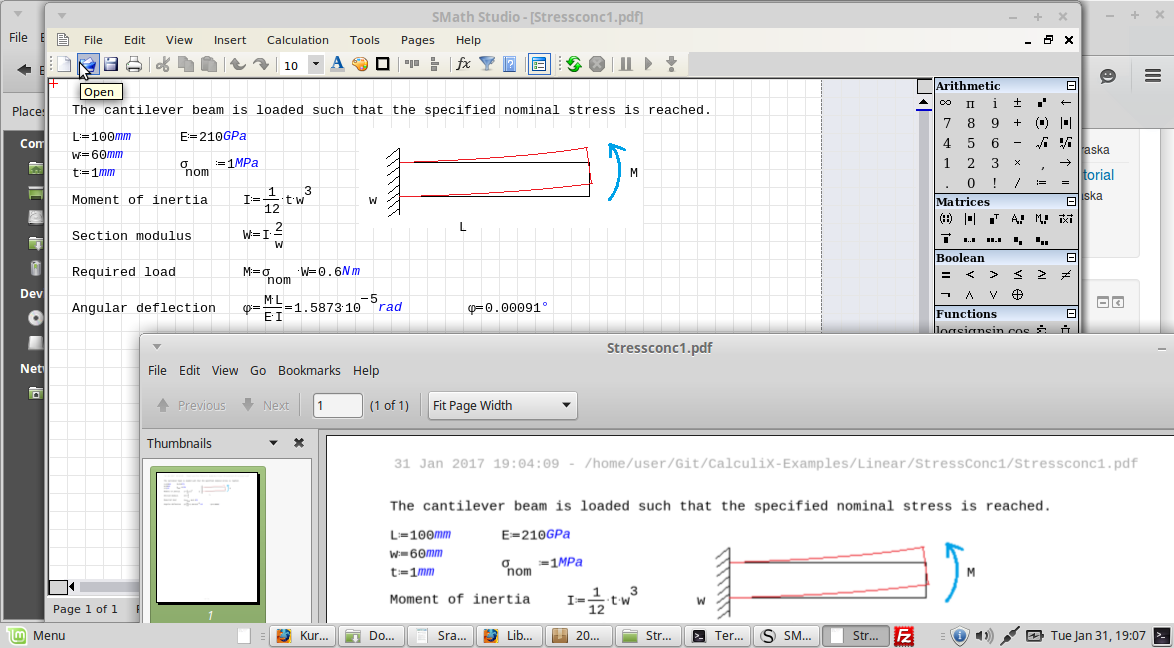
This works for me in a virtual linux box under Win 7
You need the pdf files plugin.
If you use the portable distribution (link in signature), many plugins are pre-installed (the maxima plugin, however, does not work under linux)
but printing via Windows weather in a real or in a virtual machine is not a problem for me. This works flawlessly. Also with a "real" printer.
My question targeted the Linux version mit mono. And within this version it is not possible to save the file as a *.pdf.
And also printing to a real printer does not work for me.
Greetings from Austria
Leopold
WroteMartin many thanks,
but printing via Windows weather in a real or in a virtual machine is not a problem for me. This works flawlessly. Also with a "real" printer.
My question targeted the Linux version mit mono. And within this version it is not possible to save the file as a *.pdf.
And also printing to a real printer does not work for me.
Greetings from Austria
Leopold
Actually, the VM runs ubuntu and SMath is executed with mono in the screenshot. The displayed pdf is generated by save as under linux. As I said, you need to install the pdffiles plugin by Andrey Ivashov.
I believe that this is not affected by whether linux is run on a virtual or physical machine.
BTW, this is also advisable unter windows, as it avoids the usual font size problems when printing directly (depending on dpi settings the region scaling is a bit unreliable.
Ich did not understand you correctly.
I tried to enable the pdf-extension, but I could not find it in the extension-manager.
So I assume I have to download this extension and install it by myself. Never tried this. Are there any hints?
Thanks in advance
Leopold
Many thanks!
Here are images of a page in SMath compared to the printed results- the SMath file is neatly formatted, but the printed version is badly hosed up. It seems like some things are being scaled larger than they should be.
Archivo no encontrado.Archivo no encontrado.
I've tried using the PDF Files add-on, but other than headers and footers the pages are blank. The headers and footers do look correct in that case though.
Saving as an image looks good, but that only gives a long strip of the entire file rather than individual pages, and does not include page headers and footers.
Only svg export works, sort of. Although equal signs or some other things are corrupted on it too.
Trying to find a solution for this about a week.
Regards

WroteI've tried using the PDF Files add-on, but other than headers and footers the pages are blank. The headers and footers do look correct in that case though.
WroteSame here. Installed pdf export, cups/cups-pdf, etc. Either wrong alignment and font issues or blank files.
Please try out this version: https://en.smath.com/file/LTzgd
I've installed Ubuntu 20 and after several hours of debugging discovered a bug in Mono which was a reason why you had header/footer visible only when saving to PDF. Found a workaround, so you can test if it works for you.
Please let me know about results.
WrotePlease try out this version: https://en.smath.com/file/LTzgd
I've installed Ubuntu 20 and after several hours of debugging discovered a bug in Mono which was a reason why you had header/footer visible only when saving to PDF. Found a workaround, so you can test if it works for you.
Please let me know about results.
Out of this topic, as I mentioned before bold and italic font issue remains.
PDF export works well but not "scalable" like genuine pdf print, after all pages is converted to images.
It is usable though, well done Andrey, thanks.
+ PDF Export totally works; (nicely done)
+ Only header-footer printed issues resolved;
+ Linux Cups-Pdf printing issues remain;
- Font size;
- Alignment;
- Images are sometimes half, not sure why;
- Tables are empty (can be related to font size);
+ There is an odd behaviour on printing with cups also;
- If you create a new file and do some calculation and try to print it, it won't. Blank pdf file.
- If you edit an old file, clear it, put same calculation into it (either write from scratch or copy into it) it will print.
- Totally identical files gives this bug too. I have edited example file with notepad to make them same except id's. Bug remains.
Here I am attaching all experimentation files.
Regards
bombe_en2_cupspdf.pdf (88,48 KiB) descargado 832 vez(es).
bombe_en2_pdfexport.pdf (122,61 KiB) descargado 842 vez(es).
**
example_copied into old smath file.sm (4,49 KiB) descargado 1561 vez(es).
Untitled__PDF-job_59.pdf (35,1 KiB) descargado 762 vez(es).
**
example_written to new file.sm (4,49 KiB) descargado 1491 vez(es).
Untitled__PDF-job_61.pdf (1,06 KiB) descargado 792 vez(es).
**
viscosity_copied into old smath file.sm (70,94 KiB) descargado 1585 vez(es).
Untitled__PDF-job_60.pdf (106,16 KiB) descargado 849 vez(es).
**
viscosity_written to new file.sm (70,93 KiB) descargado 1554 vez(es).
Untitled__PDF-job_62.pdf (1,06 KiB) descargado 834 vez(es).
1. What's that (\0 0B0\C) on my SS 6179
2. Triple point of water is 0.01 °C ... not 0 !
3. Engineering works "cP"
Inst_Viscosity Water.sm (43,35 KiB) descargado 1512 vez(es).
- Nuevos mensajes
- Sin mensajes nuevos