
1 páginas (7 elementos)
If Else If Statements - How to make an Else If statement - Mensajes

Hello dear Smath Users,
I accidentally pressed the keyboard once and created an Else-If statement like this:
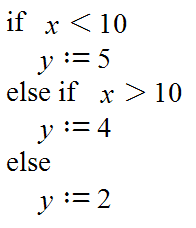
Lately I have been struggling to find this option of an Else If statement on Smath studio.
There seemed to be no information on this topic anywhere.
So I figured it out myself:
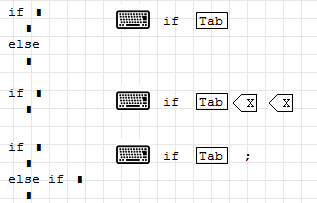
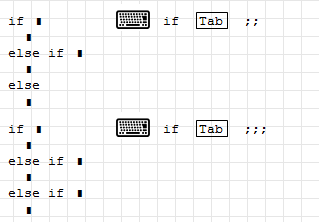
--Type "if" and press the TAB key.
--Click in the place above the "Else" portion of the If statement.
--Now press ";" and you should get an If Else-If statement.
Kind Regards!
I accidentally pressed the keyboard once and created an Else-If statement like this:
Lately I have been struggling to find this option of an Else If statement on Smath studio.
There seemed to be no information on this topic anywhere.
So I figured it out myself:
--Type "if" and press the TAB key.
--Click in the place above the "Else" portion of the If statement.
--Now press ";" and you should get an If Else-If statement.
Kind Regards!
1. if/else from program palette
2. alternately from fx menu
3. if/otherwise from fx menu cases
2. alternately from fx menu
3. if/otherwise from fx menu cases
You add and remove entries just as within vectors or lists (sys) or command blocks (line). If you don't need command blocks in the entries, then probably the cases() function from the custom functions plugin is more reader-friendly than cascades of if().
Technische Mechanik mit SMath Studio: https://link.springer.com/book/10.1007/978-3-658-50592-9
Mathcad has if/else in two styles
like Smath and single line => very convenient compactor.
like Smath and single line => very convenient compactor.
WroteLately I have been struggling to find this option of an Else If statement on Smath studio.
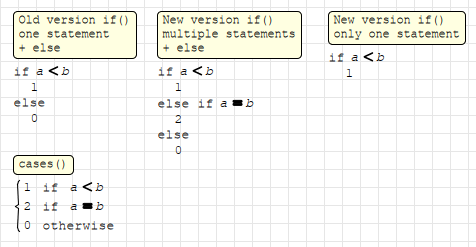
Original if() didn't have else if just over a year ago.
Only persistent else statement existed with one if.
Nowadays you can even eliminate else.
Regards
A 1 usuarios les gustó este mensaje
Oscar Campo 18/12/2023 6:16:00

Good evening. Somehow the shortcut keys for this one doesn't work for me. Am I doing it right?
Edit. I figured it out already. Under Tools > Options I can set the "Arguments separator" to semicolon
Edit. I figured it out already. Under Tools > Options I can set the "Arguments separator" to semicolon
WroteYou add and remove entries just as within vectors or lists (sys) or command blocks (line). If you don't need command blocks in the entries, then probably the cases() function from the custom functions plugin is more reader-friendly than cascades of if().
Editado 10/9/2025 12:09:13

You are not forced to change your settings, though. Just use the argument separator you prefer instead of the one in the screenshot (if your is comma, use comma to add arguments instead of the semicolon).
Editado 10/9/2025 19:21:04
If you like my plugins please consider to support the program buying a license; for personal contributions to me: paypal.me/dcprojects
1 páginas (7 elementos)
- Nuevos mensajes
- Sin mensajes nuevos