
Units in Table Region - That the Table shows the desired units. - Mensajes

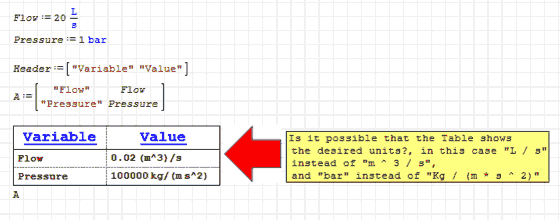
Table_Units_Kr.sm (11,31 KiB) descargado 1363 vez(es).
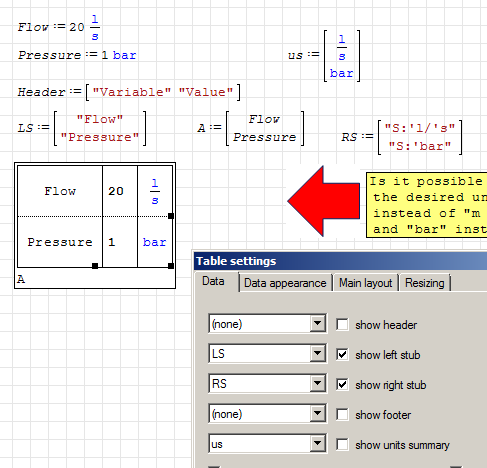
But now how do I include the header?
since it does not appear as an option in the heading list.
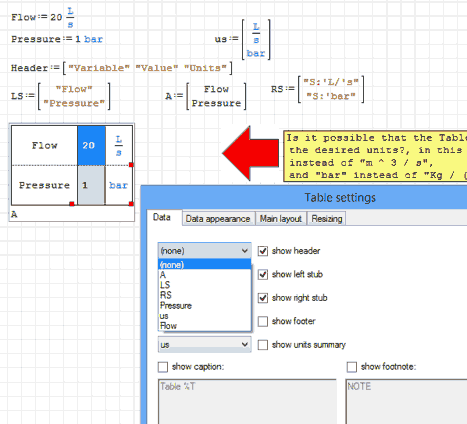
Best regards
Carlos
WroteThank you very much Martin,
But now how do I include the header?
since it does not appear as an option in the heading list.
Best regards
Carlos
The header can only be specified for the columns of the data matrix, thus only single column objects are listed as choices for header variable. I don't know of options to fill the fields above the left and right row titles.
WroteWill it be possible?
Unit system [base SI in Smath] is desperately too circular.
Table_Units(1).sm (9,87 KiB) descargado 1325 vez(es).
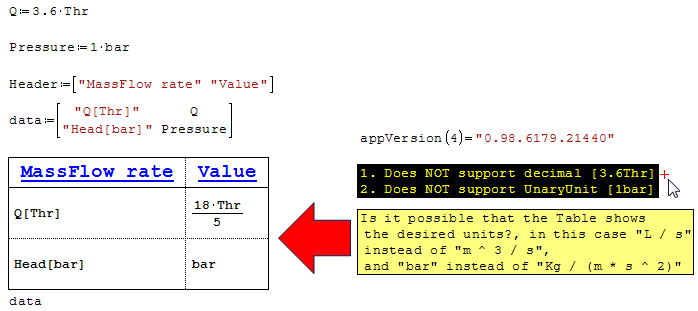
I think that the Table Region plugin should be
improved to include the possibility of incorporating
headers in the left and right columns.
Best regards
Carlos
WroteI think that the Table Region plugin should be
improved to include the possibility of incorporating
headers in the left and right columns.
... some +++ from brain storming, will make it convenient.
Would be a great tool to collect all my fluids wrt their specifics.
Jean
on the topic of units within the table, would the following be possible:
a:= ft
b:= in
matrix:=[a "-" b]
table:= matrix
Show a and b in a table with their corresponding units (ft and inches respectively)
Right now, a and b are shown as default unit only. Both are the same unit.
Why you may ask? This is an attempt at showing mixed units as a single output result in sheet. Often lengths are specified in feet + fractional inches.
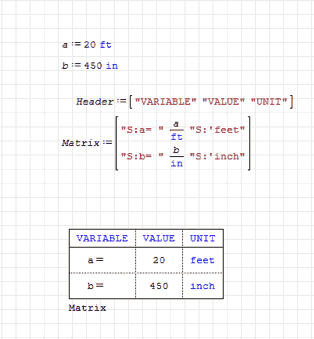
Some Jedi magic I don't understand in your sheet.
1) Where did you get the "S colon" {S:} as part of the variable? I don't remember seeing this command/function and don't understand it's use
2) How did you display Matrix (Table)? Most Matrices use the augment command to generate the table. It's not like you typed in Matrix= ... Found this answer, never used it Ctrl+Shift+T
3) Is this a true matrix that was created? Looks like just a data display table. Cannot use the values short of using the variables a or b
Thank you
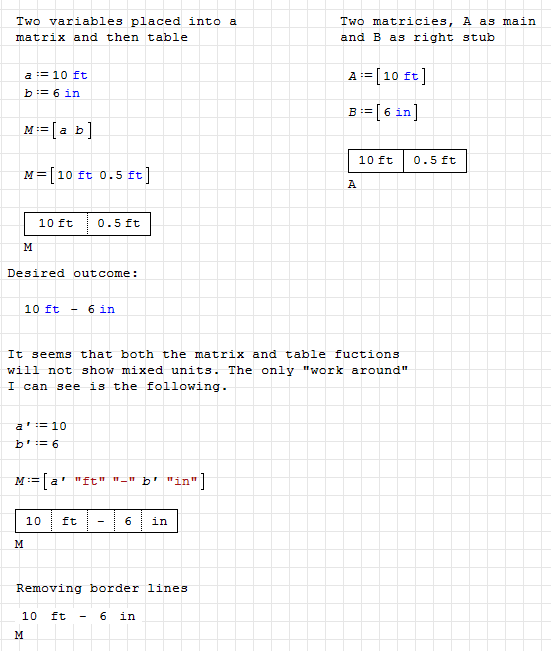
Mixed Units Ideas - Table.sm (25,34 KiB) descargado 1272 vez(es).
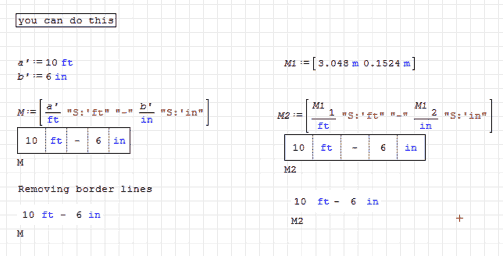
Adding the "S:" makes it look much better.
Maybe at some point, the table region will allow for mixed units. For the time being this solution will work well.
thanks for the input.
Wes
1).-The "S: '" is to be displayed as a unit in blue, and I learned it from Martin Kraska.
3).-It is the table region, which calls the variable matrix with the name.
Best Regards
Carlos
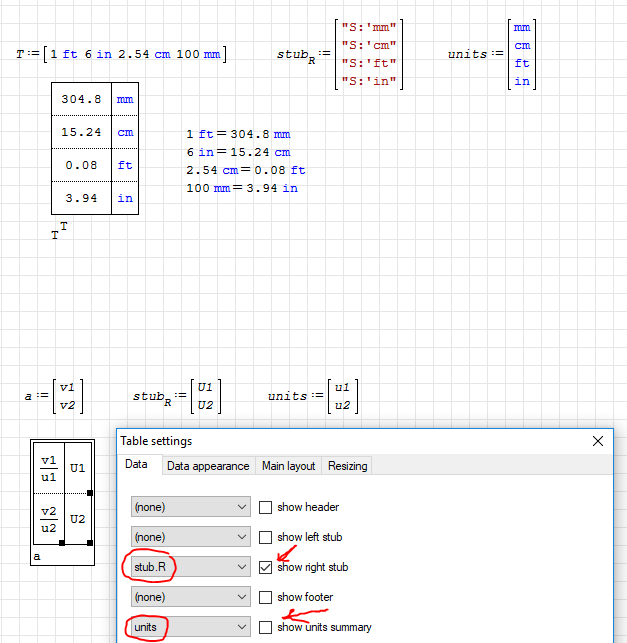
The "unit summary" function of the table region will actually perform the unit conversions for you.
Note that this is only for direct scalar multiplier conversions. It does not work for temp units...
This way you don't have to cancel out units in the matrix going into the table. The "units summary" will do that for you.
Note that the "unit summary" is selected but NOT displayed. There is also a proof with variables.
This idea comes from user ndtma on the Table Region topic, at least that's where i saw it first, maybe someone else did it first?
WroteIt does not work for temp units...
... doctored for °C. Very convenient for me, up2next !
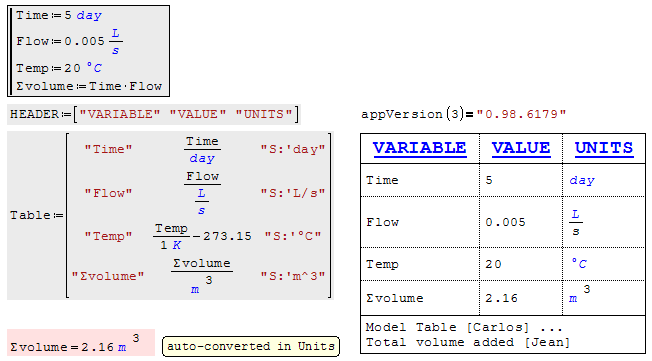
Table Region Carlos.sm (10,81 KiB) descargado 1322 vez(es).
"S:'L/s" should be "S:'L/'s". Note the added "'" in order to show "s" as blue unit.
WroteJean,
"S:'L/s" should be "S:'L/'s". Note the added "'" in order to show "s" as blue unit.
Thanks for that one wb.c ... corrected !
Jean
WroteThe "unit summary" function of the table region will actually perform the unit conversions for you.
Note that this is only for direct scalar multiplier conversions. It does not work for temp units...
This way you don't have to cancel out units in the matrix going into the table. The "units summary" will do that for you.
Note that the "unit summary" is selected but NOT displayed. There is also a proof with variables.
This idea comes from user ndtma on the Table Region topic, at least that's where i saw it first, maybe someone else did it first?
Hello wb.c
I know what you say, but it has the disadvantage that you can not put a header in the table. On the other hand,
it is very easy to make a copy of the table and delete in a single stroke the left part corresponding to the Units
Hi Jean:
A very simple solution for the problem of the conversion of the temperature in Celsius Degrees, is that you define
your own unit of degrees Celsius.
Table Region Carlos_Jean_R1.sm (11,7 KiB) descargado 1371 vez(es).
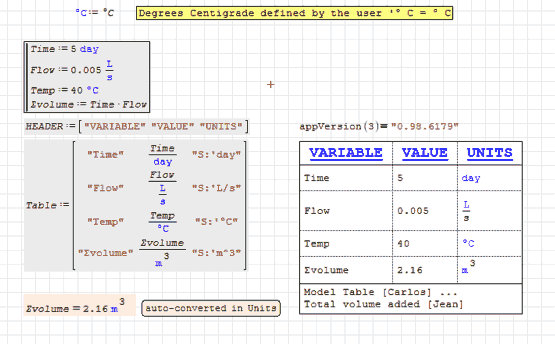
WroteHi Jean:
A very simple solution for the problem of the conversion of the temperature in Celsius Degrees, is that you define
your own unit of degrees Celsius.
Thanks Carlos for that one.
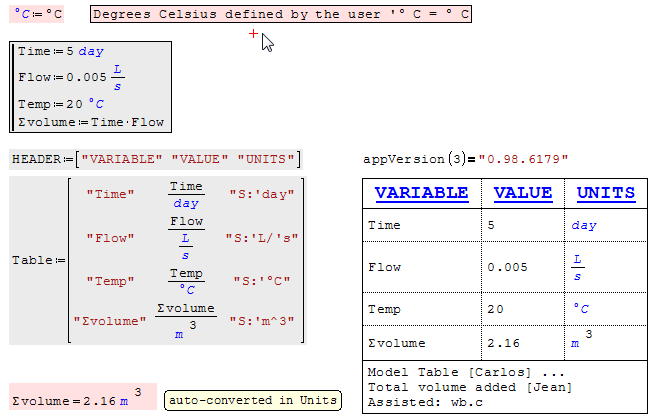
Thanks to all Doctors ... Nice for publishing.
Jean
Table Region Carlos.sm (12,15 KiB) descargado 1299 vez(es).
- Nuevos mensajes
- Sin mensajes nuevos