
1 páginas (8 elementos)
Matrix size defined by variables - Mensajes

Does anyone know if it is possible to define a variable which will determine the size of a matrix. From where on the created matrix is again an input and not an output.
For exaple:
n:=1 (number of rows)
m:=3 (number of koloms)
creates a matrix of 1 kolom and 3 rows as below
y:= [* * *]
where the '*' are emty and can be spicified by the user.
Beste regards,
Rens Servais
For exaple:
n:=1 (number of rows)
m:=3 (number of koloms)
creates a matrix of 1 kolom and 3 rows as below
y:= [* * *]
where the '*' are emty and can be spicified by the user.
Beste regards,
Rens Servais
WroteDoes anyone know if it is possible to define a variable which will determine the size of a matrix.
Both ways: empty and '0'
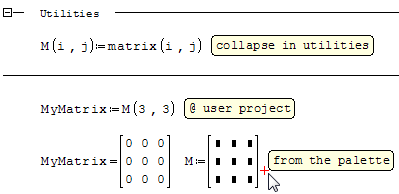
Other solution
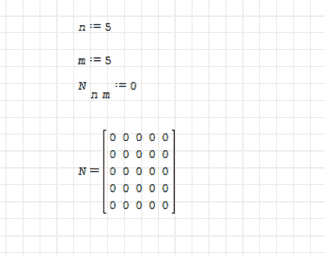
Best Regards
Carlos
Best Regards
Carlos
WroteWroteDoes anyone know if it is possible to define a variable which will determine the size of a matrix.
Both ways: empty and '0'
Thanks Jean Giraud,
Your solution suits the best for me, but I can not reproduce it. See below. What do I do wrong?
Beste regards,
Rens
Matrix.sm (31,46 KiB) descargado 1325 vez(es).

WroteI can not reproduce it
Do one of the following:
- press CTRL+M
- write mat(
- write mat and press the tabulation key
- on the right side of the windows, click on the first element of the Matrices toolbox
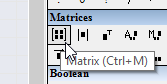
- use the function dialog (press CTRL+E or choose the Insert > Function menu item or click on the fx symbol from the toolbar) choose the Matrix and vector group and search mat (click on whatever item and press m), then double click it or click on the insert button
Archivo no encontrado. Archivo no encontrado.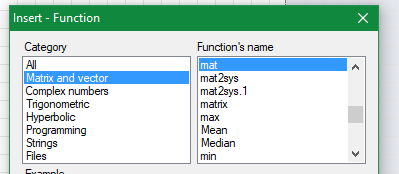
If you like my plugins please consider to support the program buying a license; for personal contributions to me: paypal.me/dcprojects
A 2 usuarios les gustó este mensaje
WroteYour solution suits the best for me, but I can not reproduce it
That will work for you. At this point, you can address any element.
The empty matrix has almost no use.
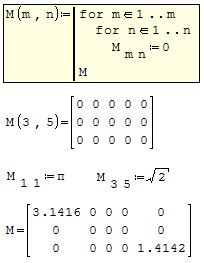
Plenty of matrix manipulation in there.
There are more and more, that should help.
Utilities Matrix Treasury_2 Copy.sm (109,43 KiB) descargado 1307 vez(es).
Utilities Matrix Treasury_0 Copy.sm (376,52 KiB) descargado 1354 vez(es).
Utilities Matrix Treasury_1 Copy.sm (372,39 KiB) descargado 1348 vez(es).
There are more and more, that should help.
Utilities Matrix Treasury_2 Copy.sm (109,43 KiB) descargado 1307 vez(es).
Utilities Matrix Treasury_0 Copy.sm (376,52 KiB) descargado 1354 vez(es).
Utilities Matrix Treasury_1 Copy.sm (372,39 KiB) descargado 1348 vez(es).
1 páginas (8 elementos)
- Nuevos mensajes
- Sin mensajes nuevos