
Solve equation - "no real roots" result - Mensajes

I am relatively new to SMath (have used Mathcad in the past). I am trying to use SMath to run some engineering calculations. Particularly, I am interested in solving equations - I have used 'solve' function, but always get a "no real roots" message (see file attached).
Can someone help out?
Many thanks in advance!
J
WroteI am relatively new to SMath (have used Mathcad in the past). I am trying to use SMath to run some engineering calculations. Particularly, I am interested in solving equations - I have used 'solve' function, but always get a "no real roots" message (see file attached).
Can someone help out?
Many thanks in advance!
Solving means a lot in Engineering works.
No real roots, indicates the solver is ill posed [generally]
Please, don't hesitate to post your problem, there is great expertise in Smath Community.
Maths bitcoin.sm (36,43 KiB) descargado 1545 vez(es).
Solve General.sm (138,6 KiB) descargado 1596 vez(es).
Solve TREASURY_0 [General].sm (119,73 KiB) descargado 1373 vez(es).

Many thanks,
J
WroteIs there any chance someone could have a look at the file I have attached originally?
There aren't attachments in your posts

Citar



WroteIs there any chance someone could have a look at the file I have attached originally?
There is no *.sm document attached !
Iff someone could have a look at the .sm file I have attached, I would be very grateful.
Many thanks,
Joao
SMath_equation solver test.zip (1,59 KiB) descargado 576 vez(es).
SMath_equation solver test.sm (8,23 KiB) descargado 1548 vez(es).
SMath_equation solver test.sm (8,23 KiB) descargado 1503 vez(es).
Hi ALL,
Many thanks for you interest and responses. Apologies for not having responded but I have been away from the office. I am trying to attach an .sm file, but for some reason this is not working... Any thoughts?
Thanks,
Joao
WroteIff someone could have a look at the .sm file I have attached, I would be very grateful.
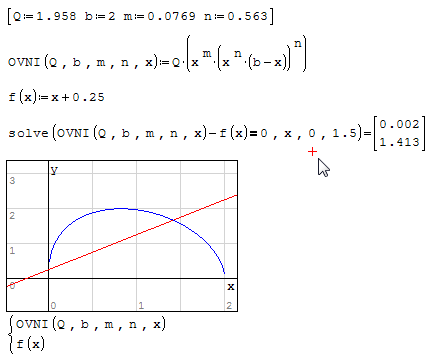
"NO real roots" from the solve bloc is an absolute pest [not to say stupid].
SMath_equation solver test (1).sm (11,49 KiB) descargado 1481 vez(es).
Many thanks for your incredible support! I am in awe for the depth of knowledge herein displayed.
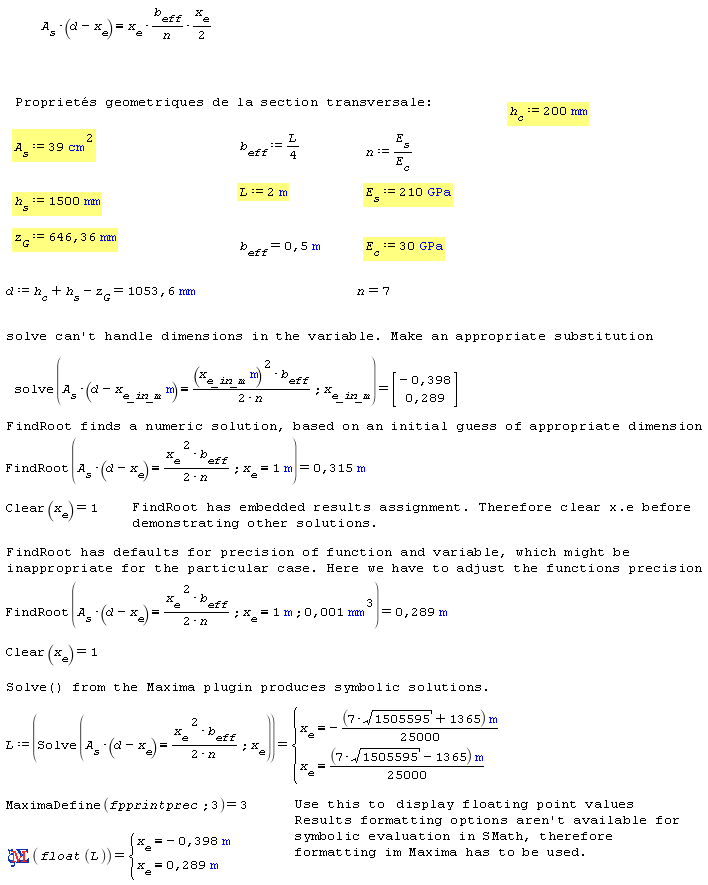
With regards to your responses, I appreciate the need to make an appropriate substitution to overcome the fact that solve can't handle units in the variable; However, I can´t seem to assign the unit to the variable, within the equation (apologies for being thick). I've tried typing x'm, tried using ctrl+w to assign meters unit to x, but still haven't managed to make it work. A bit frustrating... If anyone could be so kind to shed some light here, that would be greatly appreciated.
Many thanks,
J
WroteDear ALL,
Many thanks for your incredible support! I am in awe for the depth of knowledge herein displayed.
With regards to your responses, I appreciate the need to make an appropriate substitution to overcome the fact that solve can't handle units in the variable; However, I can´t seem to assign the unit to the variable, within the equation (apologies for being thick). I've tried typing x'm, tried using ctrl+w to assign meters unit to x, but still haven't managed to make it work. A bit frustrating... If anyone could be so kind to shed some light here, that would be greatly appreciated.
Many thanks,
J
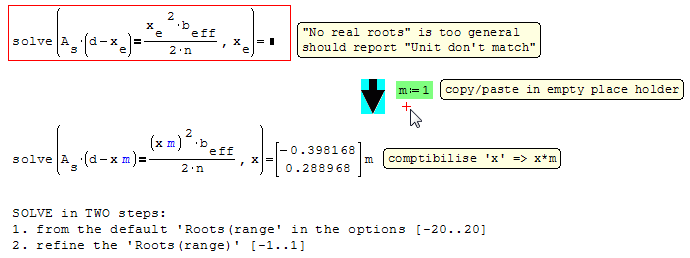
Type x*'m or x* and then insert the unit from the dialog into the empty placeholder in the right of the multiplication dot.
Multiplication operators in front of units aren't shown.
WroteMany thanks for your incredible support! I am in awe for the depth of knowledge herein displayed.
With regards to your responses, I appreciate the need to make an appropriate substitution to overcome the fact that solve can't handle units in the variable; However, I can´t seem to assign the unit to the variable, within the equation (apologies for being thick). I've tried typing x'm, tried using ctrl w to assign meters unit to x, but still haven't managed to make it work. A bit frustrating... If anyone could be so kind to shed some light here, that would be greatly appreciated.
You are debating with the Unit SI as implemented in Smath [Mathcad ...]
You may pacify your soul on several counts:
1. maths are unit less
2. ISO standards have their own units [most generally from SI derived units].
... therefore converting automatically bar in Pa ... etc.
3. Engineering formulas are constructed around the appropriate Units
... therefore no need to freak them more.
4. Consider this example: you have a formula, from which you can directly/indirectly
compute the arc length ... in what SI units Watson ???
... simple Sherlook ... in "UnitGraphic" that you can meter in year-light/micrometer ...
5. How did we do in the age of the slide rule, in the age of paper/pencil/log tables ?
6. Was Sputnik launched from SI unit software ?

Wroteit works on wolfram and symbolab, but not in Smath.
Always plot first ...
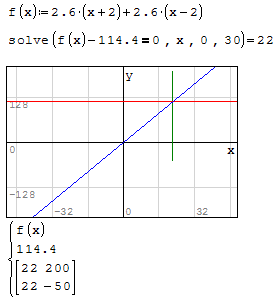
WroteWroteit works on wolfram and symbolab, but not in Smath.
Always plot first ...
I somehow missed the option to use the 2nd solve function with root limit, but I didn't need a plot for this, so I used it in one line and everything worked out fine.
I can't click the thank button, so thanks.
WroteI somehow missed the option to use the 2nd solve function with root limit, but I didn't need a plot for this, so I used it in one line and everything worked out fine.
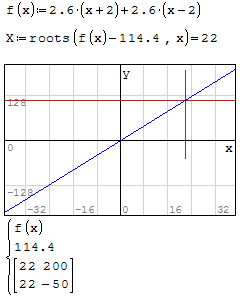
If you don't plot, you will soon hit the wall.
That will help set the limits.
When applicable, "implicit roots" is often + accurate.
- Nuevos mensajes
- Sin mensajes nuevos