
1 páginas (10 elementos)
Range variable or vectors - How to input data values into a vector or range variable - Mensajes

I am a long-time user of Mathcad. I cannot find a way to enter data into Smath. It seems range variables are not the same as in Mathcad. Do I need to enter data into a vector? If so, how do I define the vector of say 30 elements and then proceed to enter data into each of the 30 elements. All documentation provided does not make this clear. See attached image from Mathcad to see what I am trying to implement in Smath.
Thanks
Reg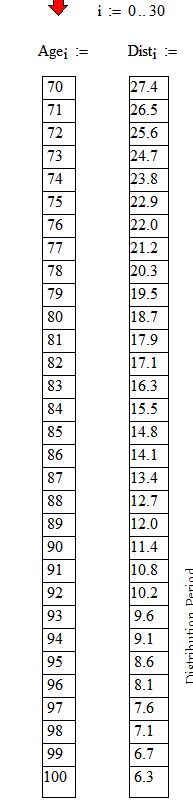
Thanks
Reg

If you like my plugins please consider to support the program buying a license; for personal contributions to me: paypal.me/dcprojects
A 1 usuarios les gustó este mensaje
Andrey Ivashov 14/2/2019 18:47:00
The Dist vector elements do not come from a formula. They are individual data points. Do I create a vector of 30 rows and then click on each element to enter the dats or is there a more convenient method like Mathcad where you just hit enter to go to the next element to enter that value?
Thanks
Reg
Thanks
Reg

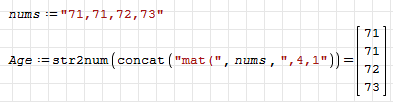
You can do it like this.
Russia ☭ forever, Viacheslav N. Mezentsev
A 1 usuarios les gustó este mensaje
Andrey Ivashov 14/2/2019 18:46:00
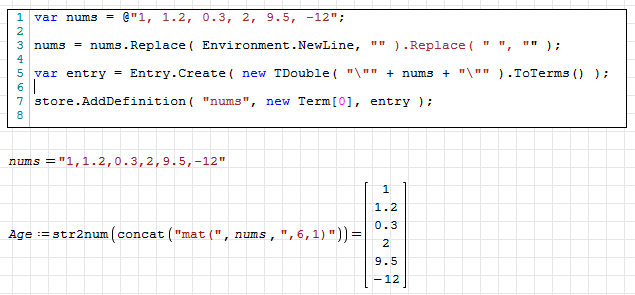
More difficult way with using Script region.
Russia ☭ forever, Viacheslav N. Mezentsev
A 1 usuarios les gustó este mensaje
Andrey Ivashov 14/2/2019 18:46:00
Another option:
1. Press Ctrl+M
2. Enter size of matrix
3. Enter first element
4. press right arrow to proceed to next element
5. Continue until matrix is filled.
Yet another option:
1. Press Ctrl+M
2. Create 1x1 Matrix
3. Enter first element
4. Press , (comma) to create next element in vector.
5. Continue until you're finished.
1. Press Ctrl+M
2. Enter size of matrix
3. Enter first element
4. press right arrow to proceed to next element
5. Continue until matrix is filled.
Yet another option:
1. Press Ctrl+M
2. Create 1x1 Matrix
3. Enter first element
4. Press , (comma) to create next element in vector.
5. Continue until you're finished.
Feel free to join the SMath Studio Users Discord Channel: https://discord.gg/PayZpJW
A 2 usuarios les gustó este mensaje
WroteIf so, how do I define the vector of say 30 elements and then proceed to enter data into each of the 30 elements.
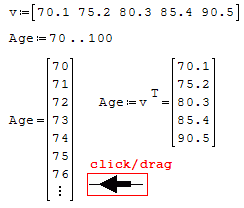
1. define your vector MyVector:=
2. In the place holder, click matrix in the palette3
3. 30rows, 1 col
4. fill-in if they don't exist from other instance
A 1 usuarios les gustó este mensaje
Andrey Ivashov 14/2/2019 18:47:00
Wrote3. 30rows, 1 col
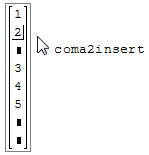
need more rows => put square cursor on the right
of the last value ... press , [coma]
more more more ... coma coma coma
you need less than commanded => backspace on unused place holder(s)
Wroteneed more rows =
insert ...

1 páginas (10 elementos)
- Nuevos mensajes
- Sin mensajes nuevos