
1 páginas (10 elementos)
x^y=error - Mensajes

hi
if i try to calculate this:
300^1.3 then it gives the result fine.
if i try to calculate 300^1.274 then it gives an error: "result is above max allowed positive number"
i tried this with the latest beta release. the previous verson from february calculates it fine.
if i try to calculate this:
300^1.3 then it gives the result fine.
if i try to calculate 300^1.274 then it gives an error: "result is above max allowed positive number"
i tried this with the latest beta release. the previous verson from february calculates it fine.

Hello.
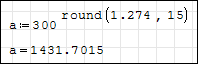
This is known problem. The only way to beat it is to use workaround with round(...) function as shown on the screenshot below:
This will be fixed later.
This is known problem. The only way to beat it is to use workaround with round(...) function as shown on the screenshot below:
This will be fixed later.

If you remember, "eval" function has been introduced in the case of rather complicated symbolic result resulting in slow calculation. If we need the numerical result only, by using "eval" the calculation time can be reduced drastically. Sometimes "eval" will not help. Here is an example were "round" can aslo help  . This is an Example from the SMath included Examples.
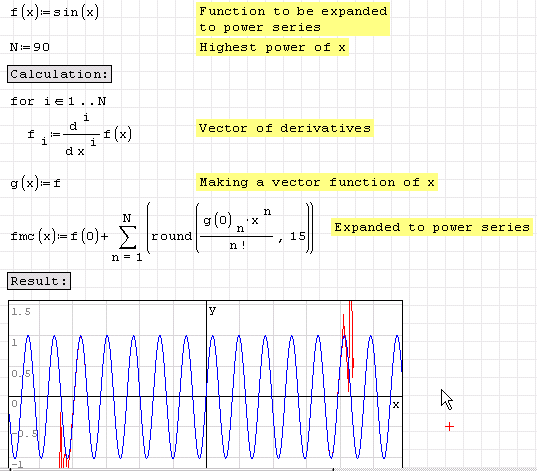
(Numerical instability is expected, of course). Without "round" you can use up to 26-th polynomial degree.
Regards,
Radovan
PS. It is interesting to note that in this particular case "eval" will drastically increase the computational time. It might be usless (very slow) for higher polynomial degree. I do not know why, but "round" will do do job quite good. Forgot to mention - this is from 0.87 stable version. Could someone check it on 0.87 Beta? I will also check it tomorow at my office.
. This is an Example from the SMath included Examples.(Numerical instability is expected, of course). Without "round" you can use up to 26-th polynomial degree.
Regards,
Radovan
PS. It is interesting to note that in this particular case "eval" will drastically increase the computational time. It might be usless (very slow) for higher polynomial degree. I do not know why, but "round" will do do job quite good. Forgot to mention - this is from 0.87 stable version. Could someone check it on 0.87 Beta? I will also check it tomorow at my office.
When Sisyphus climbed to the top of a hill, they said: "Wrong boulder!"
hi
thanks.
but it worked fine in the 10-february-2010 release. i mean there was no need for using the rounding...
i have a calculation sheet that worked fine, but after installing the new beta version yesterday it gave an error.
i could attach the file here, but there is no such button.
regards,
istvan
thanks.
but it worked fine in the 10-february-2010 release. i mean there was no need for using the rounding...
i have a calculation sheet that worked fine, but after installing the new beta version yesterday it gave an error.
i could attach the file here, but there is no such button.
regards,
istvan
Hello Istvan,
Yes, you are right. In the 0.87 stable version there would be no error issued.
You could use some file hosting service or you can make from .sm an archived (.zip) file and upload it on the Wiki (File Management - menu on the right). Then make a link to it here.
Regards,
Radovan
Yes, you are right. In the 0.87 stable version there would be no error issued.
Wrotei have a calculation sheet that worked fine, but after installing the new beta version yesterday it gave an error.
i could attach the file here, but there is no such button.
You could use some file hosting service or you can make from .sm an archived (.zip) file and upload it on the Wiki (File Management - menu on the right). Then make a link to it here.
Regards,
Radovan
When Sisyphus climbed to the top of a hill, they said: "Wrong boulder!"
hi
i uploaded the file to the examples on "wiki":
https://smath.com/wiki/GetFile.aspx?File=Examples%5cDCDC_converter_Dissipation.zip
can i expect that all known problems will be fixed in the next stable release?
i uploaded the file to the examples on "wiki":
https://smath.com/wiki/GetFile.aspx?File=Examples%5cDCDC_converter_Dissipation.zip
can i expect that all known problems will be fixed in the next stable release?
Not sure about next stable release, but this will be fixed in future. For now we have a solution mentioned in my previous comment (it is acceptable for your file as well).
Wroteif i try to calculate 300^1.274 then it gives an error: "result is above max allowed positive number"
Fixed.

Hi,
I was trying:
n:=30000
pf:=1/n
pv:=pf*(1-pf)^n
and I obtained the error "result is above max allowed positive number". But, when I select the "pv:=pf*(1-pf)^n" and choose "Calculation/Optimization/Numeric", SMath find the correct answer: "pv=1.226*10^-5". The same happen when you choose "Calculation/Optimization/None"
Regards,
Oscar
I was trying:
n:=30000
pf:=1/n
pv:=pf*(1-pf)^n
and I obtained the error "result is above max allowed positive number". But, when I select the "pv:=pf*(1-pf)^n" and choose "Calculation/Optimization/Numeric", SMath find the correct answer: "pv=1.226*10^-5". The same happen when you choose "Calculation/Optimization/None"
Regards,
Oscar

WroteHi,
I was trying:
n:=30000
pf:=1/n
pv:=pf*(1-pf)^n
and I obtained the error "result is above max allowed positive number". But, when I select the "pv:=pf*(1-pf)^n" and choose "Calculation/Optimization/Numeric", SMath find the correct answer: "pv=1.226*10^-5". The same happen when you choose "Calculation/Optimization/None"
Regards,
Oscar
Right click over the definition of pv and select optimisation and set the option to numeric (this is for version 0.88) and all will be well.

Note, to very high precision (1-1/3000)^3000=1/e, e being Euler's number and the base of natural logarithms.
CB
1 páginas (10 elementos)
- Nuevos mensajes
- Sin mensajes nuevos