
Matrices with Text and Units - Using text and units within a matrix - Mensajes

Just wondering if anyone has a workaround or knows how to change the units of a matrix with text in some slots of the matrix.
I understand a matrix with text and units will display all items as default units, is there any way to change them?
Thanks in advance.
You have to extract submatrices and display those separately.
The table region provides some extended options. There you can specify column or row units but you have to write them explicitly to the header if you want a nice display of column units.
This is sort of redundant and therefore error-prone input.
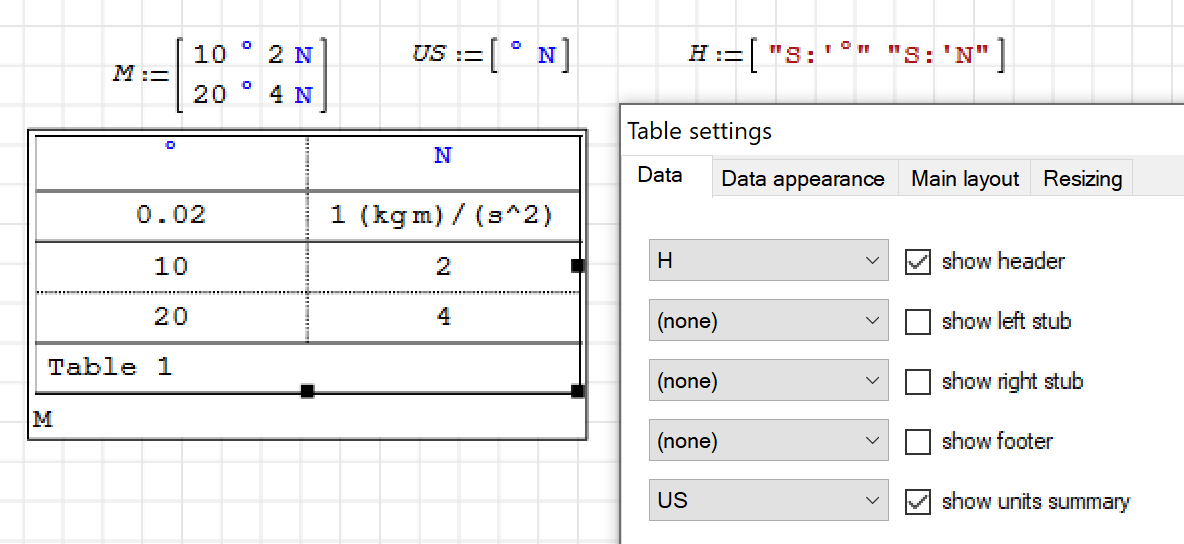
table.sm (7,87 KiB) descargado 1441 vez(es).
Wrotehow to change the units of a matrix with text in some slots of the matrix.
Inst_Colebrook Pipe Data.sm (60,97 KiB) descargado 1509 vez(es).
WroteYou can only specify units for the whole result, useless in your scenario.
You have to extract submatrices and display those separately.
The table region provides some extended options. There you can specify column or row units but you have to write them explicitly to the header if you want a nice display of column units.
This is sort of redundant and therefore error-prone input.
Is there any way to fix the improper positioning of text (which start with "S:') when used in tables?
Misalignment is so obvious, blue colored special text is always a bit upper in tables than the rest as it can be seen at this example too.
Regards
WroteIs there any way to fix the improper positioning of text (which start with "S:' when used in tables?
Misalignment is so obvious, blue colored special text is always a bit upper in tables than the rest as it can be seen at this example too.
What's wrong with such perfect Table ?
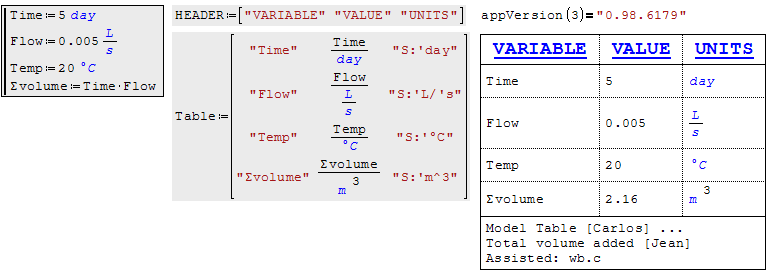
WroteWroteIs there any way to fix the improper positioning of text (which start with "S:' when used in tables?
Misalignment is so obvious, blue colored special text is always a bit upper in tables than the rest as it can be seen at this example too.
What's wrong with such perfect Table ?
What Jean says is: Stick with build 6179. The problem is version-dependent. The new text engine has multiple alignment problems, not only vertical but also horizontal (long words in text tend to overlap). It is just an intermediate step towards extended functionality. Using the newest version and reporting problems can be understood as a way to support the project and pay for use of free software.
WroteWhat Jean says is: Stick with build 6179. The problem is version-dependent. The new text engine has multiple alignment problems, not only vertical but also horizontal (long words in text tend to overlap). It is just an intermediate step towards extended functionality. Using the newest version and reporting problems can be understood as a way to support the project and pay for use of free software.
Thanks, didn't know the text engine generates different behavior between versions.
I don't bother this issue that much and don't complain actually.
Just wanted to know the reason and learned.
Regards
- Nuevos mensajes
- Sin mensajes nuevos