
1 páginas (12 elementos)
Long line formula - Splitting a long line formula - Mensajes

Hello Everybody,
I have a small practical question:
How to split a long line (formula) on two or more lines.
I think that the subject was explained somewhere but I’m not sure about.
I know the primary solution of allocation variable names for the parts of the formula, but…
Thanks for your help.
Ioan
I have a small practical question:
How to split a long line (formula) on two or more lines.
I think that the subject was explained somewhere but I’m not sure about.
I know the primary solution of allocation variable names for the parts of the formula, but…
Thanks for your help.
Ioan
Do to others as you would like them to do to you! Knowledge is of no value unless you put it into practice - Chekhov
WroteHow to split a long line (formula) on two or more lines.
If your formula is piecewise composed of ± pieces, stack those pieces.
WroteHow to split a long line (formula) on two or more lines.
Composite of [+,-,/] may be reduced built-in Smath numden
A 1 usuarios les gustó este mensaje
ioan92 25/9/2023 5:46:00
Write an expression, put the cursor to where you want a line break and press Ctrl-Enter.
This works only once in a formula, not inside results and not inside brackets.
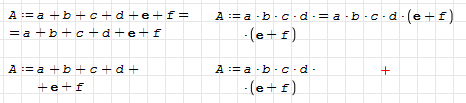
This works only once in a formula, not inside results and not inside brackets.
Technische Mechanik mit SMath Studio: https://link.springer.com/book/10.1007/978-3-658-50592-9
A 2 usuarios les gustó este mensaje

Greetings,
You could also word-wrap your formula:
*There is an issue:
May this be of Good Help;
⚜ Kenny Lemens, P.E. ᵂᴵ
You could also word-wrap your formula:
__________________________ *
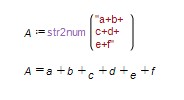
where the 'string' uses newline characters to force on the next line (\000A\ is the special code SMath uses, just copy/paste this and it will word-wrap the string). You can copy and paste the following into your worksheet:
where the 'string' uses newline characters to force on the next line (\000A\ is the special code SMath uses, just copy/paste this and it will word-wrap the string). You can copy and paste the following into your worksheet:
"a+b+\000A\0+c+d+\000A\0+e+f"- write your math expression as a 'string'
- pass that value through the str2num() function; it will be evaluated
*There is an issue:
The variable right after the newline/return/carriage feed may be contaminated, a user may replace that character before, or just get around it by addin a 0 to the character:
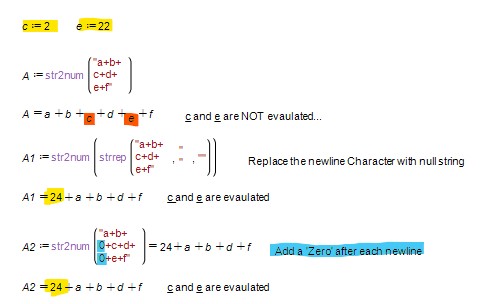
The former might be the best approach, this function can be contained within a function for easy use.
The former might be the best approach, this function can be contained within a function for easy use.
May this be of Good Help;
⚜ Kenny Lemens, P.E. ᵂᴵ
"No matter where you go, there you are." -Buckaroo BanzaiHotkeys: https://en.smath.com/forum/resource.ashx?a=45771&b=2
A 1 usuarios les gustó este mensaje
ioan92 27/9/2023 14:12:00
WroteHow to split a long line (formula) on two or more lines.
I have yet to see such long formula from native Engineering.
If your formula results from symbolic expansion... try maple.
For curiosity and help, show an image of that formula.
I have a 25 pages long formula ... Nothing can be done !
A 1 usuarios les gustó este mensaje
ioan92 27/9/2023 14:12:00
Thank you all for your kind answers.
In fact, I looked more to something like in Mathcad: (without limitations as mentioned by Martin - only one shot)
https://www.mathcad.com/en/blogs/mathcad-4-equation-wrapping#:~:text=Here%20are%20two%20quick%20keyboard,get%20PTC%20Mathcad%20Prime%204.0.&text=To%20toggle%20breaking%20on%20the,instantly%20moves%20down%20a%20line.
Best Regards,
Ioan
In fact, I looked more to something like in Mathcad: (without limitations as mentioned by Martin - only one shot)
https://www.mathcad.com/en/blogs/mathcad-4-equation-wrapping#:~:text=Here%20are%20two%20quick%20keyboard,get%20PTC%20Mathcad%20Prime%204.0.&text=To%20toggle%20breaking%20on%20the,instantly%20moves%20down%20a%20line.
Best Regards,
Ioan
Do to others as you would like them to do to you! Knowledge is of no value unless you put it into practice - Chekhov
Greetings,
I have used Mathcad's split feature as well and I can understand your plight. Keep in mind some other alternatives to present your data. For instance, you can use the a cases() function to organize your criteria/responses in a compact manner:
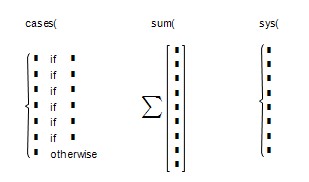
You can also explore sum() function with a matrix in it:
or just the system of equations feature:
Finally, you can just select your math statement and decrease the font size such that your equation will fit on the page. I have resorted to decreasing the font down to font size [2] in order for my matrix/tabulated data to fit on one page width; it served my purposes. [2023-09-28]
Also: Jean, Thank you for the good laugh! I always enjoy your litany of responses.
- Fair enough...
- ...but wait, not only have you seen a 25 pages long formula, but you are in possession of one that can be defined as 'such a long formula'?
- even better! you can post an image of YOUR 25 pages long formula; You are correct that I am curious of this formula.
Hope to see that formula that you have but you have never seen before!
- what a shame that the 25 page long formula that you have but you have never seen, that you decided it cannot be shown...
- Most people would say 'talk' or 'chat,' 'read' is a tad... unique; but I'm easy! Nice reading with you too!
May this be of Good Help;
⚜ Kenny Lemens, P.E. ᵂᴵ
I have used Mathcad's split feature as well and I can understand your plight. Keep in mind some other alternatives to present your data. For instance, you can use the a cases() function to organize your criteria/responses in a compact manner:
cases(#,#,#,#,#,#,#,#,#,#,#,#,#)You can also explore sum() function with a matrix in it:
sum(mat(#,#,#,#,#,#,#,#,#,9,1))or just the system of equations feature:
sys(#,#,#,#,#,#,#,#,8,1)Finally, you can just select your math statement and decrease the font size such that your equation will fit on the page. I have resorted to decreasing the font down to font size [2] in order for my matrix/tabulated data to fit on one page width; it served my purposes. [2023-09-28]
Also: Jean, Thank you for the good laugh! I always enjoy your litany of responses.
WroteI have yet to see such long formula from native Engineering.
- Fair enough...
WroteI have a 25 pages long formula ... Nothing can be done !
- ...but wait, not only have you seen a 25 pages long formula, but you are in possession of one that can be defined as 'such a long formula'?
WroteFor curiosity and help, show an image of that formula.
- even better! you can post an image of YOUR 25 pages long formula; You are correct that I am curious of this formula.
Hope to see that formula that you have but you have never seen before!
WroteI won't show that f(x,y) symbolic expansion.
- what a shame that the 25 page long formula that you have but you have never seen, that you decided it cannot be shown...
WroteAlways nice to read you Kenny ... Jean.
- Most people would say 'talk' or 'chat,' 'read' is a tad... unique; but I'm easy! Nice reading with you too!
May this be of Good Help;
⚜ Kenny Lemens, P.E. ᵂᴵ
"No matter where you go, there you are." -Buckaroo BanzaiHotkeys: https://en.smath.com/forum/resource.ashx?a=45771&b=2
A 1 usuarios les gustó este mensaje
ioan92 27/9/2023 14:48:00
Wrote- even better! you can post an image of YOUR 25 pages long formula; You are correct that I am curious of this formula.
I won't show that f(x,y) symbolic expansion.
Always nice to read you Kenny ... Jean.
Ioan, can I ask why did you delete all your posts?
Hi Overlord,
Of course you can ask...
Have a nice day,
Ioan
Of course you can ask...
Have a nice day,
Ioan
Do to others as you would like them to do to you! Knowledge is of no value unless you put it into practice - Chekhov
1 páginas (12 elementos)
- Nuevos mensajes
- Sin mensajes nuevos