
1 páginas (7 elementos)
RC2: SMath Studio 0.98.5914 (11 March 2016) - Mensajes

SMath Studio 0.98.5914 available
Latest changes (against SMath Studio 0.98.5910)
- UnitsOf(..) function implemented;
- Function time(..) documented and updated to be visible in functions list;
- Function findrows(..) improved to work with numeric evaluations inside;
- Performance of Examples view load in Extensions Manager significantly improved;
- Displaying of error restored on region focus lost after right part of definition is not defined;
- Situations when parenthesis was hidden in answer fixed;
- Function trace(..) output switched to use standard delimiters instead of specific for user;
- Worksheet recalculation now starts on toggling of Disable/Enable evaluation context menu item;
- RichScrollbars style improved for systems with disabled system style;
- Text in search box now selected when panel visibility toggled on;
- Ability to print worksheet using command prompt implemented (-silent -p default worksheet.sm);
- Command prompt interface extended to allow worksheet testing (-silent -t worksheet.sm);
- Numeric library improved to avoid displaying unnecessary "1" in expressions like "1*'unit";
- Interface translations updated.
Download
- Desktop Windows (desktop computer with Windows OS):
 SMathStudioDesktop.0_98_5914.Setup.msi (Date: 11.03.2016. File size: 1.62MB)
- Desktop Linux (desktop computer with Linux OS):
 SMathStudioDesktop.0_98_5914.Mono.tar.gz (Date: 11.03.2016. File size: 1.06MB) - last version of Mono distributive required!
- Cloud version (all modern browsers supported):
 SMath Studio in the Cloud (Date: 11.03.2016.)
A 8 usuarios les gustó este mensaje
Davide Carpi 11/3/2016 22:09:00, уни 12/3/2016 0:18:00, NDTM Amarasekera 12/3/2016 2:10:00, frapuano 12/3/2016 3:27:00, ioan92 12/3/2016 4:09:00, Radovan Omorjan 12/3/2016 4:30:00, sergio 12/3/2016 5:52:00, IVR 12/3/2016 17:58:00

Hello Andrey,
I see there is at least another command prompt feature available (SS 0.96.4902)
What's is syntax? There are other of these commands?
I see there is at least another command prompt feature available (SS 0.96.4902)
CitarAdded ability to export files to supported formats using command prompt;
What's is syntax? There are other of these commands?
If you like my plugins please consider to support the program buying a license; for personal contributions to me: paypal.me/dcprojects
Help command is:
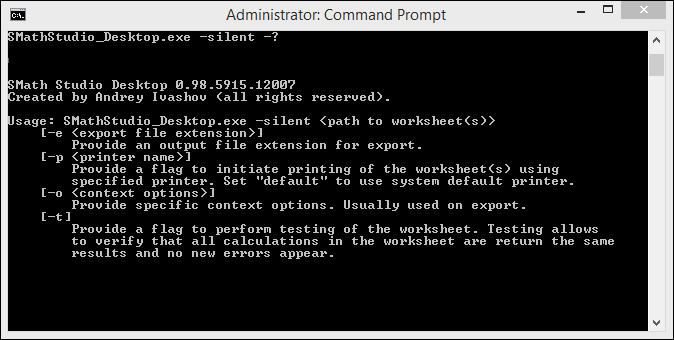
Best regards.
SMathStudio_Desktop.exe -silent -?Best regards.
A 1 usuarios les gustó este mensaje
Davide Carpi 13/3/2016 6:57:00
Thank you very much Andrey! It is very useful for batch processing! 
Documented in the wiki and linked in the wiki main page.
Not sure which options are available with -o or how to change the printer (some attempts I've done they results always with the default printer)
Documented in the wiki and linked in the wiki main page.
Not sure which options are available with -o or how to change the printer (some attempts I've done they results always with the default printer)
If you like my plugins please consider to support the program buying a license; for personal contributions to me: paypal.me/dcprojects

Does this mean I can print multiple files to PDF in with some sort of single command?
Hello. Thank you for good questions!
It may be anything. F.e. you can create a File Type plug-in and implement the following method:
To get options from -o in this plug-in you can read context.Action. So, this is how one can perform files conversion with some options (of course plug-in should support this).
For now selecting exact printer name is not supported. Default is an only option. Sorry Will be implemented in future.
Yes. F.e. here is a *.bat file content which converts all files in folder from .sm to .png:
BTW: -t parameter is actually a way similar to what I use to be sure nothing broken before releasing a new build. I have hundreds of worksheets which passed to SMath Studio in order to ensure that calculation results saved in those files are not changed after recalculation by new version of the program. One can use it also to quickly check that important files are still works after update. If not - contact me, so I could do fix asap.
Best regards.
WroteNot sure which options are available with -o
It may be anything. F.e. you can create a File Type plug-in and implement the following method:
bool IPluginSaveFileTypes.SaveFileType(Stream stream, RegionsEnumerator enumerator, FileContext context)Wrotehow to change the printer (some attempts I've done they results always with the default printer)
For now selecting exact printer name is not supported. Default is an only option. Sorry
Will be implemented in future.WroteDoes this mean I can print multiple files to PDF in with some sort of single command?
Yes. F.e. here is a *.bat file content which converts all files in folder from .sm to .png:
@echo off
for %%a in ("C:\examples\*" do call:convert %%a
exit/b
:convert
call "C:\Program Files (x86)\SMath Studio\SMathStudio_Desktop.exe" -silent -e .png %*
BTW: -t parameter is actually a way similar to what I use to be sure nothing broken before releasing a new build. I have hundreds of worksheets which passed to SMath Studio in order to ensure that calculation results saved in those files are not changed after recalculation by new version of the program. One can use it also to quickly check that important files are still works after update. If not - contact me, so I could do fix asap.
Best regards.
A 3 usuarios les gustó este mensaje
Sorry for the delay, Thanks Andrey!
1 páginas (7 elementos)
- Nuevos mensajes
- Sin mensajes nuevos