
Units in denominator not changing - Mensajes

I have an issue with the units for the calculation shown in the image
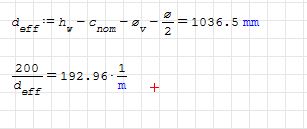
edit: image attached
The calculation of 200/d_eff gives a result of 192.96, which is in units of m^-1, however I need the units in mm^-1 (0.19296) since d_eff is in units of mm. It seems like it is impossible to change it. I have tried all the options in the tools->calculations settings.
There is a similar post to mine on the forum, but it doesn't really answer my question:
https://en.smath.info/forum/yaf_postst7976_SMath-adds-units-at-the-end-of-the-calculation.aspx
Can you please advise on this? I seem to be able to change the units from m to mm, when the units are in the numerator, but not when the units are in the denominator.
Thanks in advance.
Iura

Click a result. Then a placeholder appears to the right of the result. Set the cursor to the placeholder. Type "1/mm" and confirm the unit "mm" in the dynamic assistant by pressing [Tab]
sergio
WroteThe procedure is well illustrated in the interactive guide "Interactive SMath Handbook" (by Martin Kraska) downloadable from the menu -> tools -> plugins. It is valid for both numerator and denominator units
Click a result. Then a placeholder appears to the right of the result. Set the cursor to the placeholder. Type "1/mm" and confirm the unit "mm" in the dynamic assistant by pressing [Tab]
sergio
Hi Sergio,
Thanks for your quick reply, however the units of 1/m still remain although I have added 1/mm like you suggested before.
Please find attached the image
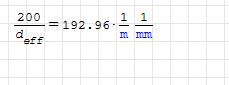
edit: image attached
Thanks
Iura

Wrotehowever the units of 1/m still remain although I have added 1/mm like you suggested before.
please right-click that region and check if you have the "Ignore units" option in the context menu enabled; in this case uncheck it.
WroteHello Iura,
Wrotehowever the units of 1/m still remain although I have added 1/mm like you suggested before.
please right-click that region and check if you have the "Ignore units" option in the context menu enabled; in this case uncheck it.
Hey,
Yes, the Ignore units option was enabled. Thank you, this has solved my query.

SMath Units1.pdf (19,09 KiB) descargado 776 vez(es).
Thanks
Iura
WroteYou're welcome
I am facing a similar issue again. Please see the link to the image below. This time, I need the result to come out in units of N, however due to a number of reasons this doesn't quite workout. Can I completely cancel the display of units and type a text box of my own next to it?
https://drive.google.com/open?id=1ONCWUcKPEa1F77ULgCTtMtXM3Fwlz2hC
WroteI am facing a similar issue again
Two things:
1. Better attach the *.sm document
2. for faster/better image
Download freeware "WinGrab", set some key options, put it in task bar.
_ click WinGrab from task bar
_ click 'start capture'
_ click 'Selection tool', adjust the rectangle
_ crop image
_ save as PNG in a dedicated Snippets in C:\ Directory
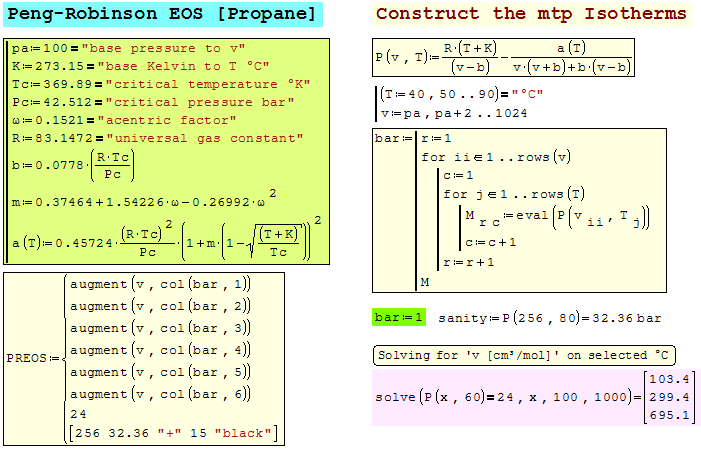
Wrote
I am facing a similar issue again. Please see the link to the image below. This time, I need the result to come out in units of N, however due to a number of reasons this doesn't quite workout. Can I completely cancel the display of units and type a text box of my own next to it?
As Jean said, it would really help out if you could attach the .sm file. It appears that there is an error somewhere in your calculation. The units come out to kg^(1/2)*m^(3/2)/s. The unit N is kg*m/s^2. So your result is not equivalent to Newtons.
This could simply be an error in variable definition (incorrect/missing units) or there may be an error in your arithmetic resulting in erroneous result.
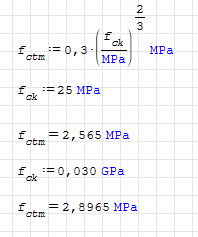
sergio
- Nuevos mensajes
- Sin mensajes nuevos