X-Y Plot Region

X-Y Plot Region - Extends SMath Studio with a X-Y Plot Region. - Mensajes

#161 Publicado: 15/10/2013 22:40:39
Ryan Freund

Ryan Freund

20 me gusta en 339 mensajes.

Grupo: User

Where is the latest download for this plug-in? I did not see it in the registered plugins file.

Thanks!
#162 Publicado: 16/10/2013 3:44:23
Вячеслав Мезенцев

Вячеслав Мезенцев

1.558 me gusta en 1.868 mensajes.

Grupo: Moderator

Russia ☭ forever, Viacheslav N. Mezentsev
#163 Publicado: 25/10/2013 11:26:04
Martin Kraska

Martin Kraska

1.361 me gusta en 2.275 mensajes.

Grupo: Moderator

If one of the plot objects fails to be evaluated, then the settings in the traces dialog are lost. This is particularly annoying, if this is just because of a temporary error in computing any of the objects.
Technische Mechanik mit SMath Studio: https://link.springer.com/book/10.1007/978-3-658-50592-9
A 1 usuarios les gustó este mensaje
#164 Publicado: 8/12/2013 7:50:09
Martin Kraska

Martin Kraska

1.361 me gusta en 2.275 mensajes.

Grupo: Moderator

When duplicating a plot by ctrl-drag, then the trace labels (seriesname) in the legend disappear.
Griffith.sm (20,93 KiB) descargado 1589 vez(es).
Technische Mechanik mit SMath Studio: https://link.springer.com/book/10.1007/978-3-658-50592-9
A 2 usuarios les gustó este mensaje
Radovan Omorjan 8/12/2013 11:38:00, Вячеслав Мезенцев 8/12/2013 9:45:00
#165 Publicado: 23/12/2013 7:43:52
Martin Kraska

Martin Kraska

1.361 me gusta en 2.275 mensajes.

Grupo: Moderator

The legend shows line patterns even if line visibility is set to false for the data series.
Workaround: Set the line color to transparent (see left plot).

Uni, I think that the X-Y Plot plugin is definitely worth further maintenance, as it currently provides the best trade between usability and flexibility. The Maxima plugin might provide similar capabilities some day (there are severe issues with list and matrix translations) but I do not expect the regular user to have Maxima installed or to learn the graphic objects and options.

Important improvements would be:
- log options for the axes
- format dialog similar to Mathcad (avoids clicking through the object tree).
- separate mouse scaling of x and y axes just like in the built-in plot region

VERGUET.txt (4,03 KiB) descargado 1372 vez(es).
Technische Mechanik mit SMath Studio: https://link.springer.com/book/10.1007/978-3-658-50592-9
A 3 usuarios les gustó este mensaje
Davide Carpi 23/12/2013 21:35:00, Вячеслав Мезенцев 23/12/2013 8:15:00, Radovan Omorjan 23/12/2013 9:14:00
#166 Publicado: 23/12/2013 8:15:09
Вячеслав Мезенцев

Вячеслав Мезенцев

1.558 me gusta en 1.868 mensajes.

Grupo: Moderator

I agree. I don't have time for revision of the plugin. I'm afraid to make changes, because then they will need to support. I don't have a complete picture of how the final version should look like.
We still don't have an agreed version of code to save the plugin settings. In this regard, the new version of the plugin may be incompatible with old documents. The code that I use to save the settings I don't like. Need to alter it so that maintained upward compatibility. This problem hinders the development of the plugin.
Russia ☭ forever, Viacheslav N. Mezentsev
A 1 usuarios les gustó este mensaje
Davide Carpi 23/12/2013 21:34:00
#167 Publicado: 7/2/2014 8:40:44
Вячеслав Мезенцев

Вячеслав Мезенцев

1.558 me gusta en 1.868 mensajes.

Grupo: Moderator

Updated.

EDIT: Try again. There were problems with redrawing.
EDIT2: Unfortunately, I can't now fully upgrade the plugin. I used the old sources for updates (I'm in another area). The current version of the plugin is not stable. Therefore, have to wait until I get back.
Russia ☭ forever, Viacheslav N. Mezentsev
A 3 usuarios les gustó este mensaje
ioan92 7/2/2014 10:49:00, IVR 7/2/2014 15:58:00, Davide Carpi 7/2/2014 8:46:00
#168 Publicado: 21/2/2014 4:41:16
zorrykid

zorrykid

5 me gusta en 18 mensajes.

Grupo: User

Hi Uni

thanks a lot for your wonderful Estensions for SMath.
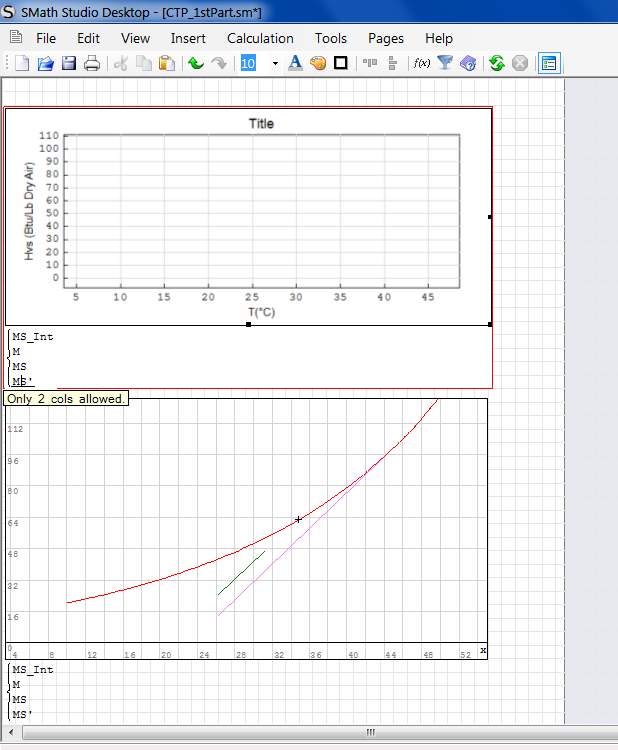
This message is just to inform you that there is a litte problem to draw single point in X-Y Plot despite 2D Plot.
Looks like are allowed only array with 2 colums ( see below ) and to draw single point are needed more.

Best Regard

Franco

Untitled 1.jpg
A 1 usuarios les gustó este mensaje
#169 Publicado: 21/2/2014 8:22:39
zorrykid

zorrykid

5 me gusta en 18 mensajes.

Grupo: User

Sorry Uni,

I have checked better and have seen that with the X-Y Plot is possible to draw a single point not using the same method used for the Plot 2D Area.
So this need is addressed.

Best regards

Franco
A 1 usuarios les gustó este mensaje
#170 Publicado: 24/2/2014 9:10:48
zorrykid

zorrykid

5 me gusta en 18 mensajes.

Grupo: User

There is something strange in the X-Y Plot too..a file of mine that worked fine in the previous portable release doesn't work now if one of the curve is a costant ( an orizontal line ).
Very strange.

Best Regards

Franco
sshot-2.png
A 2 usuarios les gustó este mensaje
Вячеслав Мезенцев 5/9/2014 9:32:00, frapuano 17/11/2018 7:18:00
#171 Publicado: 2/9/2014 17:21:45
1andro1

1andro1

0 me gusta en 2 mensajes.

Grupo: User

Hi Uni,

Thank you very much for the nice plugin.

I would like to ask you whether there is a chance the limit of the axes (XLimMin, XLimMax, XTick, YLimMin, YlimMax and YTick) to be made to be updated from the worksheet of the Smath?

As example if I have a variable in the worksheet which to calculates my Xmin and Xmax limits to be able to enter the name of that variable in the fields for XLimMin and XLimMax.

Also it would be nice feature if it is possible, after some digits, the tick number to become with scientific notation. As example if I have a value between 10uA and 100uA and I want a tick in every 10uA, currently, X-Y plot will show it as 0.

Best Regards,
Adriyan
#172 Publicado: 5/9/2014 9:24:56
Вячеслав Мезенцев

Вячеслав Мезенцев

1.558 me gusta en 1.868 mensajes.

Grupo: Moderator

Wrote

Hi Uni,

Thank you very much for the nice plugin.

I would like to ask you whether there is a chance the limit of the axes (XLimMin, XLimMax, XTick, YLimMin, YlimMax and YTick) to be made to be updated from the worksheet of the Smath?

As example if I have a variable in the worksheet which to calculates my Xmin and Xmax limits to be able to enter the name of that variable in the fields for XLimMin and XLimMax.

Also it would be nice feature if it is possible, after some digits, the tick number to become with scientific notation. As example if I have a value between 10uA and 100uA and I want a tick in every 10uA, currently, X-Y plot will show it as 0.

Best Regards,
Adriyan


Some of these things already exist but other need to be realized, I agree.
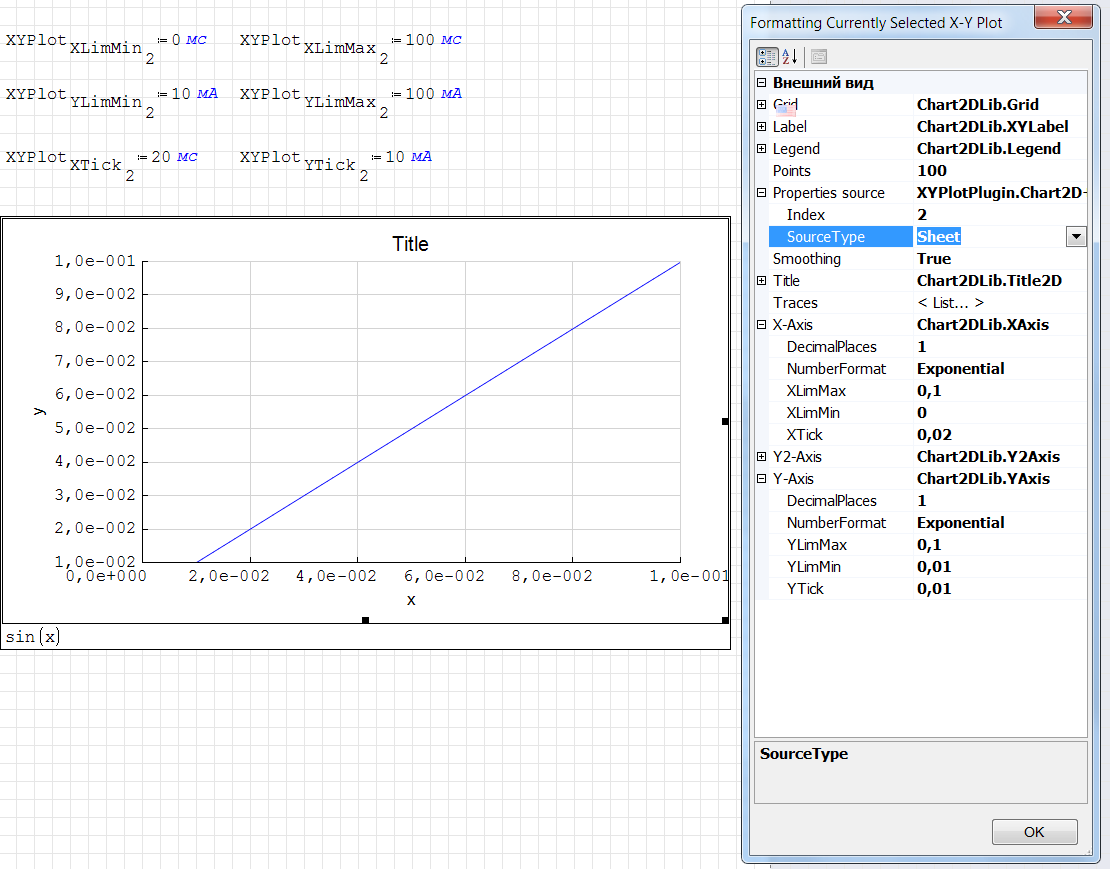
2014-09-05 19-20-22 Скриншот экрана.png
Russia ☭ forever, Viacheslav N. Mezentsev
A 3 usuarios les gustó este mensaje
ioan92 13/5/2015 2:51:00, Radovan Omorjan 5/9/2014 11:33:00, IVR 5/9/2014 10:55:00
#173 Publicado: 5/9/2014 17:02:49
1andro1

1andro1

0 me gusta en 2 mensajes.

Grupo: User

Hi Uni,

Thank you very much for the hints. Indeed, all which I require is already included in the package. My apologies that I have not seen all these features.

Once more thank you very much for the nice package and for the help.

Best Regards,
Adriyan
#174 Publicado: 11/5/2015 16:33:04
Chris McNamara

Chris McNamara

0 me gusta en 5 mensajes.

Grupo: User

Hi uni,

Thanks for your awesome plugin, it has helped me greatly with using SMath to visualize lots of data.

Is there currently a way to have a sheet control which can change the title and labels? Also is it possible to control the ticks and numbers on the Y2 axis? Currently it appears that using "XYPlot.Y2Tick" does not work.
#175 Publicado: 13/5/2015 4:10:32
NDTM Amarasekera

NDTM Amarasekera

130 me gusta en 352 mensajes.

Grupo: User

Hi All

I have noticed a strange behaviour in XY-Plot.
1. In a sm file there are 2 different plots (with index 1 & index 2) working as expected.
2. When the file is saved and reloaded, the 2nd plot re-adjusts to index 1, showing a distorted view.

Where have I gone wrong please? (sm file attached).

Regards
ndtma

Test XY Plot.sm (292,21 KiB) descargado 1637 vez(es).
Look within!... The secret is inside you. Best Regards Eng. NDTM Amarasekera - Sri Lanka
#176 Publicado: 13/5/2015 5:34:00
Вячеслав Мезенцев

Вячеслав Мезенцев

1.558 me gusta en 1.868 mensajes.

Grupo: Moderator

I'm a little busy , I will look later.
Russia ☭ forever, Viacheslav N. Mezentsev
A 1 usuarios les gustó este mensaje
Davide Carpi 14/5/2015 14:49:00
#177 Publicado: 1/9/2015 14:46:28
b3nd3r

b3nd3r

0 me gusta en 3 mensajes.

Grupo: User

On recommendation of w3b5urf3r_reloaded I wanted to use your pluging. But with the current build 5346 of version 0.97 date 21.08.2014 the plugin a unknown error occurs if the plugin is loaded.

Is this a known bug? Which kind of further information do you need?
#178 Publicado: 7/9/2015 1:49:18
Вячеслав Мезенцев

Вячеслав Мезенцев

1.558 me gusta en 1.868 mensajes.

Grupo: Moderator

Plugin not updated for new version. I'll try to fix this.
Russia ☭ forever, Viacheslav N. Mezentsev
#179 Publicado: 7/10/2015 0:42:29
NDTM Amarasekera

NDTM Amarasekera

130 me gusta en 352 mensajes.

Grupo: User

Hi

I too reported to this forum, about 5 months ago, about the problem of saving X-Y Plot settings.
Look within!... The secret is inside you. Best Regards Eng. NDTM Amarasekera - Sri Lanka
A 2 usuarios les gustó este mensaje
ioan92 7/10/2015 5:05:00, Вячеслав Мезенцев 7/10/2015 3:34:00
#180 Publicado: 7/10/2015 3:33:50
Вячеслав Мезенцев

Вячеслав Мезенцев

1.558 me gusta en 1.868 mensajes.

Grupo: Moderator

Wrote

Hi

I too reported to this forum, about 5 months ago, about the problem of saving X-Y Plot settings.


Updated. Fixed. Empty title now supported.

Citar

Please, is there available the access by program to some other parameters as Traces colors and thinnesses ?
On the other side, I've seen that the plugin generate a system crash if wrong data. Please, could it be possible to include in the plugin a programming sequence of the type "ON ERROR GO NEXT" ?


I'll think about it. I must know what kind of wrong data you want to skip.
Russia ☭ forever, Viacheslav N. Mezentsev
A 3 usuarios les gustó este mensaje
Davide Carpi 7/10/2015 10:00:00, NDTM Amarasekera 7/10/2015 8:05:00, ioan92 7/10/2015 5:05:00
  • Nuevos mensajes
  • Sin mensajes nuevos