X-Y Plot Region

X-Y Plot Region - Extends SMath Studio with a X-Y Plot Region. - Messages

#601 Posted: 2024/12/6 18:22:37
Вячеслав Мезенцев

Вячеслав Мезенцев

1,554 likes in 1,864 posts.

Group: Moderator

SMath Studio compatibility History page Changes

Plugin updated. This string representation is standard for c# Font type.

Changes:

- added font setting for text labels.

xyplot-text-lablels-font-example.sm (6.45 KiB) downloaded 1756 time(s).
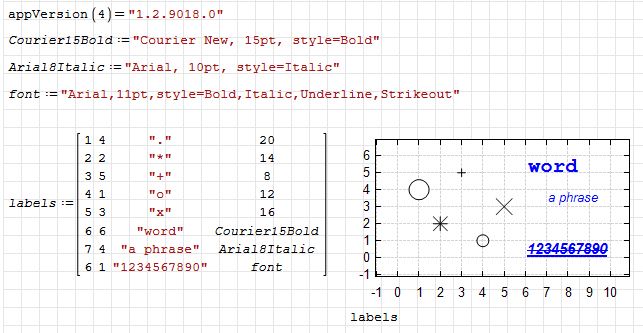
xyplot-text-lablels-font-example.jpg
Russia ☭ forever, Viacheslav N. Mezentsev
5 users liked this post
francesco rapuano 2024/12/6 21:19:00, ioan92 2024/12/6 23:13:00, sergio 2024/12/6 23:38:00, churichuro 2024/12/7 01:06:00, Oscar Campo 2024/12/6 19:38:00
#602 Posted: 2024/12/6 23:21:43
ioan92

ioan92

180 likes in 120 posts.

Group: User

Thanks Viacheslav for this excellent work
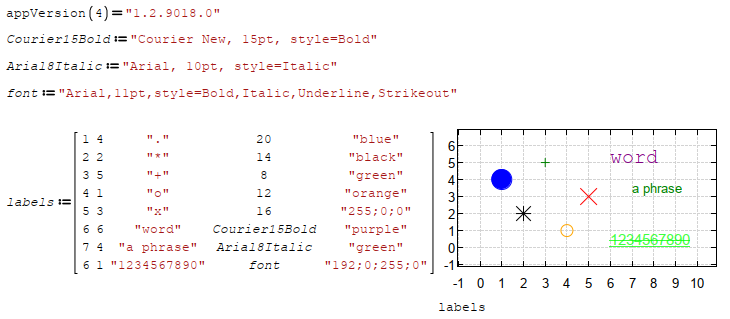
Would it be possible to add the font color ?
Do to others as you would like them to do to you! Knowledge is of no value unless you put it into practice - Chekhov
#603 Posted: 2024/12/6 23:40:53
Вячеслав Мезенцев

Вячеслав Мезенцев

1,554 likes in 1,864 posts.

Group: Moderator

The color can be set in the same way as before.

xyplot-text-labels-font-example.png
Russia ☭ forever, Viacheslav N. Mezentsev
4 users liked this post
Oscar Campo 2024/12/7 00:02:00, francesco rapuano 2024/12/7 00:22:00, sergio 2024/12/7 01:47:00, ioan92 2024/12/6 23:52:00
#604 Posted: 2024/12/7 18:19:53
francesco rapuano

francesco rapuano

15 likes in 38 posts.

Group: User

Now Uni there is a last effort ro address the issue of the font zooming , I imagine that it would be possible to trap the mouse weel event and scale the fonts used in the text in the XY Plot Plugin accordingly.
My best wishes to succeed , best regards

Franco
#605 Posted: 2024/12/15 10:54:36
Alvaro

Alvaro

1,123 likes in 1,795 posts.

Group: User

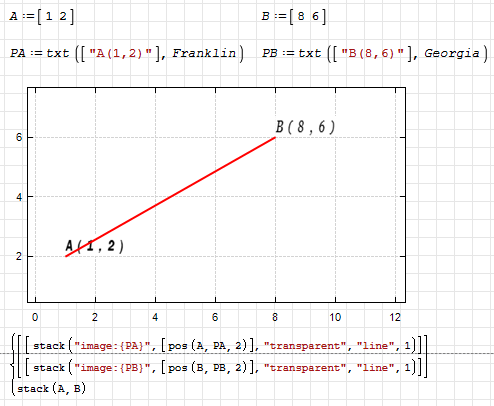
Scalable monospaced bitmapped fonts in XYPlot.

txt.png

XYPlot - Scalable monospaced bitmapped fonts.pdf (419.21 KiB) downloaded 914 time(s).

XYPlot - Scalable monospaced bitmapped fonts.sm (3.07 MiB) downloaded 1600 time(s).

Best regards.
Alvaro.
3 users liked this post
ioan92 2024/12/15 15:00:00, Oscar Campo 2024/12/16 09:28:00, francesco rapuano 2024/12/15 23:18:00
#606 Posted: 2024/12/16 00:27:20
usamakhan

usamakhan

3 likes in 79 posts.

Group: User

In this post @mkraska referred:

Quote

In X-Y Plot, you can use geometric objects to create the lines and perhaps also a legend.


What does he mean?
#607 Posted: 2024/12/18 03:35:18
Вячеслав Мезенцев

Вячеслав Мезенцев

1,554 likes in 1,864 posts.

Group: Moderator

Wrote

What does he mean?


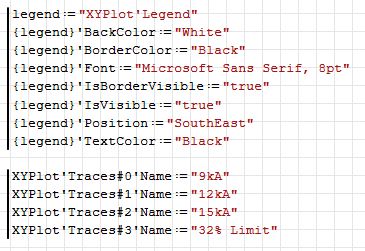
Something like that I suppose.
xyplot-copy-properties-legend.jpg

Russia ☭ forever, Viacheslav N. Mezentsev
1 users liked this post
Martin Kraska 2024/12/18 06:10:00
#608 Posted: 2024/12/18 07:16:42
Martin Kraska

Martin Kraska

1,355 likes in 2,271 posts.

Group: Moderator

Wrote

Wrote

What does he mean?


Something like that I suppose.

xyplot-copy-properties-legend.jpg


Somehow I don't manage to produce the traces settings in a loop.

2024-12-18 01_11_12-SMath Solver - [NaOH_Demiwater_VECTOR_Kr.sm_].png
NaOH_Demiwater_VECTOR_Kr.sm (197.3 KiB) downloaded 1471 time(s).
Technische Mechanik mit SMath Studio: https://link.springer.com/book/10.1007/978-3-658-50592-9
3 users liked this post
Alvaro 2024/12/18 08:43:00, francesco rapuano 2024/12/18 17:07:00, Oscar Campo 2024/12/18 08:15:00
#609 Posted: 2024/12/18 08:44:45
Alvaro

Alvaro

1,123 likes in 1,795 posts.

Group: User

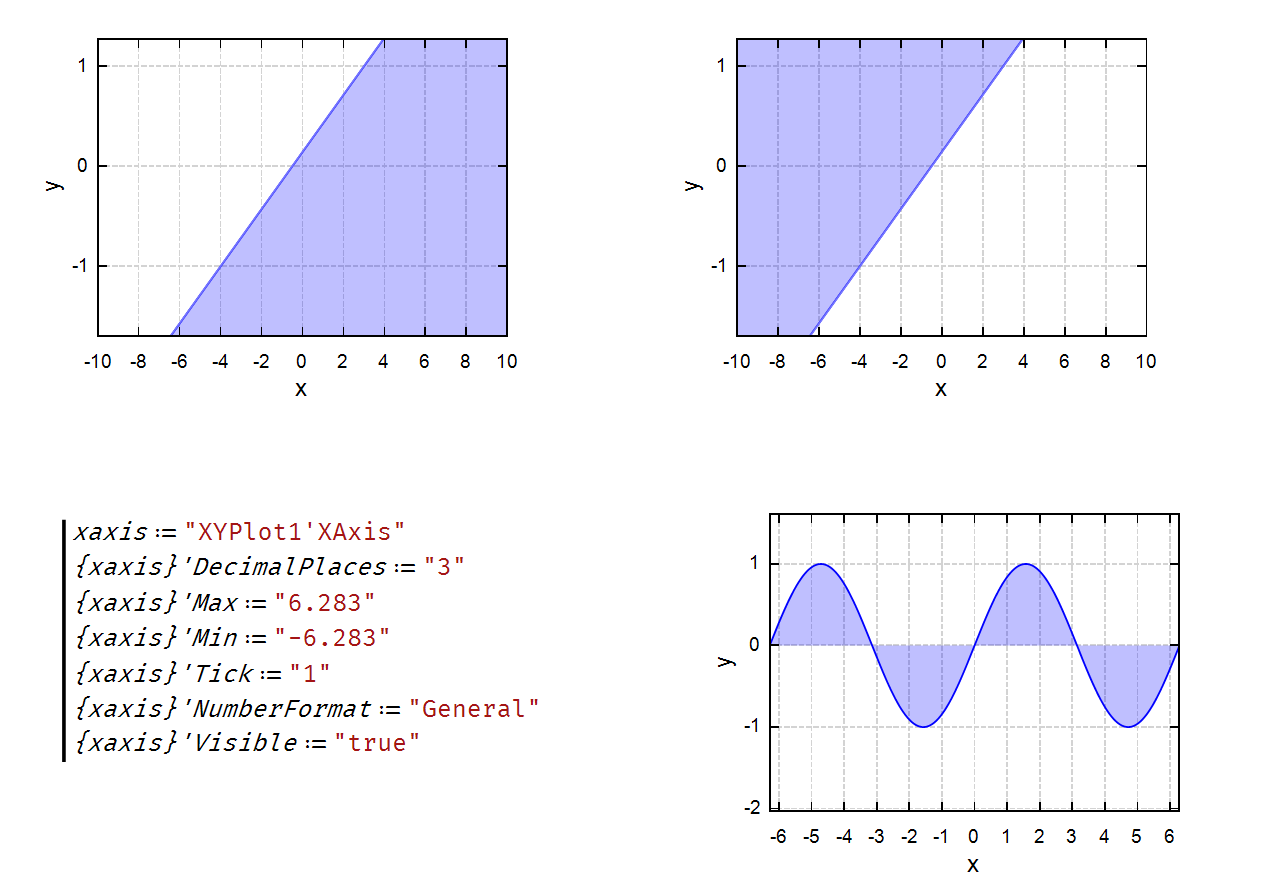
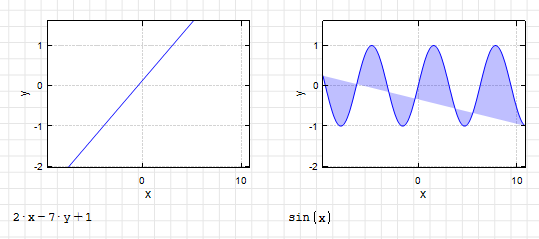
Hi. How to fill a half plane and a half wave?

filling.png

filling question.sm (5.05 KiB) downloaded 1503 time(s).

Best regards.
Alvaro.
#610 Posted: 2024/12/18 09:33:37
Oscar Campo

Oscar Campo

135 likes in 309 posts.

Group: Moderator

Some manipulations...

image_2024-12-17_213228975.png

filling approach.sm (13.75 KiB) downloaded 1486 time(s).

Best,
Oscar
3 users liked this post
francesco rapuano 2024/12/18 17:08:00, Alvaro 2024/12/18 09:42:00, Вячеслав Мезенцев 2024/12/18 17:11:00
#611 Posted: 2024/12/18 09:41:37
Alvaro

Alvaro

1,123 likes in 1,795 posts.

Group: User

Wrote

Some manipulations...


Gracias Oscar! Very clever solutions, especially the half plane one.

Best regards.
Alvaro.
2 users liked this post
francesco rapuano 2024/12/18 17:08:00, Oscar Campo 2024/12/18 11:12:00
#612 Posted: 2024/12/18 15:09:49
Вячеслав Мезенцев

Вячеслав Мезенцев

1,554 likes in 1,864 posts.

Group: Moderator

Wrote

Somehow I don't manage to produce the traces settings in a loop.


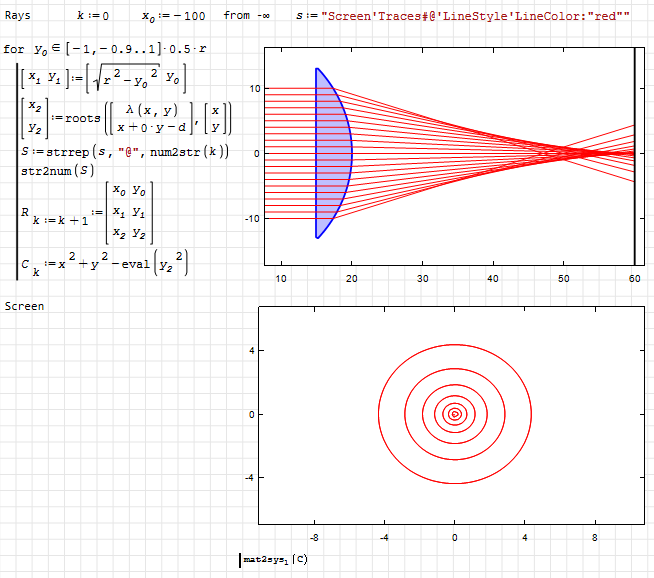
This needs to be done differently. Alvaro showed a working version somewhere here. You need to include the assignment sign in the string and then transform the text expression in a cycle. The thing is that substitution in curly brackets is not a native operation, but a feature of the component. Therefore, the substitution will not occur this way; you need to form the full expression in the text representation.

spherical aberration.sm (26.41 KiB) downloaded 1711 time(s).
lens.png
Russia ☭ forever, Viacheslav N. Mezentsev
#613 Posted: 2024/12/18 18:16:41
Oscar Campo

Oscar Campo

135 likes in 309 posts.

Group: Moderator

Wrote

Somehow I don't manage to produce the traces settings in a loop.


An example...
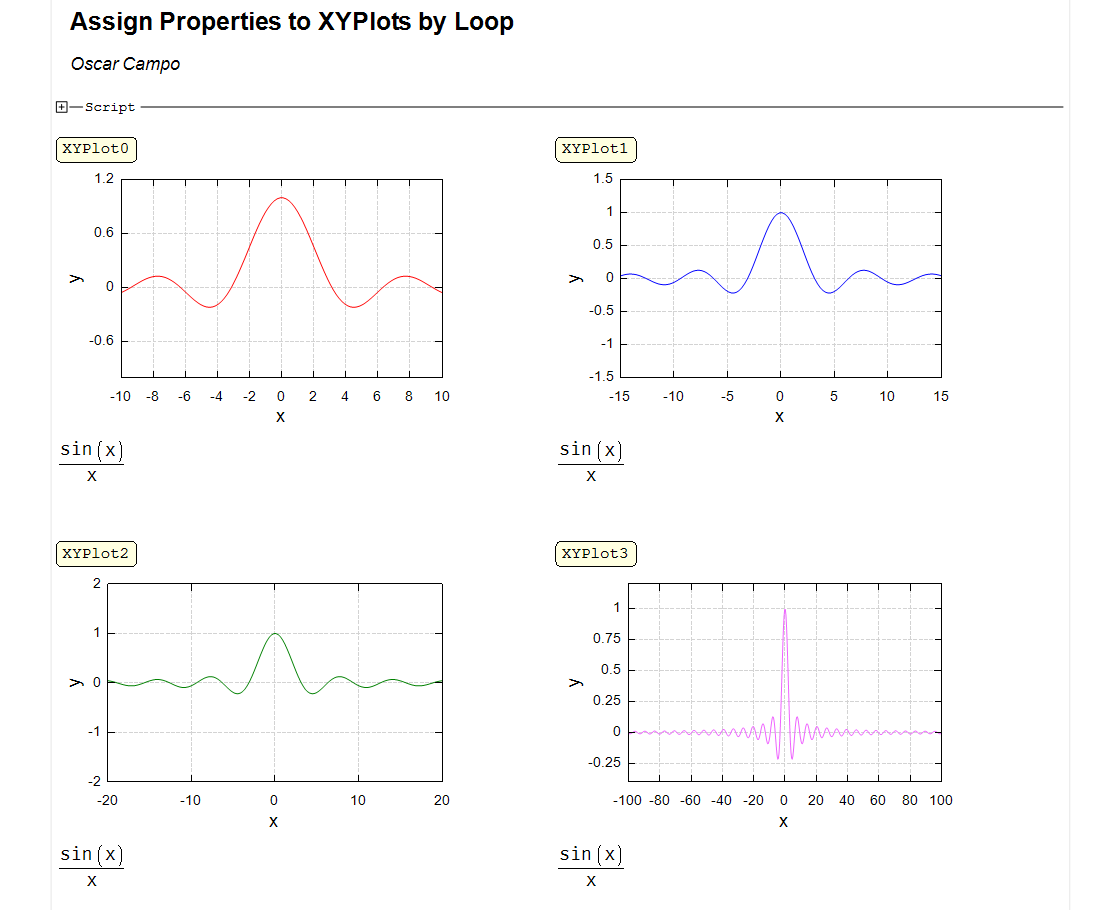
image_2024-12-18_064245517.png

Assign Properties by Loop.sm (19.05 KiB) downloaded 1495 time(s).

Best,
Oscar
#614 Posted: 2024/12/18 19:23:56
Вячеслав Мезенцев

Вячеслав Мезенцев

1,554 likes in 1,864 posts.

Group: Moderator

Wrote

Hi. How to fill a half plane and a half wave?


I might try adding behavior for endpoints when filling paths. Right now the default behavior is to just close the endpoints, but that behavior could be changed. For that, I'd need to iterate over all possible use cases.
Russia ☭ forever, Viacheslav N. Mezentsev
#615 Posted: 2024/12/18 20:21:39
Martin Kraska

Martin Kraska

1,355 likes in 2,271 posts.

Group: Moderator

Wrote

Wrote

Hi. How to fill a half plane and a half wave?


I might try adding behavior for endpoints when filling paths. Right now the default behavior is to just close the endpoints, but that behavior could be changed. For that, I'd need to iterate over all possible use cases.


In Maxima draw, there is an option filled_function, which allows to specify a second function which defines the other side of the fill. Simply saying 0 fills to the axis, some big value fills to the boundary (top or bottom). This is much like in the hatch snippet, where 2 functions are specified.

In X-Y plot you could take a second function of the same variable in a row or in a list (just like with parametric functions, just with undefined dummy variable or you could say "to next", referring to the next trace, other options could be "to x", "to y", "to top" "close along border" etc.


Technische Mechanik mit SMath Studio: https://link.springer.com/book/10.1007/978-3-658-50592-9
2 users liked this post
Вячеслав Мезенцев 2024/12/18 21:02:00, Alvaro 2024/12/19 05:18:00
#616 Posted: 2024/12/18 20:32:24
Martin Kraska

Martin Kraska

1,355 likes in 2,271 posts.

Group: Moderator

So I understand if I don't use {} in a loop then I am safe. Of course, I could use p while building the string in the loop.

2024-12-18 14_28_13-SMath Solver - [NaOH_Demiwater_VECTOR_Kr.sm].png
NaOH_Demiwater_VECTOR_Kr.sm (197.5 KiB) downloaded 1596 time(s).
Technische Mechanik mit SMath Studio: https://link.springer.com/book/10.1007/978-3-658-50592-9
#617 Posted: 2024/12/19 05:24:50
Alvaro

Alvaro

1,123 likes in 1,795 posts.

Group: User

Wrote

... In Maxima draw, there is an option filled_function, which allows to specify a second function which defines the other side of the fill. Simply saying 0 fills to the axis, some big value fills to the boundary (top or bottom). This is much like in the hatch snippet, where 2 functions are specified.


Thanks Martin! It works fine.
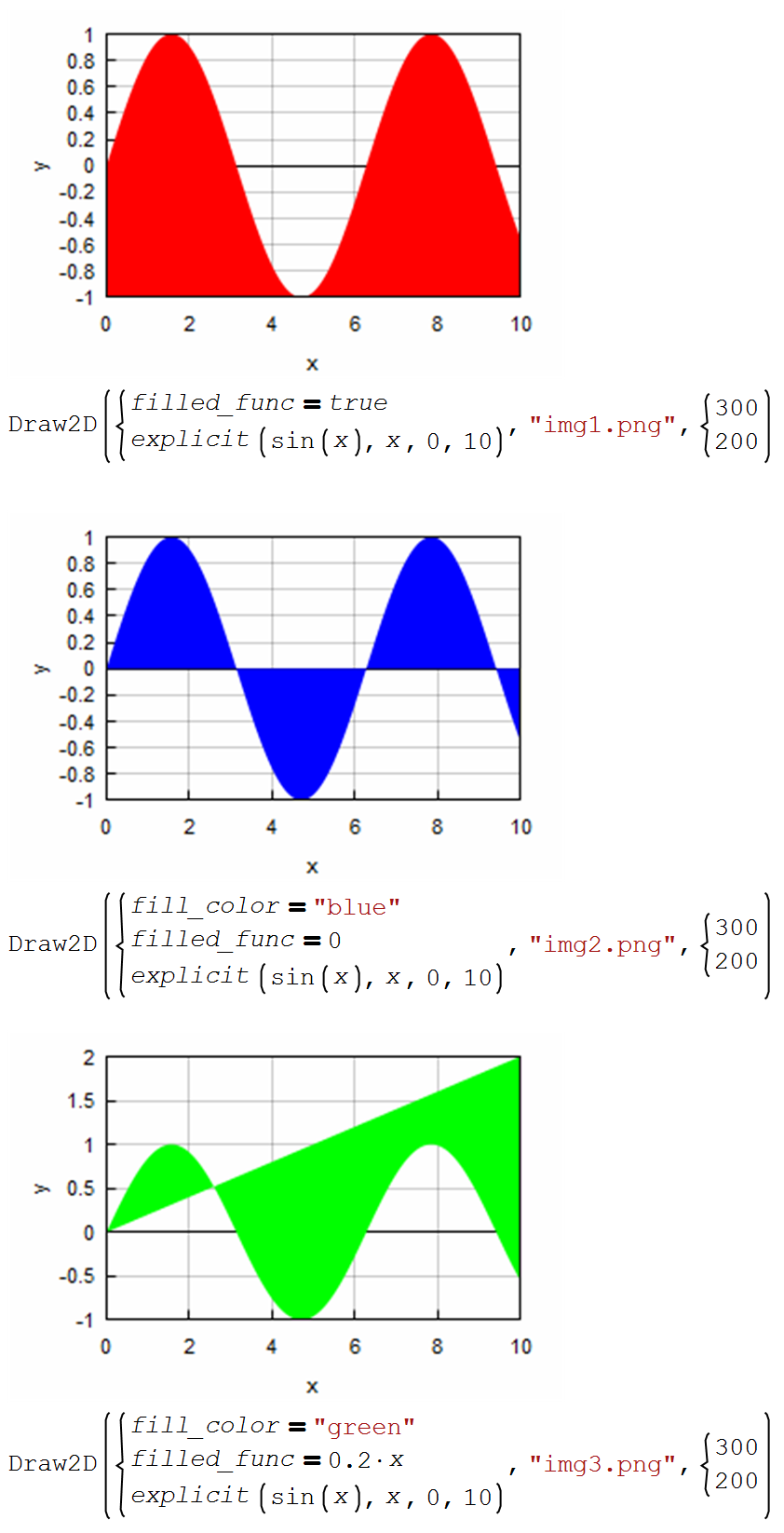
draw2d-filled.png

draw2d-filled.sm (29.13 KiB) downloaded 1495 time(s).

Wrote

... In X-Y plot you could take a second function of the same variable in a row or in a list (just like with parametric functions, just with undefined dummy variable or you could say "to next", referring to the next trace, other options could be "to x", "to y", "to top" "close along border" etc.


I don't know how to do that.

Best regards.
Alvaro.
1 users liked this post
Oscar Campo 2024/12/19 08:15:00
#618 Posted: 2024/12/19 06:48:52
Martin Kraska

Martin Kraska

1,355 likes in 2,271 posts.

Group: Moderator

Wrote


Wrote

... In X-Y plot you could take a second function of the same variable in a row or in a list (just like with parametric functions, just with undefined dummy variable or you could say "to next", referring to the next trace, other options could be "to x", "to y", "to top" "close along border" etc.


I don't know how to do that.

Best regards.
Alvaro.


That was just a proposal as to what control options I'd find useful.
Technische Mechanik mit SMath Studio: https://link.springer.com/book/10.1007/978-3-658-50592-9
1 users liked this post
Alvaro 2024/12/19 11:32:00
#619 Posted: 2024/12/19 11:33:23
Alvaro

Alvaro

1,123 likes in 1,795 posts.

Group: User

Wrote

... That was just a proposal as to what control options I'd find useful.


Thanks Martin. I found it very useful too, and I thought it was already a reality. Although I think my reading comprehension was not at its best level.
Best regards.
Alvaro.
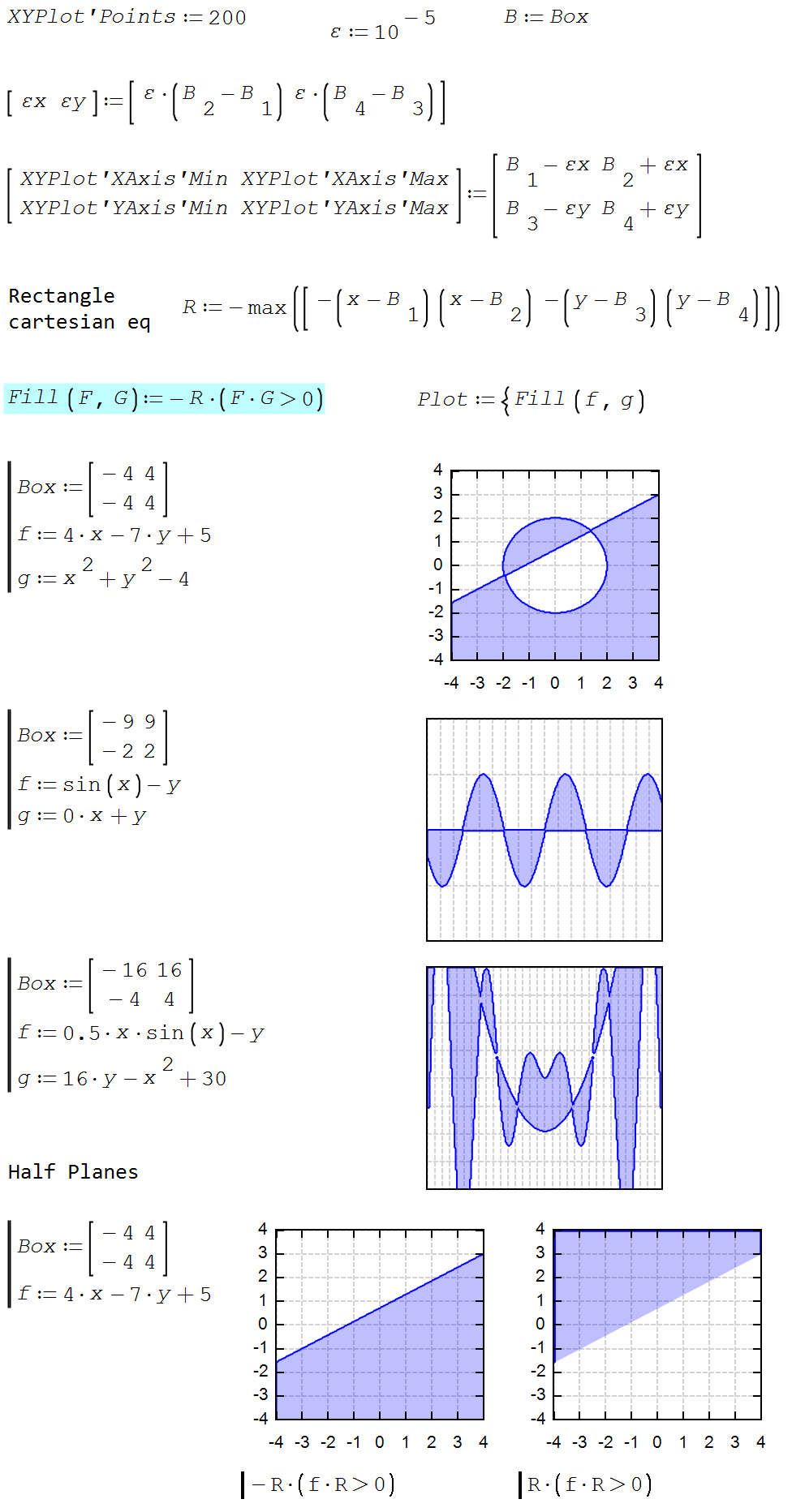
#620 Posted: 2024/12/20 07:55:32
Alvaro

Alvaro

1,123 likes in 1,795 posts.

Group: User

A way for filling the region between curves, combining Oscar's box and Martin's fill_func.

filling.png

XYFilling.sm (24.18 KiB) downloaded 1476 time(s).

Best regards.
Alvaro.

5 users liked this post
sergio 2024/12/20 18:26:00, Oscar Campo 2024/12/20 09:28:00, Вячеслав Мезенцев 2024/12/20 15:37:00, francesco rapuano 2024/12/20 20:42:00, ioan92 2024/12/20 15:03:00
  • New Posts
  • No New Posts