
Maxima - Examples for using the Maxima Plugin - Messaggi

WroteBTW, you also can use ODE.2, a wrapper for ode2, with preprocessing of the equation switched off.
Also, you can specify the initial conditions in Solve using Davide's at().
Thank you, just forgot about it out and found it afterwards.
Regards,
Radovan
When Sisyphus climbed to the top of a hill, they said: "Wrong boulder!"

Yet another example from the maxima discussion list. It demonstrates use and limitations of the solver function Solve().
Example Maxima cross.sm (21,3 KiB) scaricato 1588 volta(e).
Example Maxima cross.sm (21,3 KiB) scaricato 1588 volta(e).
Technische Mechanik mit SMath Studio: https://link.springer.com/book/10.1007/978-3-658-50592-9
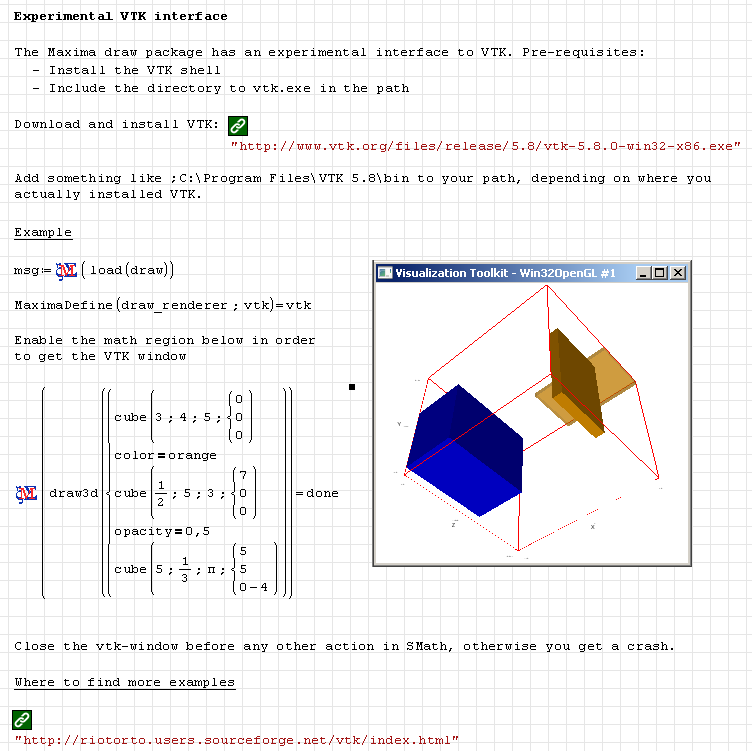
The Maxima draw package has an experimental interface to the VTK visualization toolkit. It provides high performance 3D rendering.
Objects and options are very similar to those of the Gnuplot interface in the commands Draw2D() and Draw3D().
The current state of the Maxima plugin allows you to play around with VTK. Some limitations apply:
- The interactive viewer is opened as a separate window (not embedded in the sheet)
- The Maxima plugin does not wait for the viewer to be closed but gives up after some short time.
- Any SMath action while the viewer is open can generate a crash.
Objects and options are very similar to those of the Gnuplot interface in the commands Draw2D() and Draw3D().
The current state of the Maxima plugin allows you to play around with VTK. Some limitations apply:
- The interactive viewer is opened as a separate window (not embedded in the sheet)
- The Maxima plugin does not wait for the viewer to be closed but gives up after some short time.
- Any SMath action while the viewer is open can generate a crash.
Technische Mechanik mit SMath Studio: https://link.springer.com/book/10.1007/978-3-658-50592-9
1 utenti hanno apprezzato questo post
Radovan Omorjan 03/08/2014 10:44:00
Technische Mechanik mit SMath Studio: https://link.springer.com/book/10.1007/978-3-658-50592-9
1 utenti hanno apprezzato questo post
Radovan Omorjan 03/08/2014 10:44:00
Thank you Martin with keeping this up 
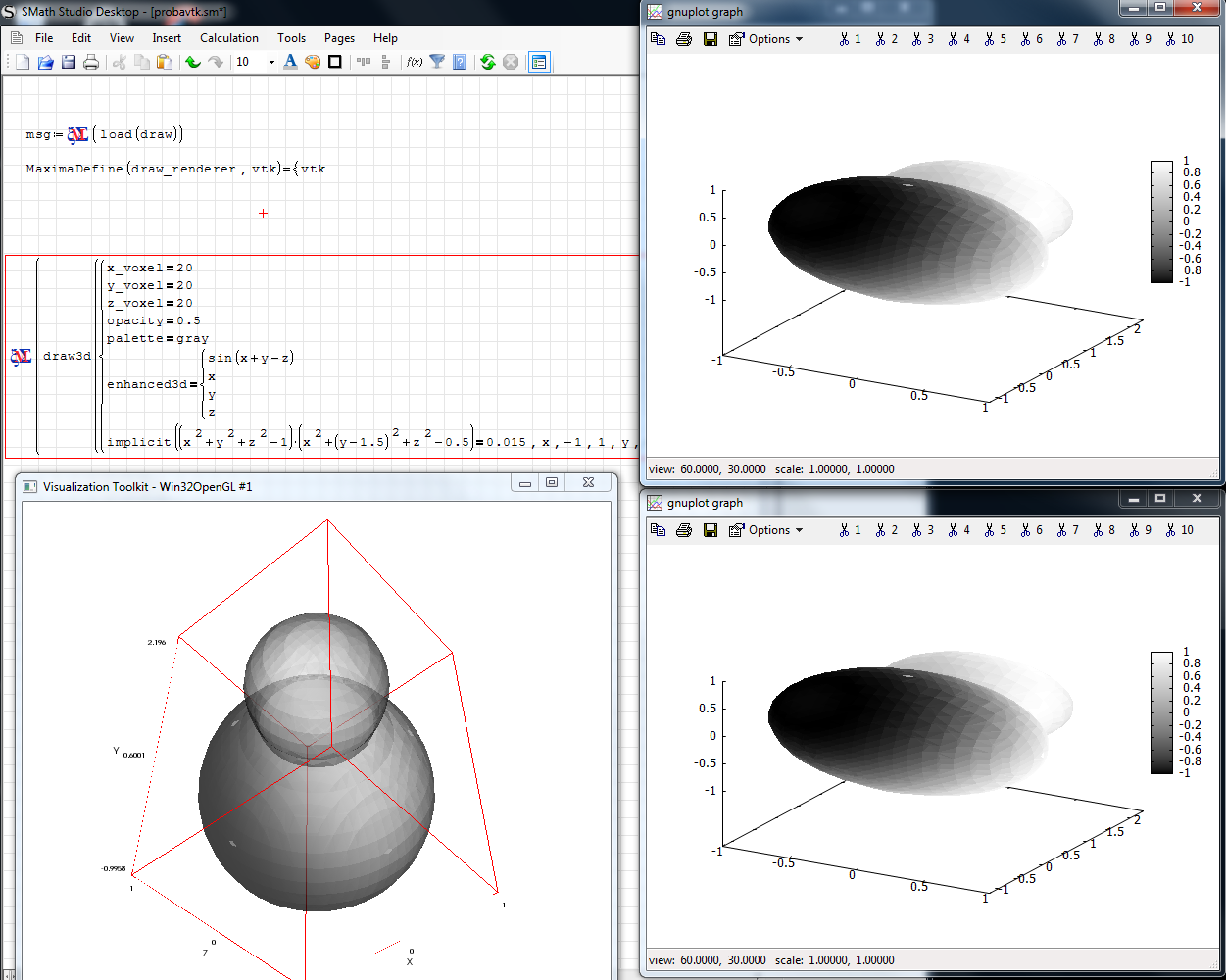
I just played a bit (see the picture, please). I suppose this will be improved and I wish you all the best of luck in your efforts.
In the case I did not do something wrong here, but it seems that my example produces additional gnuplot windows.
Regards,
Radovan
probavtk.sm (5,7 KiB) scaricato 1524 volta(e).
I just played a bit (see the picture, please). I suppose this will be improved and I wish you all the best of luck in your efforts.
In the case I did not do something wrong here, but it seems that my example produces additional gnuplot windows.
Regards,
Radovan
probavtk.sm (5,7 KiB) scaricato 1524 volta(e).
When Sisyphus climbed to the top of a hill, they said: "Wrong boulder!"
Wrote
In the case I did not do something wrong here, but it seems that my example produces additional gnuplot windows.
This is related to issue SS-189. Maxima is restarted and the plugin retries to execute the command. However, in the new Maxima process, the variable draw_renderer has the default value (gnuplot) instead of VTK.
Technische Mechanik mit SMath Studio: https://link.springer.com/book/10.1007/978-3-658-50592-9
If the image file format is set to png, then the plot functions provide enhanced text capabilities now. See the attachment.
Section Maxima Draw2D3D enhanced.sm (155,36 KiB) scaricato 1601 volta(e).
Section Maxima Draw2D3D enhanced.sm (155,36 KiB) scaricato 1601 volta(e).
Technische Mechanik mit SMath Studio: https://link.springer.com/book/10.1007/978-3-658-50592-9
1 utenti hanno apprezzato questo post
Radovan Omorjan 07/08/2014 02:26:00
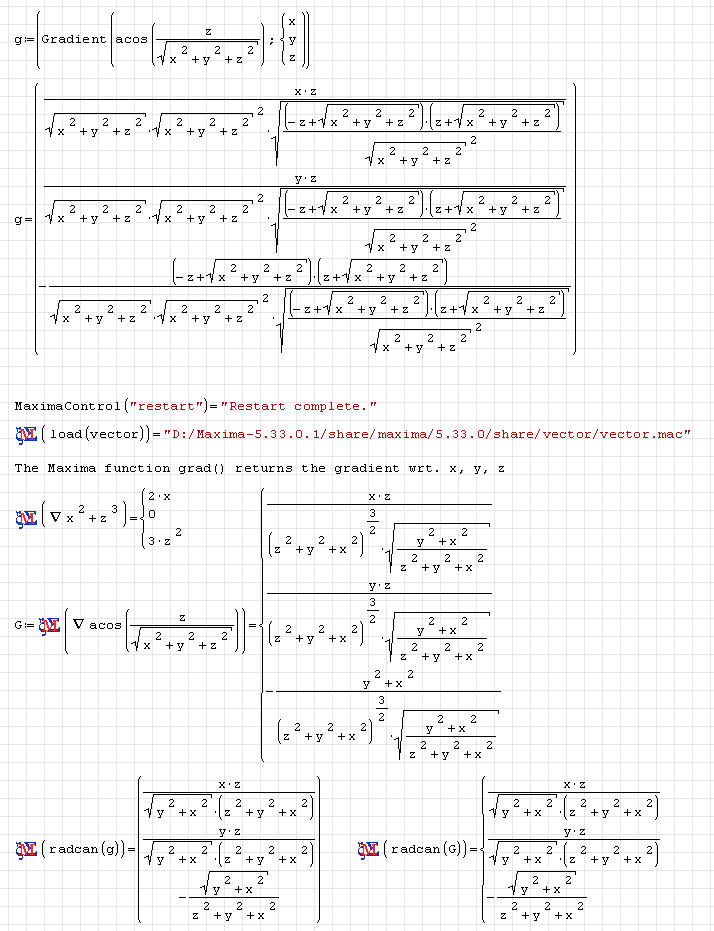
Here comes life to the gradient symbol of the functions extensions plugin.
Technische Mechanik mit SMath Studio: https://link.springer.com/book/10.1007/978-3-658-50592-9
4 utenti hanno apprezzato questo post
frapuano 29/01/2017 11:07:00, Davide Carpi 25/08/2014 18:20:00, Radovan Omorjan 26/08/2014 01:28:00, Andrey Ivashov 26/08/2014 09:07:00
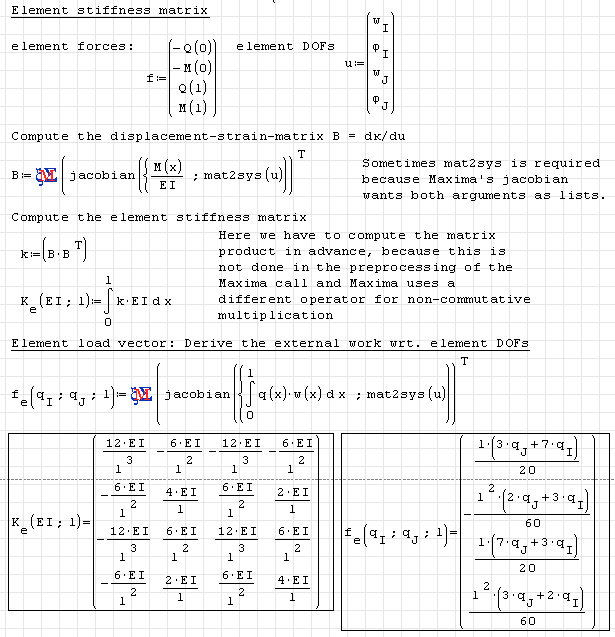
In the attached sheet you find the construction of the element stiffness matrix and the element load vector for a shear-stiff plane horizontal beam finite element as used in this example.
Technische Mechanik mit SMath Studio: https://link.springer.com/book/10.1007/978-3-658-50592-9
1 utenti hanno apprezzato questo post
IVR 26/01/2017 19:02:00

WroteExample for beam calculation using separate integration intervals.
Hello,
I tried to use this method on a simple case with triangular distributed load.
I got the correct results for V and M moment but not for w and rotation (file1).
Using the same equations but divided into two separate systems ( equilibrium and elastic line) the result is correct (file 2)
anyone can give me any suggestions?
sergio
file2.sm (27,25 KiB) scaricato 1547 volta(e).
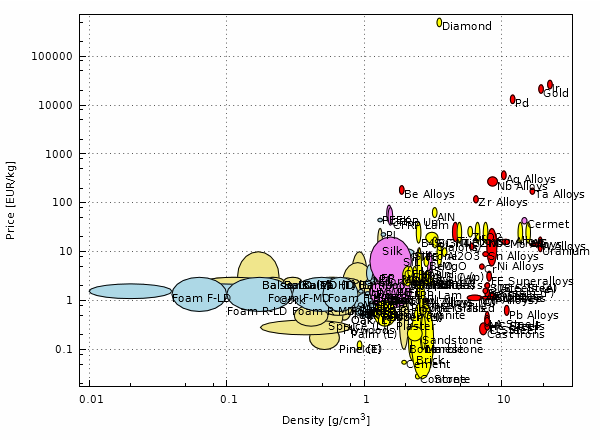
This example produces Asby material property charts. The data has been taken from the online ressources for Buchmayr 2002. Besides the Maxima plugin and it's drawing functions this program also demonstrates the use of varous plugins by Davide (ComboBox List, DataExchange, Checkbutton List)
It was posted already 3 years ago, works with the current SMath+Maxima version (no symbolics involved). Just cosmetic changes (output as PNG instead of SVG)
Werkstoffdiagramme.zip (54,1 KiB) scaricato 541 volta(e).
It was posted already 3 years ago, works with the current SMath+Maxima version (no symbolics involved). Just cosmetic changes (output as PNG instead of SVG)
Werkstoffdiagramme.zip (54,1 KiB) scaricato 541 volta(e).
Technische Mechanik mit SMath Studio: https://link.springer.com/book/10.1007/978-3-658-50592-9
2 utenti hanno apprezzato questo post
- Nuovi post
- Nessun nuovo post