
Mathcad Custom Functions - This plugin will help you to connect Mathcad custom functions - Mensajes

Yes, it is possible. I didn't update the plugin. I only changed the SMath Studio Desktop exe file.
efi.txt
efi.txt
23.02.2014 16:55:11 [CreateUserFunction] Tsat_p - [Steamtables.dll] [ a ] Saturation temperature
23.02.2014 16:55:11 [CreateUserFunction] T_ph - [Steamtables.dll] [ a, b ] Temperture as a function of pressure and enthalpy
23.02.2014 16:55:11 [CreateUserFunction] T_ps - [Steamtables.dll] [ a, b ] Temperture as a function of pressure and entropy
23.02.2014 16:55:11 [CreateUserFunction] T_hs - [Steamtables.dll] [ a, b ] Temperture as a function of enthalpy and entropy
23.02.2014 16:55:11 [CreateUserFunction] psat_T - [Steamtables.dll] [ a ] Saturation pressure
23.02.2014 16:55:11 [CreateUserFunction] p_hs - [Steamtables.dll] [ a, b ] Pressure as a function of h and s
23.02.2014 16:55:11 [CreateUserFunction] p_hrho - [Steamtables.dll] [ a, b ] Pressure as a function of enthalpy and density
23.02.2014 16:55:11 [CreateUserFunction] hV_p - [Steamtables.dll] [ a ] Saturated vapour enthalpy
23.02.2014 16:55:11 [CreateUserFunction] hL_p - [Steamtables.dll] [ a ] Saturated liquid enthalpy
23.02.2014 16:55:11 [CreateUserFunction] hV_T - [Steamtables.dll] [ a ] Saturated vapour enthalpy
23.02.2014 16:55:11 [CreateUserFunction] hL_T - [Steamtables.dll] [ a ] Saturated liquid enthalpy
23.02.2014 16:55:11 [CreateUserFunction] h_pT - [Steamtables.dll] [ a, b ] Entalpy as a function of pressure and temperature
23.02.2014 16:55:11 [CreateUserFunction] h_ps - [Steamtables.dll] [ a, b ] Entalpy as a function of pressure and entropy
23.02.2014 16:55:11 [CreateUserFunction] h_px - [Steamtables.dll] [ a, b ] Entalpy as a function of pressure and vapour fraction
23.02.2014 16:55:11 [CreateUserFunction] h_Tx - [Steamtables.dll] [ a, b ] Entalpy as a function of temperature and vapour fraction
23.02.2014 16:55:11 [CreateUserFunction] h_prho - [Steamtables.dll] [ a, b ] Entalpy as a function of pressure and density. Observe for low temperatures (liquid) this equation has 2 solutions. (Not valid!!)
23.02.2014 16:55:11 [CreateUserFunction] vV_p - [Steamtables.dll] [ a ] Saturated vapour volume
23.02.2014 16:55:11 [CreateUserFunction] vL_p - [Steamtables.dll] [ a ] Saturated liquid volume
23.02.2014 16:55:11 [CreateUserFunction] vV_T - [Steamtables.dll] [ a ] Saturated vapour volume
23.02.2014 16:55:11 [CreateUserFunction] vL_T - [Steamtables.dll] [ a ] Saturated liquid volume
23.02.2014 16:55:11 [CreateUserFunction] v_pT - [Steamtables.dll] [ a, b ] Specific volume as a function of pressure and temperature.
23.02.2014 16:55:11 [CreateUserFunction] v_ph - [Steamtables.dll] [ a, b ] Specific volume as a function of pressure and enthalpy
23.02.2014 16:55:11 [CreateUserFunction] v_ps - [Steamtables.dll] [ a, b ] Specific volume as a function of pressure and entropy.
23.02.2014 16:55:11 [CreateUserFunction] rhoV_p - [Steamtables.dll] [ a ] Saturated vapour density
23.02.2014 16:55:11 [CreateUserFunction] rhoL_p - [Steamtables.dll] [ a ] Saturated liquid density
23.02.2014 16:55:11 [CreateUserFunction] rhoV_T - [Steamtables.dll] [ a ] Saturated vapour density
23.02.2014 16:55:11 [CreateUserFunction] rhoL_T - [Steamtables.dll] [ a ] Saturated liquid density
23.02.2014 16:55:11 [CreateUserFunction] rho_pT - [Steamtables.dll] [ a, b ] Density as a function of pressure and temperature.
23.02.2014 16:55:11 [CreateUserFunction] rho_ph - [Steamtables.dll] [ a, b ] Density as a function of pressure and enthalpy
23.02.2014 16:55:11 [CreateUserFunction] rho_ps - [Steamtables.dll] [ a, b ] Density as a function of pressure and entropy.
23.02.2014 16:55:11 [CreateUserFunction] sV_p - [Steamtables.dll] [ a ] Saturated vapour entropy
23.02.2014 16:55:11 [CreateUserFunction] sL_p - [Steamtables.dll] [ a ] Saturated liquid entropy
23.02.2014 16:55:11 [CreateUserFunction] sV_T - [Steamtables.dll] [ a ] Saturated vapour entropy
23.02.2014 16:55:11 [CreateUserFunction] sL_T - [Steamtables.dll] [ a ] Saturated liquid entropy
23.02.2014 16:55:11 [CreateUserFunction] s_pT - [Steamtables.dll] [ a, b ] Specific entropy as a function of pressure and temperature (Returns saturated vapour entalpy if mixture.)
23.02.2014 16:55:11 [CreateUserFunction] s_ph - [Steamtables.dll] [ a, b ] Specific entropy as a function of pressure and enthalpy
23.02.2014 16:55:11 [LoadLibraries] C:\Users\саша\AppData\Roaming\SMath\extensions\plugins\91a20d24-c30b-4774-9b1b-4d502a80420f\1.0.4977.35617\userefi\Steamtables.dll loaded.
23.02.2014 16:55:11 [CreateUserFunction] T_ph - [Steamtables.dll] [ a, b ] Temperture as a function of pressure and enthalpy
23.02.2014 16:55:11 [CreateUserFunction] T_ps - [Steamtables.dll] [ a, b ] Temperture as a function of pressure and entropy
23.02.2014 16:55:11 [CreateUserFunction] T_hs - [Steamtables.dll] [ a, b ] Temperture as a function of enthalpy and entropy
23.02.2014 16:55:11 [CreateUserFunction] psat_T - [Steamtables.dll] [ a ] Saturation pressure
23.02.2014 16:55:11 [CreateUserFunction] p_hs - [Steamtables.dll] [ a, b ] Pressure as a function of h and s
23.02.2014 16:55:11 [CreateUserFunction] p_hrho - [Steamtables.dll] [ a, b ] Pressure as a function of enthalpy and density
23.02.2014 16:55:11 [CreateUserFunction] hV_p - [Steamtables.dll] [ a ] Saturated vapour enthalpy
23.02.2014 16:55:11 [CreateUserFunction] hL_p - [Steamtables.dll] [ a ] Saturated liquid enthalpy
23.02.2014 16:55:11 [CreateUserFunction] hV_T - [Steamtables.dll] [ a ] Saturated vapour enthalpy
23.02.2014 16:55:11 [CreateUserFunction] hL_T - [Steamtables.dll] [ a ] Saturated liquid enthalpy
23.02.2014 16:55:11 [CreateUserFunction] h_pT - [Steamtables.dll] [ a, b ] Entalpy as a function of pressure and temperature
23.02.2014 16:55:11 [CreateUserFunction] h_ps - [Steamtables.dll] [ a, b ] Entalpy as a function of pressure and entropy
23.02.2014 16:55:11 [CreateUserFunction] h_px - [Steamtables.dll] [ a, b ] Entalpy as a function of pressure and vapour fraction
23.02.2014 16:55:11 [CreateUserFunction] h_Tx - [Steamtables.dll] [ a, b ] Entalpy as a function of temperature and vapour fraction
23.02.2014 16:55:11 [CreateUserFunction] h_prho - [Steamtables.dll] [ a, b ] Entalpy as a function of pressure and density. Observe for low temperatures (liquid) this equation has 2 solutions. (Not valid!!)
23.02.2014 16:55:11 [CreateUserFunction] vV_p - [Steamtables.dll] [ a ] Saturated vapour volume
23.02.2014 16:55:11 [CreateUserFunction] vL_p - [Steamtables.dll] [ a ] Saturated liquid volume
23.02.2014 16:55:11 [CreateUserFunction] vV_T - [Steamtables.dll] [ a ] Saturated vapour volume
23.02.2014 16:55:11 [CreateUserFunction] vL_T - [Steamtables.dll] [ a ] Saturated liquid volume
23.02.2014 16:55:11 [CreateUserFunction] v_pT - [Steamtables.dll] [ a, b ] Specific volume as a function of pressure and temperature.
23.02.2014 16:55:11 [CreateUserFunction] v_ph - [Steamtables.dll] [ a, b ] Specific volume as a function of pressure and enthalpy
23.02.2014 16:55:11 [CreateUserFunction] v_ps - [Steamtables.dll] [ a, b ] Specific volume as a function of pressure and entropy.
23.02.2014 16:55:11 [CreateUserFunction] rhoV_p - [Steamtables.dll] [ a ] Saturated vapour density
23.02.2014 16:55:11 [CreateUserFunction] rhoL_p - [Steamtables.dll] [ a ] Saturated liquid density
23.02.2014 16:55:11 [CreateUserFunction] rhoV_T - [Steamtables.dll] [ a ] Saturated vapour density
23.02.2014 16:55:11 [CreateUserFunction] rhoL_T - [Steamtables.dll] [ a ] Saturated liquid density
23.02.2014 16:55:11 [CreateUserFunction] rho_pT - [Steamtables.dll] [ a, b ] Density as a function of pressure and temperature.
23.02.2014 16:55:11 [CreateUserFunction] rho_ph - [Steamtables.dll] [ a, b ] Density as a function of pressure and enthalpy
23.02.2014 16:55:11 [CreateUserFunction] rho_ps - [Steamtables.dll] [ a, b ] Density as a function of pressure and entropy.
23.02.2014 16:55:11 [CreateUserFunction] sV_p - [Steamtables.dll] [ a ] Saturated vapour entropy
23.02.2014 16:55:11 [CreateUserFunction] sL_p - [Steamtables.dll] [ a ] Saturated liquid entropy
23.02.2014 16:55:11 [CreateUserFunction] sV_T - [Steamtables.dll] [ a ] Saturated vapour entropy
23.02.2014 16:55:11 [CreateUserFunction] sL_T - [Steamtables.dll] [ a ] Saturated liquid entropy
23.02.2014 16:55:11 [CreateUserFunction] s_pT - [Steamtables.dll] [ a, b ] Specific entropy as a function of pressure and temperature (Returns saturated vapour entalpy if mixture.)
23.02.2014 16:55:11 [CreateUserFunction] s_ph - [Steamtables.dll] [ a, b ] Specific entropy as a function of pressure and enthalpy
23.02.2014 16:55:11 [LoadLibraries] C:\Users\саша\AppData\Roaming\SMath\extensions\plugins\91a20d24-c30b-4774-9b1b-4d502a80420f\1.0.4977.35617\userefi\Steamtables.dll loaded.
Russia ☭ forever, Viacheslav N. Mezentsev

Thanks a lot for your replay but probably I am doing something wrong.
First of all using the Plugin gallery i downloaded the EFI for Smath Studio..but it was very strange that I didn't find any mcadefi.ddl and USEREFI directory under the plugin dir of my installation of SMath Studio...so I decided to download manually the plugin and install it manually.
Then I downloaded the steamtable for mathcad and moved the 2 files (.ddl) in the USEREFI directory.
But ..no result I do not see listed the steamtable functions and the test file from Martin related to the steamtable functions doesn't work either.
So for sure I have done something wrong , please when you have a moment can you let me know which is supposed to be the correct installation procedure for bot the EFI plugin and the stematable library.
Best regards
Franco
First of all using the Plugin gallery i downloaded the EFI for Smath Studio..but it was very strange that I didn't find any mcadefi.ddl and USEREFI directory under the plugin dir of my installation of SMath Studio...so I decided to download manually the plugin and install it manually.
Then I downloaded the steamtable for mathcad and moved the 2 files (.ddl) in the USEREFI directory.
But ..no result I do not see listed the steamtable functions and the test file from Martin related to the steamtable functions doesn't work either.
So for sure I have done something wrong , please when you have a moment can you let me know which is supposed to be the correct installation procedure for bot the EFI plugin and the stematable library.
Best regards
Franco
You might try the unofficial portable version (see my signature), it is updated to SMath 0.97. There, the steamtables are installed and ready to use (at least on my system this works).
Thanks to uni for the 32bit-compatible SMath-executable.
Thanks to uni for the 32bit-compatible SMath-executable.
Technische Mechanik mit SMath Studio: https://link.springer.com/book/10.1007/978-3-658-50592-9
I'll do this way thanks and best regards
Franco
Franco

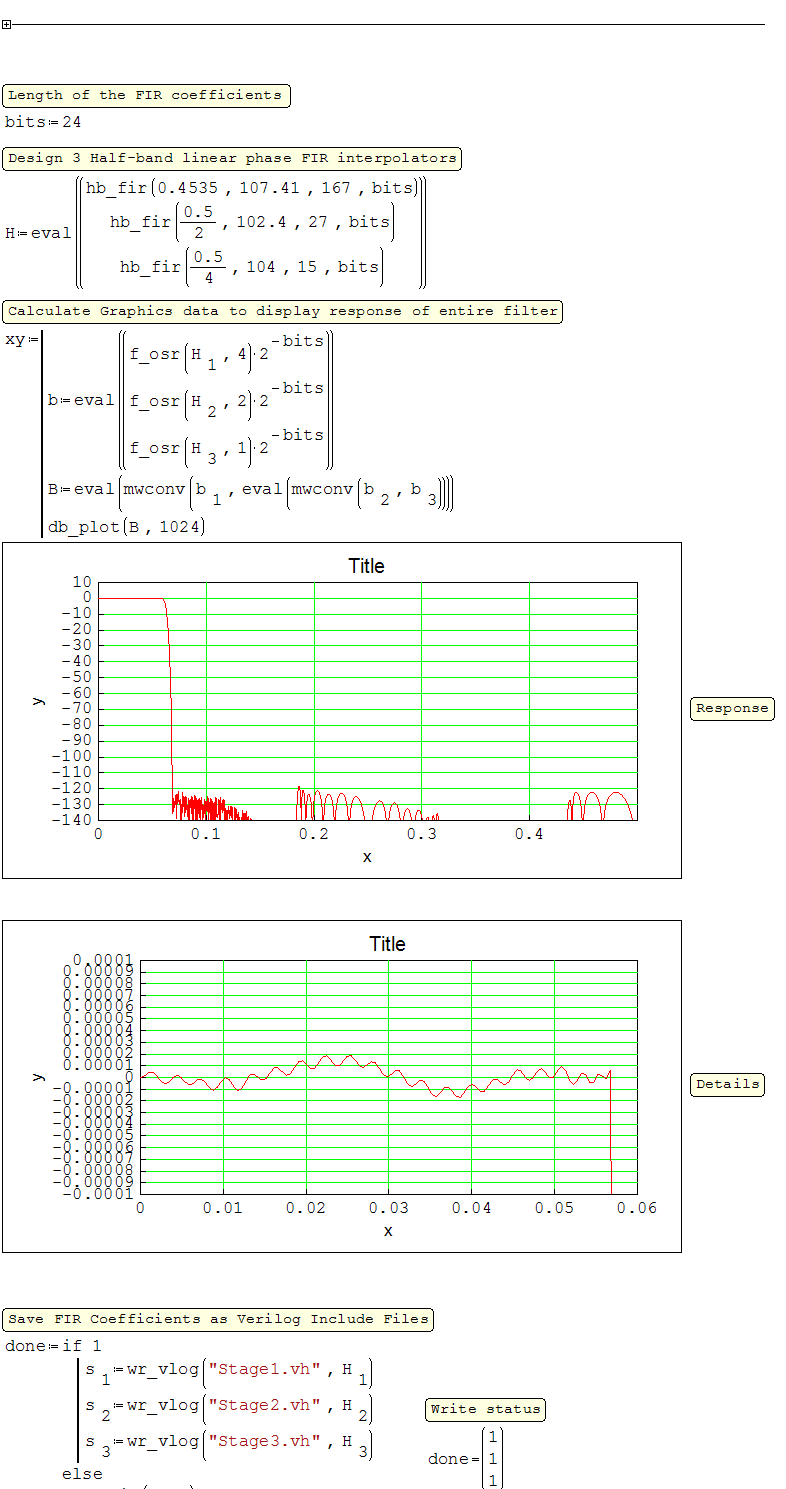
This is my remez2.dll. Usually it works a little better than Matlab tools.
You can design FIR band-pass/stop filters up to length~2000.
The example is audiophile's "holy" NPC SM5842 8X interpolating digital filter.
Before starting the program, do not forget to put remez2.dll in the plugin's \userefi folder.
You can design FIR band-pass/stop filters up to length~2000.
The example is audiophile's "holy" NPC SM5842 8X interpolating digital filter.
Before starting the program, do not forget to put remez2.dll in the plugin's \userefi folder.
A 1 usuarios les gustó este mensaje
Вячеслав Мезенцев 13/3/2014 14:33:00
SMathStudio_Desktop_0.97.5189_32bit
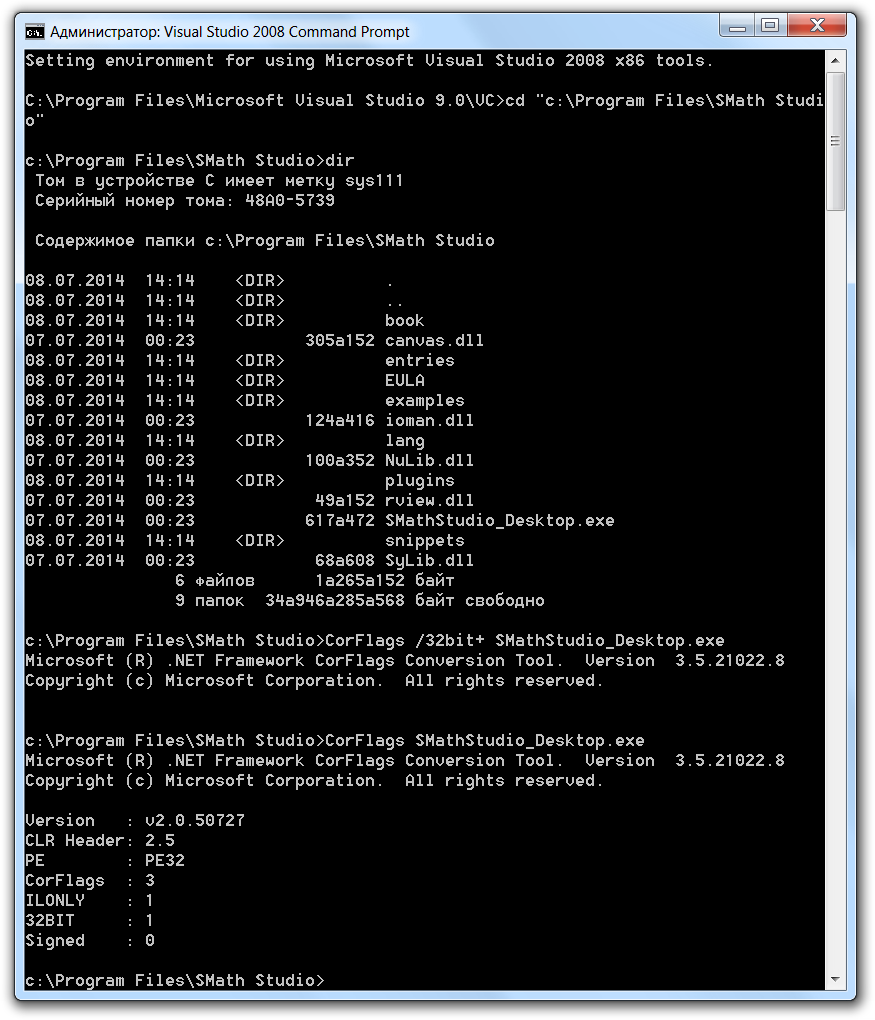
How to get this 32-bit version (MSVS2010):
How to get this 32-bit version (MSVS2010):
CorFlags /32bit+ SMathStudio_Desktop.exeRussia ☭ forever, Viacheslav N. Mezentsev
A 2 usuarios les gustó este mensaje
Russia ☭ forever, Viacheslav N. Mezentsev
A 1 usuarios les gustó este mensaje
Radovan Omorjan 21/6/2014 10:50:00
Russia ☭ forever, Viacheslav N. Mezentsev
I'm not a programmer, so VS2010 is not a good option. Simple patch is preferable  .
So far the flags bits are at the same location for all SMath versions.
Just use HEX editor to write one byte 0x03 to absolute address 0x00000218 in the SMathStudio_Desktop.exe.
Good luck !!
. So far the flags bits are at the same location for all SMath versions.
Just use HEX editor to write one byte 0x03 to absolute address 0x00000218 in the SMathStudio_Desktop.exe.
Good luck !!
A 2 usuarios les gustó este mensaje
Russia ☭ forever, Viacheslav N. Mezentsev
A 1 usuarios les gustó este mensaje
Davide Carpi 18/9/2016 11:46:00
Updated for the fully automatic build using Release Manager.
Russia ☭ forever, Viacheslav N. Mezentsev
A 3 usuarios les gustó este mensaje
I am the author of the Prode Physical Properties dll for Mathcad and I am excited to see that it is supposed to work with this extension in SMath. However, I can't seem to get the MathcadEFI installed properly. For example, the digamma function doesn't appear in SMath.
I have a path of C:\Program Files (x86)\SMath Studio\plugins. In the plugins folder is mcaduser.dll, mcadefi.ddl, and userefi folder. The userefi folder contains 4 dlls including mathlib.dll.
From a SMath worksheet, tools>plugins shows that the EFI for SMath Studio is present and enabled, although I had to add to files manually as described above.
Can you help?
I have a path of C:\Program Files (x86)\SMath Studio\plugins. In the plugins folder is mcaduser.dll, mcadefi.ddl, and userefi folder. The userefi folder contains 4 dlls including mathlib.dll.
From a SMath worksheet, tools>plugins shows that the EFI for SMath Studio is present and enabled, although I had to add to files manually as described above.
Can you help?
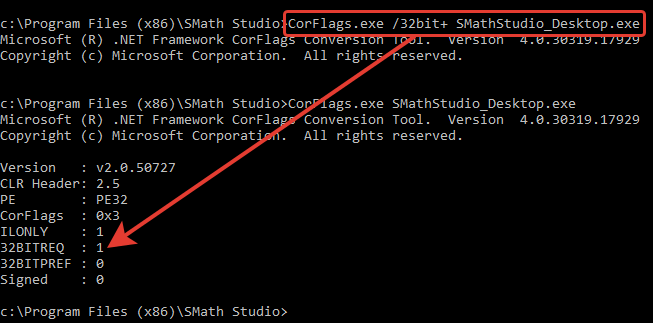
Mathcad works only with 32-bit plugins but SMath Studio is 64-bit application, so you need to make it 32-bit using CorFlags with administrative privileges.
It is better to use the standard installation method for the plugin.
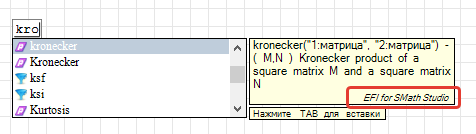
When the program is running, the mcadefi.log file (located next to the mcadefi.dll) will show the number of loaded functions:
It is better to use the standard installation method for the plugin.
When the program is running, the mcadefi.log file (located next to the mcadefi.dll) will show the number of loaded functions:
30.05.2020 03:11:45 [INFO ] [Plugin.Initialize()] OS: Microsoft Windows NT 6.2.9200.0
30.05.2020 03:11:45 [INFO ] [Plugin.Initialize()] .Net: 4.0.30319.42000
30.05.2020 03:11:45 [INFO ] [Plugin.Initialize()] 32-bit
30.05.2020 03:11:45 [INFO ] [Plugin.Initialize()] EFI for SMath Studio, version 1.0.7165.40625, 14-авг-2019 22:34:10
30.05.2020 03:11:45 [INFO ] [Plugin.Initialize()] Psi(1) - ( z ) Digamma function for complex z
30.05.2020 03:11:45 [INFO ] [Plugin.Initialize()] kronecker(2) - ( M,N ) Kronecker product of a square matrix M and a square matrix N
30.05.2020 03:11:45 [INFO ] [Plugin.Initialize()] Successfully. 2 function(s) loaded.
Russia ☭ forever, Viacheslav N. Mezentsev
A 1 usuarios les gustó este mensaje
frapuano 30/5/2020 2:41:00
WroteFor example, the digamma function doesn't appear in SMath.
Digamma from series approximation.
Maths Special Polygamma(x).sm (36,99 KiB) descargado 1667 vez(es).
Hi uni,
I downloaded the CorFlags but I don't understand what I'm supposed to do with the contents. It appears that your example was run from the command line but that didn't work, see below.
C:\Users\Harvey>C:\Users\Harvey>C:\Program Files\SMath Studio>CorFlags.exe /32bit+SMathStudio_Desktop.exe
'C:\Users\Harvey' is not recognized as an internal or external command,
operable program or batch file.
Since I am not a developer, I need some step by step instructions. I have looked through this topic and I don't understand the procedure.
Eventually I hope to get the Prode Properties dll to work.
Sorry to be so clueless.
I downloaded the CorFlags but I don't understand what I'm supposed to do with the contents. It appears that your example was run from the command line but that didn't work, see below.
C:\Users\Harvey>C:\Users\Harvey>C:\Program Files\SMath Studio>CorFlags.exe /32bit+SMathStudio_Desktop.exe
'C:\Users\Harvey' is not recognized as an internal or external command,
operable program or batch file.
Since I am not a developer, I need some step by step instructions. I have looked through this topic and I don't understand the procedure.
Eventually I hope to get the Prode Properties dll to work.
Sorry to be so clueless.
Step 0. Copy CorFlags.exe to the program folder.
Step 1. Start command console with administrative privileges.
Step 2. Move to the program directory:
Step 3. Set the 32-bit flag to 1 (don't forget about spaces):
Step 4. Check the flag value (32BITREQ must be 1):
Result:
Command to return back 32-bit flag value (32BITREQ must be 0):
Step 1. Start command console with administrative privileges.
Step 2. Move to the program directory:
cd "c:\Program Files (x86)\SMath Studio"Step 3. Set the 32-bit flag to 1 (don't forget about spaces):
CorFlags.exe /32bit+ SMathStudio_Desktop.exeStep 4. Check the flag value (32BITREQ must be 1):
CorFlags.exe SMathStudio_Desktop.exeResult:
Version   : v2.0.50727
CLR Header: 2.5
PE        : PE32
CorFlags  : 0x3
ILONLY    : 1
32BITREQ  : 1
32BITPREF : 0
Signed    : 0
Command to return back 32-bit flag value (32BITREQ must be 0):
CorFlags.exe /32bit- SMathStudio_Desktop.exeRussia ☭ forever, Viacheslav N. Mezentsev
A 1 usuarios les gustó este mensaje
frapuano 30/5/2020 2:43:00
Thank you for the clear instructions. I have the EFI working (e.g. kronecker works). However, the prode test file still doesn't work. I'll continue in the Prode Physical Properties thread.
WroteI have the EFI working (e.g. kronecker works)
... kronecker & Kronecker are built-in native Smath.
WroteWroteI have the EFI working (e.g. kronecker works)
... kronecker & Kronecker are built-in native Smath.
For my installation, kronecker only works if the MathcadEFI is enabled.
Can someone please remind me how to get WaterSteamPro working with SMath? I had it working with my last laptop but I cannot get it working with the new one. I have WSP v6.5; it works fine in Mathcad 15 and in Excel.
I have used the CorFlags app to force SMathStudio_Desktop to work as a 32-bit application (32BITREQ : 1).
I think I must be putting some of the dlls in the wrong folder, as I can't get X-Steam to work either.
I have used the CorFlags app to force SMathStudio_Desktop to work as a 32-bit application (32BITREQ : 1).
I think I must be putting some of the dlls in the wrong folder, as I can't get X-Steam to work either.
- Which version of mcadefi.dll is needed for the current SMathStudio Desktop?
- Do I need mcaduser.dll? If so, which version?
- Which folders should everything (including wspmcad.dll) be in?
- Nuevos mensajes
- Sin mensajes nuevos